

CTR Reports
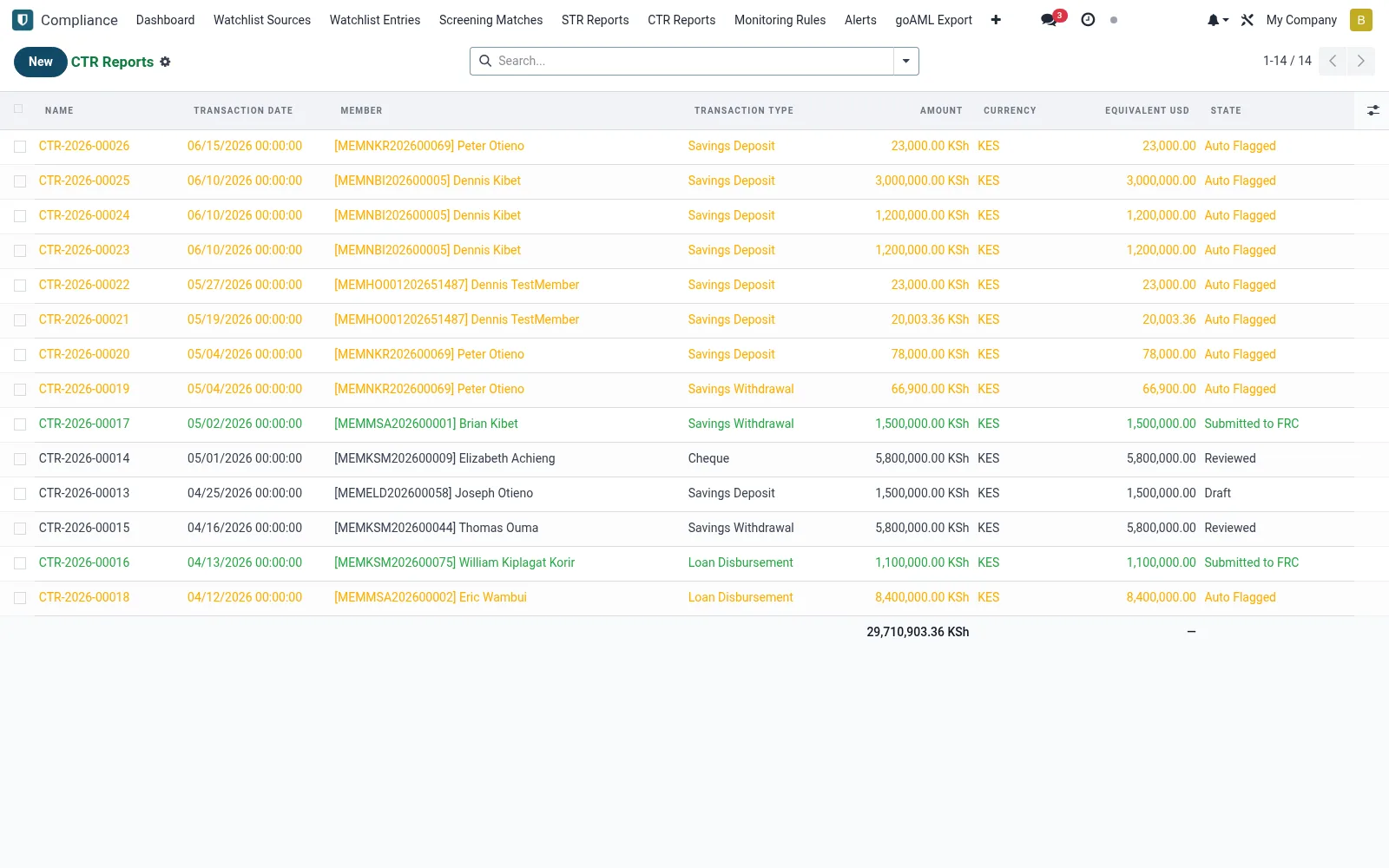
Manages Cash Transaction Reports (mfi.aml.ctr.report) for cash movements at or above the regulatory threshold, regardless of suspicion. The suite can generate these automatically from qualifying transactions, with staff confirming the subject and details. CTRs are then bundled into the goAML submission to satisfy mandatory threshold reporting.
Workflow
- Open CTR Reports under Compliance.
- Review reports auto-generated from threshold-breaching cash activity.
- Open a record to confirm the subject, amount and source of funds.
- Validate the supporting transaction details.
- Include the CTR batch in the goAML export for filing.
Fields reference
Every field on this screen, drawn from the live data model.
| Field | Type | Required | Description |
|---|---|---|---|
Transaction Typetransaction_type | Choice: Savings Deposit, Savings Withdrawal, Loan Disbursement, Cheque, Aggregated / Structuring | Yes | Transaction Type |
Membermember_id | Link → mfi.member | Yes | Member |
Amountamount | Money | Yes | Amount |
Currencycurrency_id | Link → res.currency | Yes | Currency |
Transaction Datetransaction_date | Date & time | Yes | Transaction Date |
Companycompany_id | Link → res.company | Yes | Company |
Has Messagehas_message | Yes/No | — | Has Message |
Namename | Text | — | Name |
Transaction Referencetransaction_ref | Text | — | Transaction Reference |
Res Modelres_model | Text | — | Res Model |
Resres_id | Number | — | Res |
Branchbranch_id | Link → mfi.branch | — | Branch |
Tellerteller_id | Link → res.users | — | Teller |
Equivalent Usdequivalent_usd | Money | — | Equivalent Usd |
Usd Currencyusd_currency_id | Link → res.currency | — | Usd Currency |
Statestate | Choice: Draft, Auto Flagged, Reviewed, Submitted to FRC, Dismissed | — | State |
Parent (aggregated)aggregated_id | Link → mfi.aml.ctr.report | — | Parent (aggregated) |
Component Transactionscomponent_ids | List | — | Component Transactions |
Reviewed Byreviewed_by_id | Link → res.users | — | Reviewed By |
Reviewed Datereviewed_date | Date & time | — | Reviewed Date |
Submitted Datesubmitted_date | Date & time | — | Submitted Date |
Frc Referencefrc_reference | Text | — | Frc Reference |
Notesnotes | Long text | — | Notes |
Actions & buttons
Buttons available on this screen and what they do:
- Mark Reviewed
- Submit to FRC
- Dismiss
Status lifecycle
Records on this screen move through these statuses:
Draft → Auto Flagged → Reviewed → Submitted to FRC → Dismissed
Notes & rules
- Triggered by cash transactions meeting the reporting threshold.
- Filed irrespective of whether suspicion exists.
- Threshold value follows the prevailing regulatory rule.
- Bundled with STRs into the goAML submission.
Was this page helpful?