

BridgeERP HMS Suite
The BridgeERP HMS Suite is a complete, modular hospital information system for African healthcare providers — from a single clinic to a multi-facility referral hospital. One shared patient chart sits at the centre; every department, specialty and back-office function plugs into it as an add-on module. You install only the parts you need, and each one writes to the same patient record, the same bill and the same audit trail.
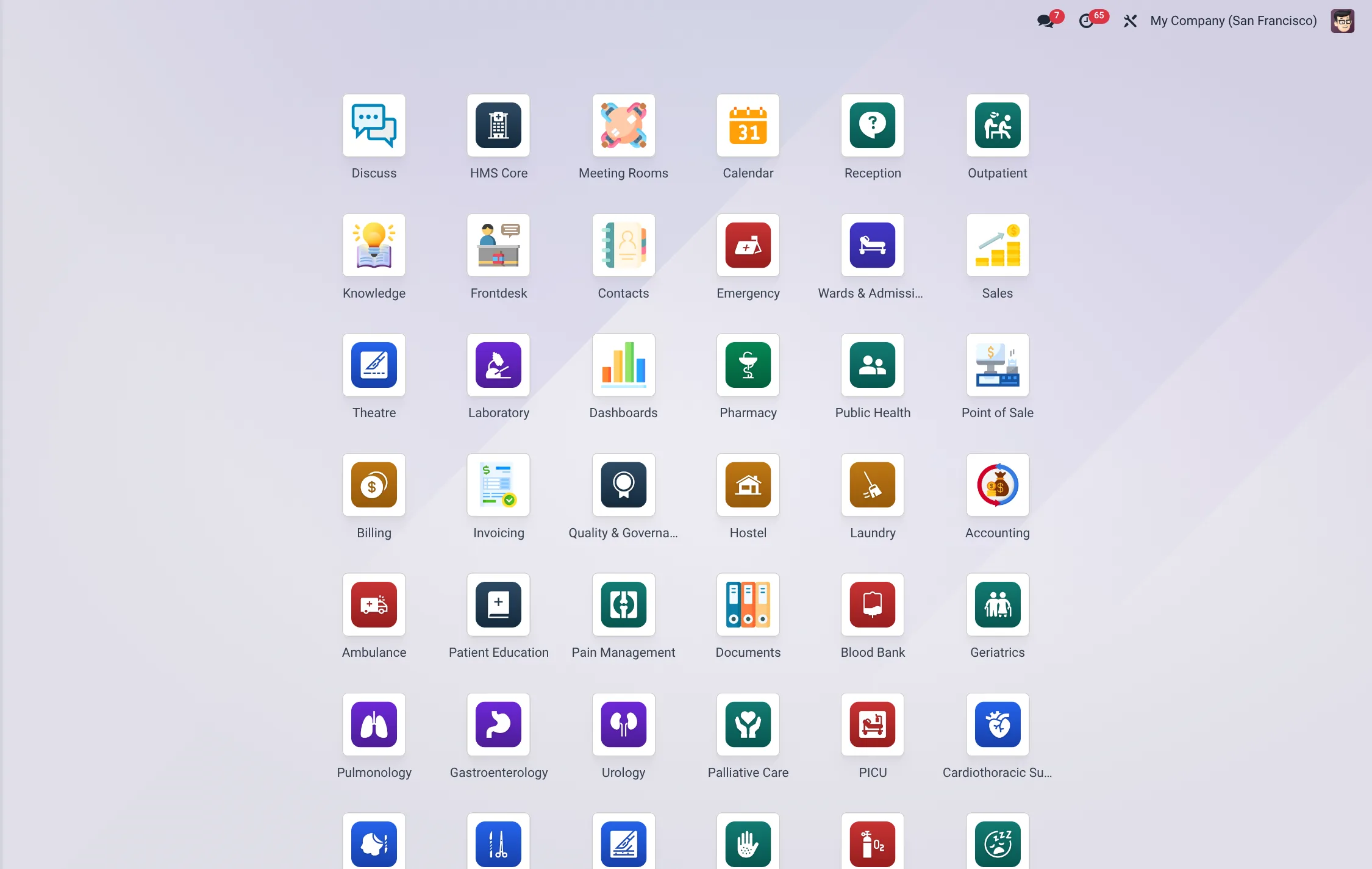
What the suite is
BridgeERP HMS is built as a core platform plus department and specialty add-ons. The core (HMS Core) carries the master patient index, facilities, departments, staff, consents and the shared configuration that every other module depends on. Around it sit operational departments — Reception, Outpatient, Wards & Admissions, Laboratory, Pharmacy, Theatre, Emergency, Blood Bank, Billing — and on top of those, clinical specialty modules (Cardiology, Oncology, Obstetrics, Eye Clinic and many more) that extend the chart with specialty-specific forms, scoring tools and registers.
Because every module shares one patient record, a patient registered once at the front desk flows through triage, consultation, lab, pharmacy and the cashier without ever being re-keyed. Clinicians see a single longitudinal chart; finance sees one consolidated bill; managers see one set of dashboards.
This architecture is what lets the suite scale from a small clinic to a referral hospital without re-platforming. A facility can go live on a handful of modules and add departments and specialties as it grows, with no data migration at each step — the chart, the bill and the audit trail are already there waiting for the new module to write to them. The same design also keeps the system maintainable: a problem in one department’s module never destabilises another, and each module can be licensed, installed and upgraded on its own schedule.
The module map
The table below groups the principal modules by the team that uses them. Each department is documented on its own page in this section.
| Area | Who uses it | What it does |
|---|---|---|
| HMS Core | Administrators, every department | Master patient index, facilities, departments, staff, consents, audit log and the shared configuration all other modules build on. |
| Reception | Front-desk clerks | Patient registration, ID proofing, queue management, scheduling and check-in. See Reception. |
| Outpatient | Doctors, clinical officers, nurses | Consultations, the Chart Desktop, diagnoses, prescriptions, referrals and telehealth. See Outpatient. |
| Wards & Admissions | Ward nurses, admitting officers | Bed map, admissions, transfers, discharges and ICU beds. See Wards & Admissions. |
| Laboratory | Lab technologists, pathologists | Test requests, specimen tracking, result entry, validation and lab dashboards. See Laboratory. |
| Pharmacy | Pharmacists, dispensary staff | Dispensing, stock, formulary and drug-interaction checking. See Pharmacy. |
| Theatre | Surgeons, theatre nurses | Surgery scheduling, the theatre dashboard, anaesthesia and CSSD instrument cycles. |
| Emergency | Casualty staff | Triage and emergency flow for walk-in and ambulance arrivals. See Emergency. |
| Blood Bank | Transfusion services | Blood units, cross-match and issue requests. See Blood Bank. |
| Billing | Cashiers, finance | Charges, service tariffs, invoices, payments, insurance claims and revenue-cycle management. See Billing. |
| Patient Portal | Patients | Self-service appointments, results, bills and payment from the patient’s own phone. See Patient Portal. |
| Specialty modules | Specialist clinicians | Add-on clinical modules — Cardiology, Oncology, Obstetrics, Eye Clinic, Urology and more — that extend the shared chart. See Specialties. |
The patient journey, end to end
The suite is designed around a single continuous journey. A typical outpatient visit moves through these stages, each handled by a different module writing to the same record:
- Registration — the front desk creates or finds the patient in Reception, captures demographics and insurance, and places them in the queue.
- Triage — vitals and acuity are recorded; emergency arrivals are triaged in the Emergency module.
- Consultation — the clinician opens the patient in Outpatient → Chart Desktop, documents the encounter, makes diagnoses and places orders.
- Diagnostics — lab tests flow to the Laboratory and results return to the chart; imaging and specialty work-ups attach the same way.
- Treatment — prescriptions are dispensed in Pharmacy; procedures route to Theatre; admissions open a bed in Wards & Admissions.
- Billing & payment — every charge accrues to one bill in Billing; the patient pays at the cashier or via M-Pesa, and insurance claims are raised automatically.
- Follow-up — the patient sees results, bills and the next appointment on the Patient Portal.
Built for African healthcare
The suite is designed first for the realities of African facilities rather than retrofitted from a Western product:
- National insurance & schemes — Billing and the insurance-claims modules handle scheme membership and claim files, including Kenya’s SHA/NHIF successor flows, alongside private and corporate cover.
- Mobile money — the M-Pesa module adds Safaricom Daraja STK Push, C2B Paybill/Till and B2C refunds as a payment rail that works at the cashier, on invoices and on the patient portal.
- Ministry of Health reporting — dedicated reporting and registry modules produce the statutory returns expected by national health information systems, including DHIS2-style aggregate reporting.
- Localisation packs — per-country packs cover Kenya, Tanzania, Uganda, Rwanda, Ethiopia, Ghana, Nigeria and South Africa.
- Low-connectivity operation — offline-capable progressive-web-app modules keep reception and clinical capture working when the network drops and sync when it returns.
Country localisation packs
Each localisation pack adds that country’s administrative geography, national insurance schemes, professional registries, statutory facility codes and national-ID format on top of the shared core. Install the one pack for the country you operate in; the rest of the suite is unchanged. Every pack depends only on the core, so it can be added at any time.
| Pack | Country | What it adds |
|---|---|---|
| HMS Kenya Localization | Kenya | MOH and PPB reporting bundle plus the standard KRA eTIMS path for fiscalised billing. |
| HMS Tanzania Localisation Bundle | Tanzania | MoH-TZ and PORALG facility hierarchy, NHIF and iCHF cover, NIDA identifiers, NACTE registry and MoH programmes. |
| HMS — Uganda Localisation | Uganda | National Identification Number (NIN), district selection, NHIF stub and the +256 phone-format hint. |
| HMS Rwanda Localisation | Rwanda | Administrative geography, Mutuelle / RAMA / RSSB insurance schemes, RBC programmes and NIDA identifiers. |
| HMS — Ethiopia Localisation | Ethiopia | Ethiopia Patient Identifier (PIDM), region selection, Ethiopian Birr currency note and the +251 phone-format hint. |
| HMS Ghana Localisation Bundle | Ghana | Region / District / CHPS hierarchy, NHIS cover, Ghana Card, GHS and GMC registries and DHIMS2 reporting. |
| HMS Nigeria Localisation Bundle | Nigeria | Facility hierarchy, NHIA cover, NPHCDA programmes, NIN, states / LGAs and NCD reporting. |
| HMS South Africa Localisation | South Africa | Provinces, districts, BHF medical schemes, HPCSA registry and NDoH facility codes. |
How modules are licensed and grouped
Each module is independently installable, so a hospital licenses only the footprint it runs. Modules fall into three groups:
- Core — HMS Core and its immediate dependencies must be present; everything else builds on it.
- Department modules — Reception, Outpatient, Laboratory, Pharmacy, Wards, Theatre, Emergency, Blood Bank and Billing. Install the departments your facility actually operates.
- Specialty & add-on modules — clinical specialties, the patient portal, M-Pesa, the public website and country localisation packs. These are optional and can be added at any time. See Specialties for the full list.
Bridge dependencies are wired so that, for example, installing a fees-bearing department automatically pulls in the billing link it needs, while clinical modules soft-guard their cross-references so a department can be installed on its own.
The table below sets out the licensing groups and what falls into each, so you can map your facility’s footprint before you install.
| Group | Modules in the group | When you install |
|---|---|---|
| Core (required) | HMS Core and its immediate dependencies (master patient index, facilities, departments, staff, consents, audit). | Always — everything else builds on it. |
| Departments | Reception, Outpatient, Wards & Admissions, Laboratory, Pharmacy, Theatre, Emergency, Blood Bank, Billing. | Install the departments your facility actually operates. |
| Clinical specialties | Cardiology, Oncology, Obstetrics, Eye Clinic, Urology, Gastroenterology and the rest of the add-on clinics. | Where you run that specialist clinic. See Specialties. |
| Patient access | Patient Portal, the public hospital website and the storefront interface. | When you want patient self-service and an online presence. See Patient Portal. |
| Payments & revenue | M-Pesa, insurance claims and revenue-cycle management. | For mobile-money collection and scheme claiming. |
| Localisation | One country pack (Kenya, Tanzania, Uganda, Rwanda, Ethiopia, Ghana, Nigeria or South Africa). | One per facility, matching your country. |
Where to start
If you are setting up a new hospital, follow the Getting started guide. It walks you through installing the core, configuring your facility and departments, creating staff desks and roles, securing the system, and registering your first patient. Once the core is live, return here and add the department and specialty pages relevant to your teams.
| Goal | Start here |
|---|---|
| Install and configure the platform | Getting started → Installation |
| Set up your facility and departments | Getting started → Facility |
| Create staff and assign roles | Getting started → Roles |
| Register the first patient | Getting started → First patient |
| Turn on patient self-service | Patient Portal |