

Theatre
The Theatre area of BridgeERP HMS manages the complete surgical pathway — from the moment a surgeon requests an operation, through pre-operative preparation and the WHO surgical safety checklist, the procedure itself, anaesthesia, post-anaesthesia recovery, and the sterile supply of instruments that makes every case possible. It is used by surgeons, anaesthetists, scrub and circulating nurses, theatre coordinators and the Central Sterile Supply Department (CSSD), and it ties the operating room schedule to billing, implant traceability and clinical outcomes.
The surgical pathway
A surgical episode in BridgeERP HMS moves through a single, traceable lifecycle. Each operation is held as a surgery booking that advances through a defined sequence of states as the patient progresses: Requested → Scheduled → Pre-op Prepared → Ready for Theatre → In Theatre → In Recovery (PACU) → Transferred to Ward → Discharged. A booking can also be Cancelled or Postponed at appropriate points. Every transition is recorded on the booking so coordinators always know exactly where each case stands.
Around that spine sit the supporting records: the pre-op safety checklist, the anaesthesia record, the operative note, the implant register, the post-anaesthesia care (PACU) record, complications and the final surgical outcome. Behind the scenes, CSSD ensures sterile instrument trays are decontaminated, assembled, sterilised and released in time for the list.
Where to find it
The surgical workflow lives under the dedicated Theatre application; sterile supply lives under HMS Core → Theatre.
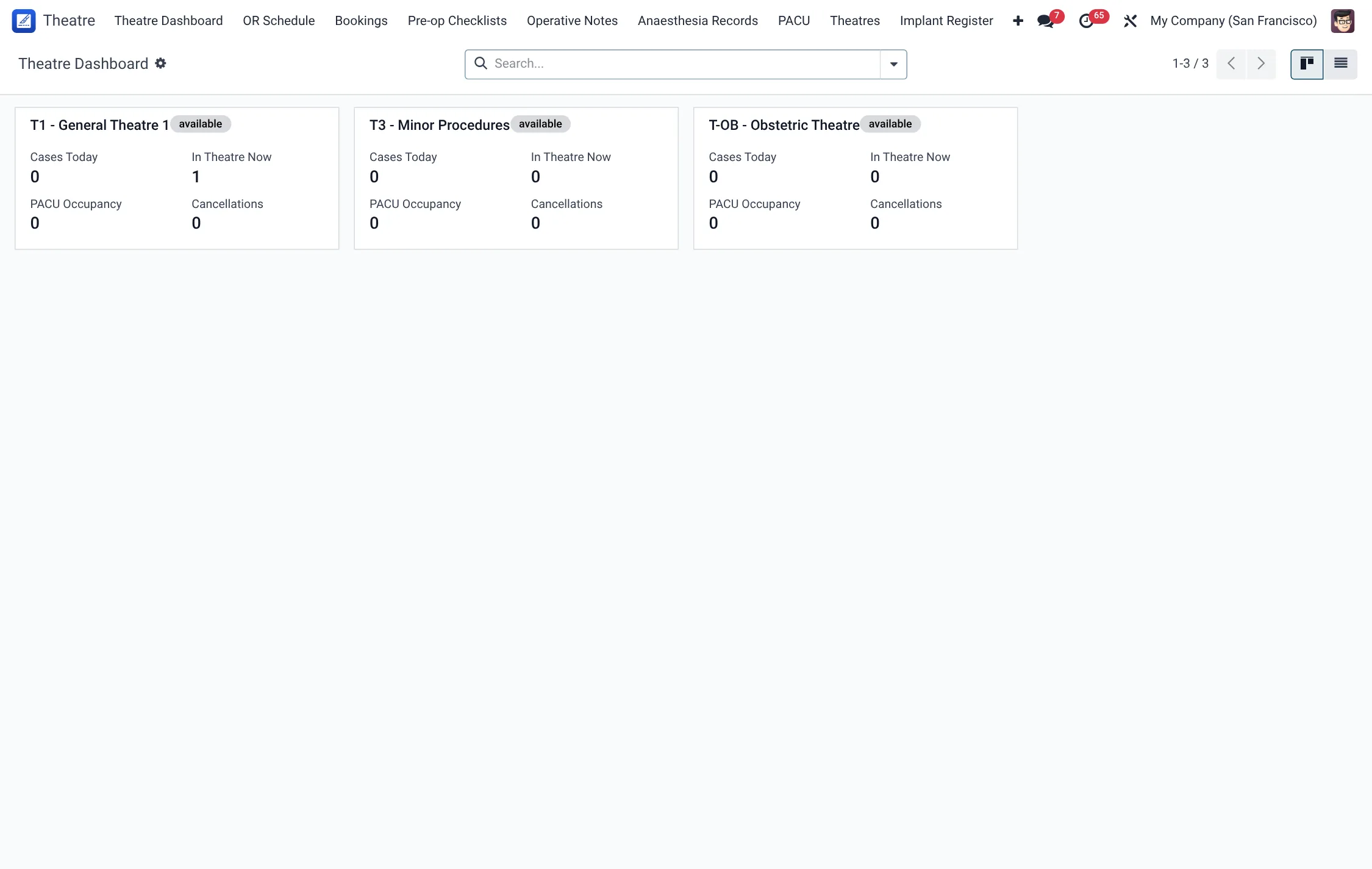
- Theatre → Theatre Dashboard — the operational cockpit for the day's lists and theatre status.
- Theatre → OR Schedule — the operating-room schedule of all surgery bookings.
- Theatre → Bookings — filtered views: Today, This Week, In Progress, Completed and Cancelled.
- Theatre → Pre-op Checklists — the WHO surgical safety checklists.
- Theatre → Anaesthesia Records — intra-operative anaesthesia documentation.
- Theatre → PACU — post-anaesthesia recovery records.
- Theatre → Operative Notes, Outcomes and Implant Register — the clinical record of what was done, the result, and any implanted devices.
- Theatre → Theatres — master data: Theatre Rooms, Procedure Catalogue, Complications and the Equipment Usage Log.
- HMS Core → Theatre — the CSSD module: Instrument Trays, Loose Instruments, Sterilization Cycles, Workflow Board, Biological Indicators, Recalls, Repair Tickets and Usage Events.
Before you start
Before booking the first operation, set up the area's master data so that bookings, scheduling and sterile supply work correctly:
- Theatre Rooms — create each operating room under Theatre → Theatres → Theatre Rooms. Rooms carry their own status (such as occupied, cleaning or out of service) that the booking workflow updates automatically.
- Procedure Catalogue — define the operations your hospital performs under Theatre → Theatres → Procedure Catalogue so bookings can reference a standard procedure.
- Staff records — surgeons, anaesthetists and nurses must exist as staff so they can be assigned to bookings; the circulating-nurse field, for example, is limited to staff with the nurse role.
- CSSD master data — trays, sterilizers, locations and checklist templates must be configured before instruments can be tracked (see the CSSD page).
The three pillars of the area
1. Scheduling & the surgical case
The booking is the centre of gravity. It captures the patient, surgeon, theatre, procedure, scheduled date, anaesthesia type, ASA grade and surgical priority, and it drives the WHO checklist, the operative note and billing. The full booking, checklist and case-state workflow is documented on the Scheduling page.
2. Anaesthesia
Each case records its anaesthesia type — from General Anaesthesia, GA with Endotracheal Intubation or GA with Laryngeal Mask Airway, through Spinal, Epidural, Regional Block and Local Infiltration, to MAC (Monitored Anaesthesia Care). The booking also carries the patient's ASA grade (ASA I Healthy through ASA V Moribund), which signals peri-operative risk. The intra-operative anaesthesia record documents airway assessment, vitals, drug and fluid events through the operation, and recovery continues in the PACU record until the patient is safe to leave.
3. CSSD — sterile supply
No operation proceeds without sterile instruments. The CSSD module tracks every instrument tray through its reprocessing cycle and links sterilisation results back to the trays issued for a case, giving full traceability from patient to load. See the CSSD page for the complete sterile-supply workflow.
Surgery booking lifecycle
Every operation is held as one surgery booking that advances through a fixed sequence of states; the buttons that move it are described on the Scheduling page.
| State | What it means |
|---|---|
| Requested | Surgery requested by the surgeon; not yet slotted. |
| Scheduled | Confirmed onto the operating-room schedule. |
| Pre-op Prepared | Patient prepared and pre-operative steps done. |
| Ready for Theatre | Team and room ready; the case may start. |
| In Theatre | Operation in progress; the room is marked occupied. |
| In Recovery (PACU) | Patient in post-anaesthesia care; the room is flagged for cleaning. |
| Transferred to Ward | Patient handed over to ward care. |
| Discharged | Surgical episode complete. |
| Cancelled | Case stopped before theatre, with a cancellation reason. |
| Postponed | Case deferred and available to re-slot. |
Anaesthesia types
Each booking carries a planned anaesthesia type; the full set of options is below, and the intra-operative detail is captured on the anaesthesia record.
| Anaesthesia type | Notes |
|---|---|
| General Anaesthesia | The default; whole-body anaesthesia with loss of consciousness. |
| GA with Endotracheal Intubation | General anaesthesia with a secured airway via endotracheal tube. |
| GA with Laryngeal Mask Airway | General anaesthesia with a supraglottic LMA airway. |
| Spinal | Single-shot intrathecal block for lower-body surgery. |
| Epidural | Continuous epidural block, often for labour or major abdominal cases. |
| Regional Block | Peripheral nerve or plexus block for a limb or region. |
| Local Infiltration | Local anaesthetic infiltrated at the operative site. |
| MAC (Monitored Anaesthesia Care) | Sedation with monitoring, typically for minor procedures. |
ASA physical status
The booking records the patient's ASA grade, the standard physical-status classification that signals peri-operative risk and informs anaesthetic planning.
| Grade | Description |
|---|---|
| ASA I | Healthy patient. |
| ASA II | Mild systemic disease. |
| ASA III | Severe systemic disease. |
| ASA IV | Life-threatening disease. |
| ASA V | Moribund; not expected to survive without the operation. |
Theatre rooms & their status
Each operating room is master data under Theatre → Theatres → Theatre Rooms. A room carries a type (its surgical specialisation) and a live status that the booking workflow updates automatically.
| Room type | Room status |
|---|---|
| General Surgery | Available |
| Orthopedic | Occupied (set automatically when a case starts) |
| Cardiac | Cleaning (set automatically when the patient moves to recovery) |
| Obstetrics & Gynaecology | Maintenance |
| Neurosurgery | Emergency Standby |
| Ophthalmic / ENT | Out of Service |
| Minor Procedure / Emergency | – |
| Bronchoscopy / Endoscopy | – |
Theatre menus at a glance
The surgical workflow sits under the dedicated Theatre application; sterile supply sits under HMS Core → Theatre. The main menus and the record each opens:
| Menu | Opens |
|---|---|
| Theatre → Theatre Dashboard | The day's operating cockpit. |
| Theatre → OR Schedule | The surgery-booking schedule for every room. |
| Theatre → Bookings (Today / This Week / In Progress / Completed / Cancelled) | Pre-filtered booking lists. |
| Theatre → Pre-op Checklists | WHO surgical safety checklists. |
| Theatre → Anaesthesia Records | Intra-operative anaesthesia documentation. |
| Theatre → PACU | Post-anaesthesia recovery records. |
| Theatre → Operative Notes / Outcomes / Implant Register | What was done, the result, and implanted devices. |
| Theatre → Theatres | Theatre Rooms, Procedure Catalogue, Complications, Equipment Usage Log. |
| HMS Core → Theatre | CSSD: trays, instruments, cycles, BIs, recalls, repairs, usage events. |
Roles & access
Theatre and CSSD ship with dedicated security roles so each professional sees only what they need:
| Role | Typical responsibility |
|---|---|
| BridgeERP HMS / Surgeon | Requests and performs surgery; signs operative notes and outcomes. |
| BridgeERP HMS / Anaesthetist | Pre-op assessment, intra-operative anaesthesia record, PACU handover. |
| BridgeERP HMS / Scrub Nurse | Theatre preparation, checklist participation, instrument and equipment use. |
| BridgeERP HMS / CSSD Technician, Supervisor, Manager | Reprocess, release, recall and manage sterile instrument trays at escalating authority. |
Record rules scope surgery bookings, theatres and CSSD master data to a user's own facility, so multi-site hospitals keep each campus's lists separate.
Reports & dashboards
The Theatre Dashboard summarises the day's lists, theatre occupancy and case progress. CSSD provides its own Metrics and Workflow Board for sterile-supply throughput. Surgical Outcomes and Complications registers feed quality review, and the Implant Register supports device recalls and audits.
Tips & troubleshooting
Related
- Theatre → Scheduling — booking surgeries, OR slots, the safety checklist and anaesthesia.
- Theatre → CSSD — sterile supply, instrument sets, cycles and traceability.
- Quality & Governance — where surgical incidents and outcomes feed institutional quality review.