

Outpatient & Clinical
The Outpatient & Clinical area is where doctors do their work in BridgeERP HMS: they open a patient’s visit, record the consultation, reach a diagnosis, prescribe, order labs and imaging, and refer when needed. It brings the chart, the orders, clinical decision support and the AI assistants into one consultation workspace so a clinician can run a full outpatient day without leaving the encounter.
What this area is, and who uses it
Outpatient & Clinical is the clinician’s home in the suite. Where Reception creates the patient and the visit, and the nurse triages, the Outpatient area is where the doctor picks up that visit and turns it into a clinical record. Every encounter is captured as a structured SOAP note (Subjective, Objective, Assessment, Plan) on the Consultation record, with diagnoses coded to ICD-10, medications written on a prescription, and lab, imaging and referral orders raised from inside the same screen.
The primary users are doctors and clinical officers. Nurses contribute vitals and read the chart; pharmacists receive the prescriptions that are sent through; managers supervise, amend and report. The area is designed so that a busy outpatient department can move a patient from waiting room to signed note to dispensed medication with the fewest possible clicks.
Where to find it
Everything in this area lives under the Outpatient top-level menu:
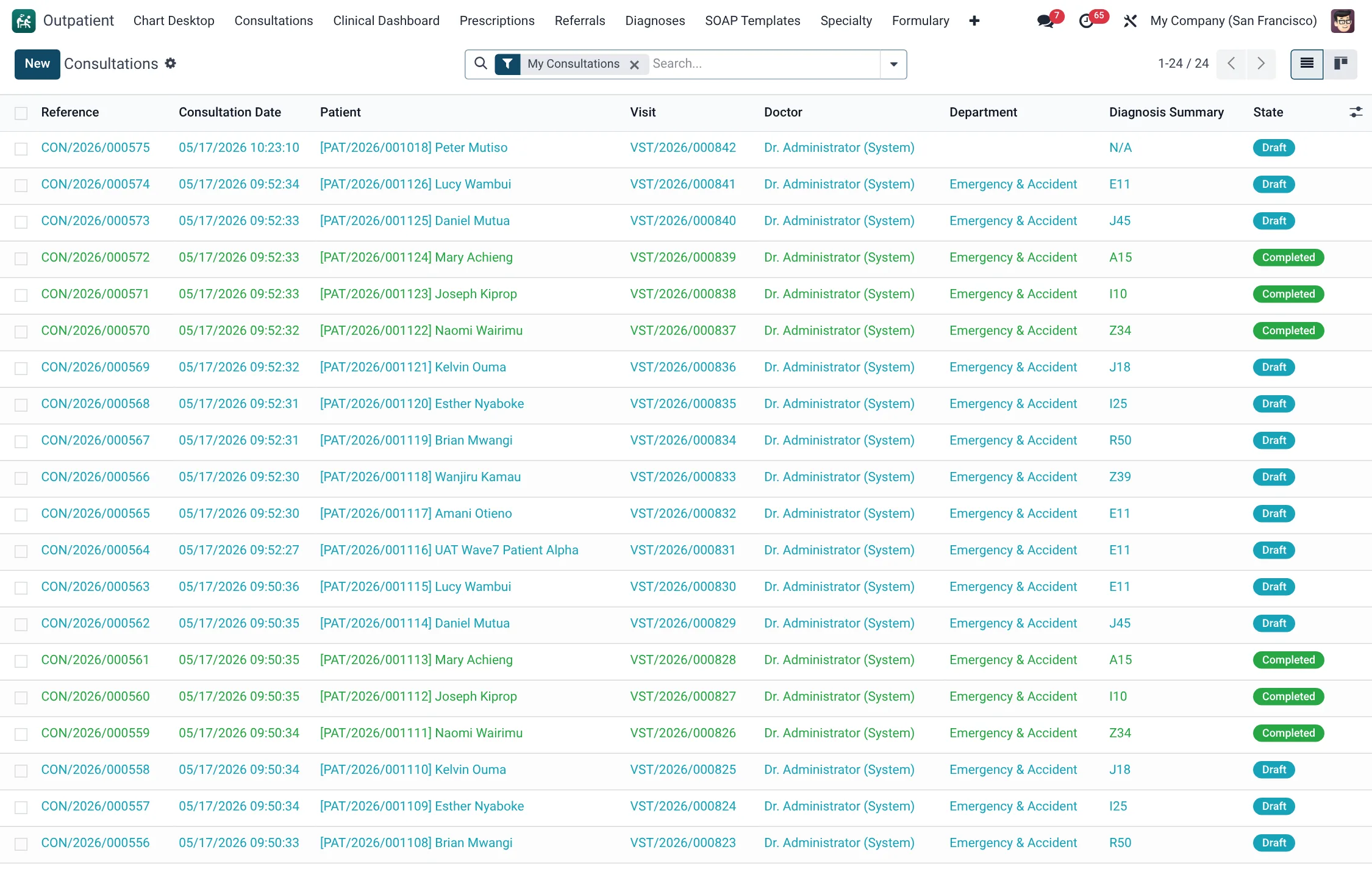
- Outpatient → Consultations — the full list of consultation (SOAP) records; open one to conduct or review an encounter.
- Outpatient → Chart Desktop → Open Chart (select consult) — the single-screen clinician workspace (problem list, vitals trend, timeline, ordering and note all on one page).
- Outpatient → Chart Desktop → Quick Order Sets — reusable bundles of orders that can be applied to a chart in one action.
- Outpatient → Clinical Dashboard — the at-a-glance dashboard for the clinical day.
- Outpatient → Prescriptions — all prescriptions; Outpatient → Diagnoses — the diagnosis register; Outpatient → Referrals — inbound and outbound referrals.
- Outpatient → Formulary, Drug Interactions and Immunization Schedule — the master data that backs prescribing and child health.
- Outpatient → SOAP Templates — reusable note templates that pre-fill the SOAP fields.
- Outpatient → Specialty — specialty registers: Antenatal Register, Delivery Records, Dental Charts, Immunizations and Pediatric Growth.
- Outpatient → Configuration → Settings — the area’s feature switches.
Telehealth, e-consult and the AI clinical tools are operated from the clinical menus described on their own pages: Telehealth & e-consult and AI clinical tools.
Outpatient menus at a glance
Every menu under the Outpatient root and the record type it opens:
| Menu path | Opens | Use it for |
|---|---|---|
| Outpatient → Consultations | Consultation | The full SOAP-note register; conduct or review an encounter. |
| Outpatient → Chart Desktop → Open Chart | Consultation | The single-screen clinician workspace. |
| Outpatient → Chart Desktop → Quick Order Sets | Quick Order Set | Reusable order bundles applied to a chart in one action. |
| Outpatient → Clinical Dashboard | Clinical Dashboard | Live picture of the clinical day. |
| Outpatient → Diagnoses | Diagnosis | The diagnosis register for morbidity reporting. |
| Outpatient → Prescriptions | Prescription | All prescriptions across the department. |
| Outpatient → Referrals | Referral | Inbound and outbound referrals. |
| Outpatient → Formulary | Formulary | Master list of prescribable medications. |
| Outpatient → Drug Interactions | Drug Interaction | Interaction pairs that back prescribing checks. |
| Outpatient → Seed Drug Interactions | Drug Interaction Seeder | Load a starter set of interaction pairs. |
| Outpatient → Immunization Schedule | Immunization Schedule | The childhood vaccination calendar. |
| Outpatient → SOAP Templates | Consultation Template | Reusable note templates that pre-fill SOAP fields. |
| Outpatient → Specialty → Antenatal Register | Antenatal record | Antenatal programme register. |
| Outpatient → Specialty → Delivery Records | Delivery record | Birth and delivery register. |
| Outpatient → Specialty → Dental Charts | Dental Chart | Per-patient odontogram. |
| Outpatient → Specialty → Immunizations | Immunization | Vaccines actually administered. |
| Outpatient → Specialty → Pediatric Growth | Pediatric Growth | Growth-monitoring percentiles. |
| Outpatient → Configuration → Settings | Settings | Feature switches for the area. |
Before you start
The outpatient workflow assumes some master data and an open visit already exist:
- An open visit. A consultation must attach to a patient Visit. Visits are created at Reception and move through the states Draft → Triaged → In Consultation → Services → Billing → Discharged → Closed (a visit may also be Cancelled). You cannot add a draft consultation to a visit that is already Closed or discharged.
- Staff records. The doctor must have an HMS staff record with the doctor role; the consultation defaults the doctor to the logged-in user’s staff record.
- Formulary & interactions. Populate the Formulary and seed Drug Interactions so prescribing checks and formulary restrictions work. Use Outpatient → Seed Drug Interactions to load a starter set.
- ICD-10 catalogue. Diagnoses are coded against the bundled ICD-10 catalogue used across the suite.
The clinical day
A typical outpatient session runs like this:
- Open the Clinical Dashboard or the Chart Desktop to see who is waiting and which charts are in progress.
- Pick the patient’s visit and open (or create) the consultation for that visit.
- Take the history and examination into the SOAP fields, or dictate them — the ambient scribe and smart-text tools described under AI clinical tools draft the note for you.
- Record diagnoses against ICD-10, write the prescription, and raise any lab, imaging or referral orders — decision-support alerts fire automatically as you order.
- Complete (sign) the consultation. The note becomes part of the legal record; the prescription can be sent to pharmacy and a visit summary sent to the patient portal.
Record states across the area
The three core clinical records each carry their own lifecycle. Knowing the states tells you what an item can still become and who is waiting on it.
| Record | States | What the final state means |
|---|---|---|
| Consultation | Draft → Completed → Amended | Completed signs the note into the legal record; Amended marks a note that has been superseded by a correction. |
| Prescription | Draft → Active → Partially Dispensed → Dispensed; also Expired, Cancelled | Dispensed when pharmacy has supplied every line; Expired once the validity date passes. |
| Referral | Requested → Accepted / Declined → Completed; also Cancelled | Completed closes the loop after the receiving clinician responds. |
Referral specialties
When raising a referral you classify it by specialty so demand can be routed and reported. The available specialties are:
| Specialty | Specialty | Specialty |
|---|---|---|
| General Practice | Internal Medicine | Pediatrics |
| Obstetrics & Gynaecology | Surgery | Orthopaedics |
| Cardiology | Neurology | Nephrology |
| Oncology | Psychiatry | Ear Nose Throat |
| Ophthalmology | Dental | Dermatology |
| Urology | Endocrinology | Other |
Dashboards & reporting
The Clinical Dashboard (Outpatient → Clinical Dashboard) gives the department a live picture of the clinical day — consultations in progress, what is waiting, and where the bottlenecks are. The Consultations list itself is the main reporting surface for clinical activity: filter by Draft, Completed, My Consultations, Today or This Week, and group by Doctor, Department, State or Date to count throughput, audit completion rates, or review one clinician’s workload. The Diagnoses register supports morbidity reporting against ICD-10, and the Referrals list shows outbound demand by specialty and urgency. The specialty registers under Outpatient → Specialty — Antenatal, Delivery, Dental, Immunizations and Pediatric Growth — double as the programme registers those services report from.
Roles & access
| Role | Can do in this area |
|---|---|
| Doctor | Create and complete consultations, diagnose, prescribe, order labs/imaging, refer, create amendments. |
| Nurse | Read charts and consultation records; contribute vitals and observations. |
| Pharmacist | Receive and act on prescriptions sent from consultations. |
| HMS Manager | Supervise, reset a completed consultation to draft, and run clinical reporting. |
| Patient Portal | View the visit summary sent to the patient portal. |