

The live queue
The queue is the live, moving picture of everyone waiting to be seen. Once a patient has been registered and given a ticket, the queue is what calls them forward in the right order, sends them to the right clinic, and shows them their number on the waiting-room screen. Receptionists and clinic staff drive it with a handful of buttons — call, serve, no-show, void — and a manager watches the whole thing on the Reception Dashboard.
Where to find it
- Reception → Reception → Today's Queue — the live list of active tickets for today (model
hms.queue.ticket). - Reception → Reception → Queue Tickets — the full ticket model, including served and voided tickets, for search and audit.
- Reception → Reception → Waiting Room Display — the patient-facing now-serving board.
- Reception → Reception → Kiosk → Queue Board (TV) — the same board for a wall-mounted screen.
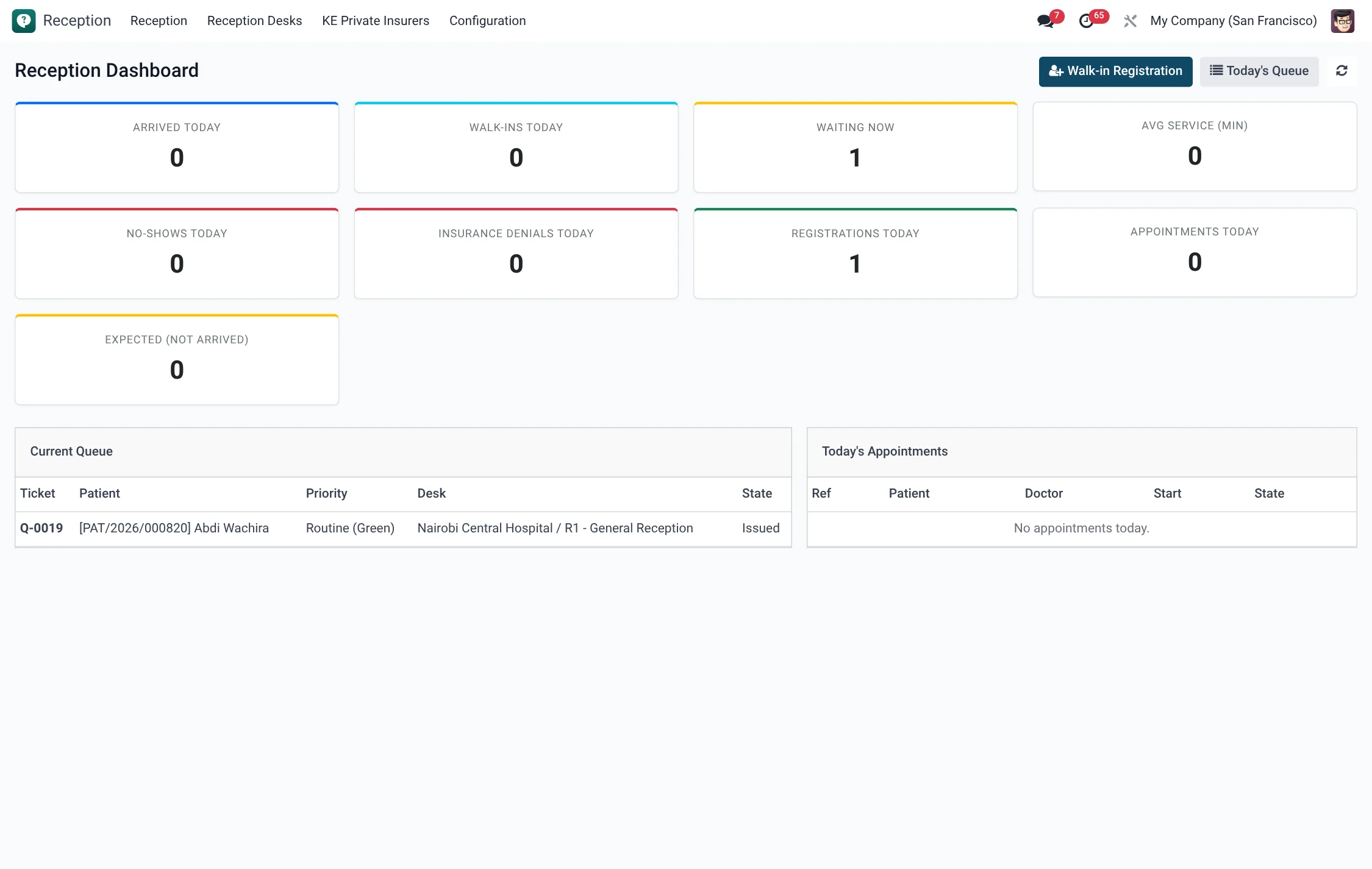
- Reception → Reception → Reception Dashboard and HMS Core → Reports & Dashboards → Queue Dashboard — live counts and wait metrics.
- Reception → Reception → Reception Desktop → Queue tab — the receptionist's working view of the queue.
The ticket lifecycle
Every queue ticket carries a Status that moves through a fixed set of states. Knowing them is the key to working the queue confidently:
| Status | Meaning | Reached by |
|---|---|---|
| Issued | Ticket created, patient has a number. | Issuing the ticket at registration. |
| Waiting | Patient is confirmed in the waiting area. | Set Waiting. |
| Called | Number called; the patient should come forward. | Call. |
| In Service | Patient is being attended. | Start Service. |
| Served | Encounter at the desk/clinic complete. | Serve. |
| No Show | Called but did not appear. | No Show. |
| Voided | Cancelled (duplicate, error, left early). | Void. |
A ticket can only move forward from a valid prior state — for example, only a Called ticket can enter In Service, and only a Called or In Service ticket can be marked Served — so the order of service stays honest.
Calling and serving patients
- Pick the next ticket. On the Reception Desktop Queue tab (or Today's Queue list), the next ticket is the highest priority that has waited longest. Emergency (red) outranks Urgent (yellow), which outranks Routine (green).
- Call it. Click Call. The status becomes Called, the call time is stamped, and the number appears on the Waiting Room Display.
- Start service. When the patient reaches the counter or room, click Start Service — status In Service.
- Serve. When done, click Serve. The ticket closes as Served with a served-at timestamp.
- Handle a no-show. If the patient does not appear after being called, click No Show. (Tickets left waiting past a cut-off are also swept to No Show automatically.)
- Void if needed. For a duplicate or an error, click Void; the ticket leaves the active queue without counting as served.
Routing to clinics
A ticket is not just a number — it carries the patient's visit and a target Department, so serving a ticket hands the patient to the right place. As the visit progresses it walks its own granular states: Registered → Triage Pending → In Triage → Consultation Pending → In Consultation → Services Pending → In Services → Billing Pending → In Billing → Discharged (or Admitted for an inpatient). From the desktop you open the visit behind a queue row and use its Next Step action to send the patient to triage, a consultation room, services or billing. The clinical queue (HMS Core → Patients → Queue) and the Triage Queue (Today) are where clinicians then pick the patient up.
Visit states & next step
Behind each queue ticket sits a visit whose Status tracks the patient through the facility. The receptionist mostly touches the early states; clinicians drive the later ones. The Next Step action on the visit always offers the single button that moves it forward.
| Visit state | Meaning | Next step |
|---|---|---|
| Registered | Patient registered at reception; ticket issued. | Send to Triage |
| Triage Pending | Queued for triage but not yet started. | Start Triage |
| In Triage | Nurse is taking vitals / assessing. | Send to Consultation |
| Consultation Pending | Waiting for a consultation room. | Start Consultation |
| In Consultation | With the doctor. | Send to Services |
| Services Pending | Awaiting lab, imaging or procedures. | Start Services |
| In Services | Services in progress. | Send to Billing |
| Billing Pending | Waiting at the cashier. | Start Billing |
| In Billing | Charges being settled. | Discharge |
| Discharged | Patient leaving (outpatient path). | Close Visit |
| Admitted | Patient admitted as an inpatient instead of discharged. | — |
Ticket priorities
Priority sets the colour band and the order of service. The expected-wait estimate counts only same-or-higher-priority tickets ahead, so an emergency is never queued behind routine cases.
| Priority | Colour | Meaning |
|---|---|---|
| Emergency | Red | Acute case; served first, ahead of all others. |
| Urgent | Yellow | Needs prompt attention; ahead of routine. |
| Routine | Green | Standard walk-in; served in arrival order within its band. |
Ticket field reference
| Field | Meaning |
|---|---|
| Ticket Number (Name) | The patient-facing number, generated with the desk's prefix. |
| Patient | The person the ticket belongs to. |
| Desk | Counter that issued the ticket. |
| Department | Where the ticket routes the patient. |
| Priority | Emergency (Red), Urgent (Yellow) or Routine (Green). |
| Issued / Called / Served / No-show / Voided At | Timestamps for each transition, used for wait-time reporting. |
| Callers Waiting Ahead | How many same-or-higher-priority tickets are in front. |
| Expected Wait (minutes) | Estimated wait shown to staff and on the board. |
| Appointment | Link to a booked appointment, where one applies. |
Dashboards & metrics
The Reception Dashboard and the Queue Dashboard show today's waiting count, served count, no-shows and average/expected wait, so a supervisor can open a second desk before a backlog builds. The Waiting Room Display / Queue Board (TV) shows patients their number and the now-serving counter, cutting crowding at the desk.
Roles & access
Front-desk staff in the Reception group call, serve, no-show and void tickets for their own facility under multi-company record rules. Clinical pick-up of the routed visit is done by the Nurse and Doctor groups from the clinical and triage queues; Administrator has full oversight.
Tips & troubleshooting
| Symptom | Cause & fix |
|---|---|
| “Only called tickets can enter in-service state” | You skipped Call; call the ticket first, then Start Service. |
| Patient not on the Waiting Room Display | Ticket is still Issued, not Called — the board shows called/serving numbers. |
| Routine patient seems stuck behind emergencies | Working as designed — emergency and urgent tickets are served first; open another desk if the routine line grows. |
| Tickets vanished overnight | Stale waiting tickets are swept to No Show after the cut-off; they remain visible under Queue Tickets for audit. |