

Wards & Admissions
The Wards & Admissions area of BridgeERP HMS is the inpatient engine of the hospital. It is where a patient stops being a passing visit and becomes an admitted bed-holder — tracked from a pre-admission booking, through the daily life of a ward, to a clean discharge. This overview explains how the inpatient model fits together: wards and the beds inside them, the live bed map nurses watch all shift, the admission record that follows the patient, and the nursing, acuity and dietary functions that surround the bed. Ward clerks, charge nurses, bed managers, admitting officers and matrons all work here.
What this area covers
Inpatient care in BridgeERP HMS is organised around three linked records. A ward (hms.ward) is a physical nursing unit — a general ward, a maternity unit, a paediatric ward. Each ward holds many beds (hms.bed), and each bed is the slot a patient physically occupies. The admission (hms.admission) is the clinical-and-financial record of one inpatient stay; it points at a ward and a bed and walks through a status from pre-admission to discharge. Around these sit nursing assessments, nurse-acuity scoring, therapeutic diets and bed housekeeping, so that a single admitted patient has one coherent inpatient chart.
The headline screen is the Bed Map, a colour-coded board of every bed grouped by ward. A glance tells the bed manager what is free, what is occupied, what is being cleaned and what is out of service — the same picture the admitting officer needs before sending the next patient up.
Where to find it
The inpatient workspace lives under the dedicated Wards & Admissions top menu:
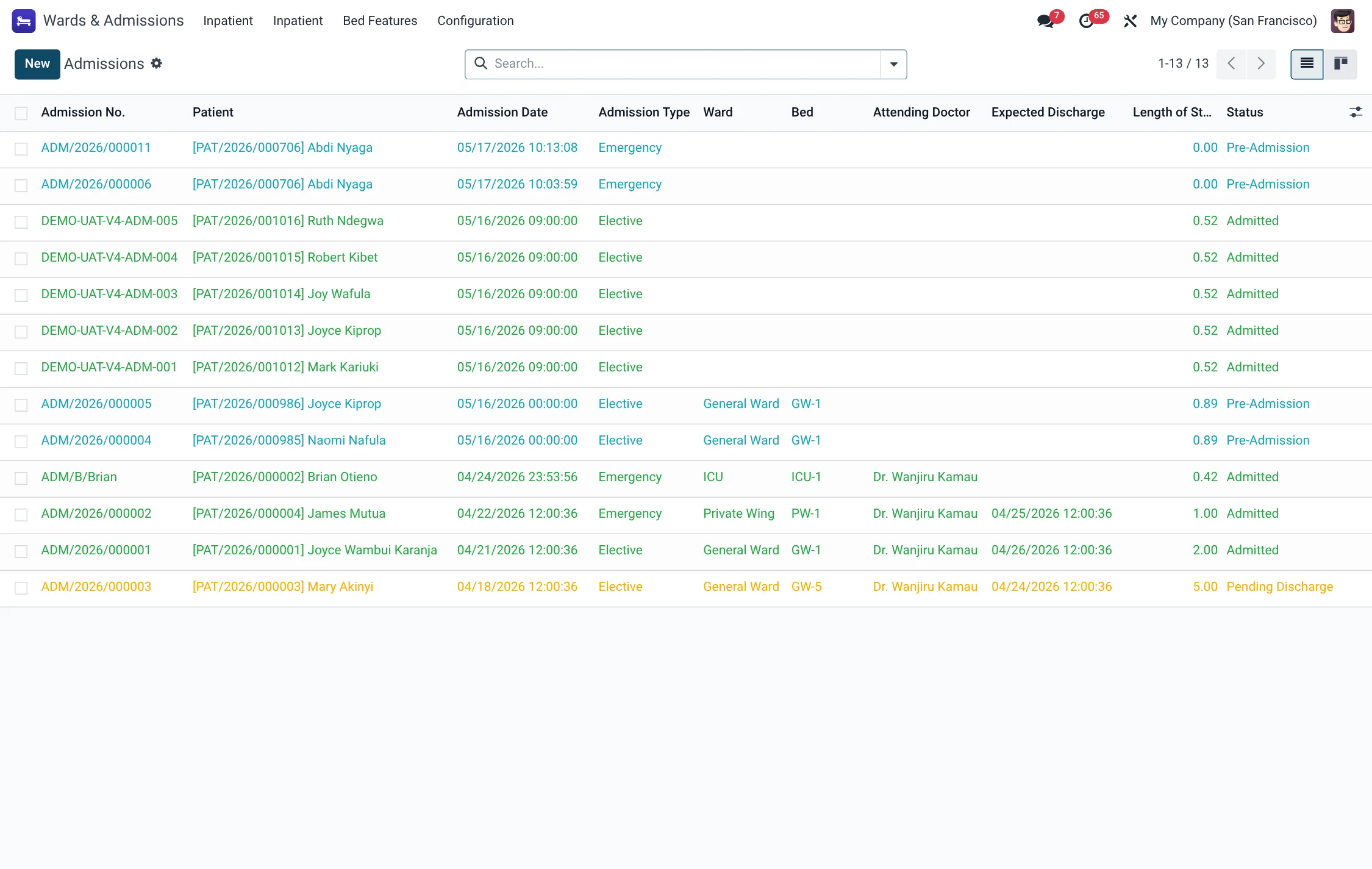
- Wards & Admissions → Inpatient → Admissions — the admission records, split into Pre-Admission, Active, Discharged and All.
- Wards & Admissions → Inpatient → Bed Map — the live colour board, grouped by ward.
- Wards & Admissions → Inpatient → Wards — the list of wards with occupancy figures.
- Wards & Admissions → Inpatient → Beds — All Beds, the Cleaning Queue, the Cleaning Log and beds in Maintenance.
- Wards & Admissions → Inpatient → Transfers — the audit trail of bed-to-bed and ward-to-ward moves.
- Wards & Admissions → Inpatient → Occupancy, Length of Stay and 30-Day Readmissions — the management views over the same admission records.
- Wards & Admissions → Configuration → Settings and Wards & Admissions → Bed Features — the setup screens.
Critical-care, dietary and housekeeping functions are grouped under the parallel HMS Core → Wards & Admissions branch — see ICU & Critical Care and the dietary and bed-board entries below.
Before you start
Three pieces of master data must exist before you can admit anyone. Set them up in this order:
- Create your wards under Wards & Admissions → Inpatient → Wards, choosing a ward type and naming the ward in charge.
- Create beds inside each ward, giving each a bed label, code and number, and a bed class. See Wards, rooms & beds for the full bed setup.
- Optionally define Bed Features (oxygen point, monitor, isolation) so beds can be matched to clinical need.
The admission lifecycle
Every inpatient stay is one admission record that moves through a fixed set of statuses. Understanding these states is the key to the whole area:
| Status | Meaning |
|---|---|
| Pre-Admission | Booked but not yet in a bed (planned surgery, scheduled delivery). |
| Admitted | Patient is physically in the bed; the stay is live. |
| On Leave | Temporary authorised absence, bed held. |
| Pending Discharge | Discharge requested, awaiting clearance/billing. |
| Discharged | Stay closed normally. |
| Transferred / Deceased / Left Against Medical Advice / Cancelled | The other closing outcomes, each kept distinct for reporting. |
The buttons on the admission form move the record between these states — Admit Patient, Mark On Leave, Return from Leave, Transfer, Request Discharge and Discharge. The full workflow, including the care team and dietary side, is covered in Admit, transfer & discharge.
Ward types
Every ward carries a Ward Type that classifies the nursing unit and, by default, the class of the beds inside it. The available types are fixed:
| Ward type | Typical use |
|---|---|
| General | Standard open inpatient ward, the default for new wards. |
| Private | Single-occupancy private rooms. |
| Semi-Private | Two- to four-bed shared rooms at a mid tier. |
| Intensive Care Unit | Critical-care beds; see ICU & Critical Care. |
| High Dependency Unit | Step-down acuity between ICU and a general ward. |
| Maternity | Antenatal, delivery and postnatal beds. |
| Paediatric | Children’s ward beds. |
| Psychiatric | Mental-health inpatient unit. |
| Isolation | Beds reserved for infection-control isolation. |
Bed states at a glance
The colour of every tile on the Bed Map is driven by the bed’s State. There are seven states, and the bed manager reads the whole board by colour:
| State | What it means for the bed manager |
|---|---|
| Available | Free and clean — can take the next admission immediately. |
| Occupied | A live admission is in the bed. |
| Reserved | Held for a planned (pre-admission) patient; not free to reassign. |
| Cleaning | Vacated; a cleaning task is open and the bed is not yet re-usable. |
| Maintenance | Withdrawn for repair or engineering work. |
| Out of Service | Unavailable for any clinical use until re-commissioned. |
| Isolation Hold | Held under infection-control rules pending terminal clean or clearance. |
The full mechanics of how a bed moves between these states are on the beds page.
Nursing and the bedside
Once a patient is in a bed, the nursing layer takes over. Under HMS Core → Nursing → Nursing the ward team records vitals charts, intake/output (I/O) charts, nursing assessments and care plans, medication administration (the MAR), shift handovers and nursing incidents. The HMS Core → Nursing → Nurse Acuity branch scores how much nursing each patient needs and compares required against actual staffing per shift, raising Gap Alerts when a ward is under-staffed. These functions are what turn an occupied bed into a documented episode of care.
Housekeeping & turnover
A bed cannot simply be re-used the moment a patient leaves. When an admission is discharged, the bed drops to a Cleaning state and a cleaning task is raised. Housekeeping works the Cleaning Queue, marks the clean complete, and only then does the bed return to Available. The EVS Bed Board and the environmental-services tasks under HMS Core → Wards & Admissions manage this turnover and the deep-clean schedule. The mechanics are detailed on the beds page.
Reports & KPIs
The inpatient area produces the metrics hospital managers live by. The Occupancy view shows live bed utilisation; Length of Stay tracks average bed-nights; 30-Day Readmissions flags patients re-admitted inside the quality window; and Bed Turnover measures how fast beds are cleaned and returned. Each ward record also computes its own occupied, available and cleaning bed counts and an occupancy percentage.
Wards & Admissions menus at a glance
The whole inpatient menu tree, with the record each entry opens:
| Menu path | Opens |
|---|---|
| Wards & Admissions → Inpatient → Admissions (Active / All / Discharged / Pre-Admission) | Admission records (hms.admission) |
| Wards & Admissions → Inpatient → Bed Map | Live colour bed board (hms.bed) |
| Wards & Admissions → Inpatient → Wards | Wards with occupancy (hms.ward) |
| Wards & Admissions → Inpatient → Beds (All Beds / Cleaning Queue / Cleaning Log / Maintenance) | Beds and cleaning (hms.bed, hms.bed.cleaning) |
| Wards & Admissions → Inpatient → Transfers | Bed/ward moves (hms.admission.transfer) |
| Wards & Admissions → Inpatient → Occupancy / Length of Stay / 30-Day Readmissions / Bed Turnover | Management views (hms.admission, hms.bed.cleaning) |
| Wards & Admissions → Inpatient → Mortuary | Mortuary intake (hms.mortuary.intake) |
| Wards & Admissions → Bed Features | Bed feature master (hms.bed.feature) |
| Wards & Admissions → Configuration → Settings | Area settings (res.config.settings) |
Roles & access
Inpatient records are scoped by facility and by security group. The groups that touch this area:
| Role | What they do in Wards & Admissions |
|---|---|
| Receptionist | Read bed features and beds; book and register admitting patients. |
| Nurse | Work the bed map, record nursing care, run cleaning and turnover, verify cleans. |
| Doctor | Admit, transfer and discharge patients; set diagnoses and care plans. |
| HMS Manager / HMS Admin | Configure wards, beds, features and settings; see occupancy and outcome reports. |
Related
- Wards, rooms & beds — the bed map, bed states and housekeeping.
- Admit, transfer & discharge — the ADT workflow and care team.
- ICU & Critical Care — critical-care beds and acuity.
- Emergency — where many admissions begin.