

Ambulance & dispatch
The Ambulance & dispatch area of BridgeERP HMS runs your emergency medical services (EMS): it takes the emergency call, dispatches the right vehicle, tracks it from station to scene to hospital, captures the pre-hospital patient run sheet, and stands up a mass-casualty incident command when many patients arrive at once. Dispatchers, paramedics and the EMS manager work from one menu, and every call leaves a timed, auditable trail.
Where to find it
Everything is under the Ambulance application:
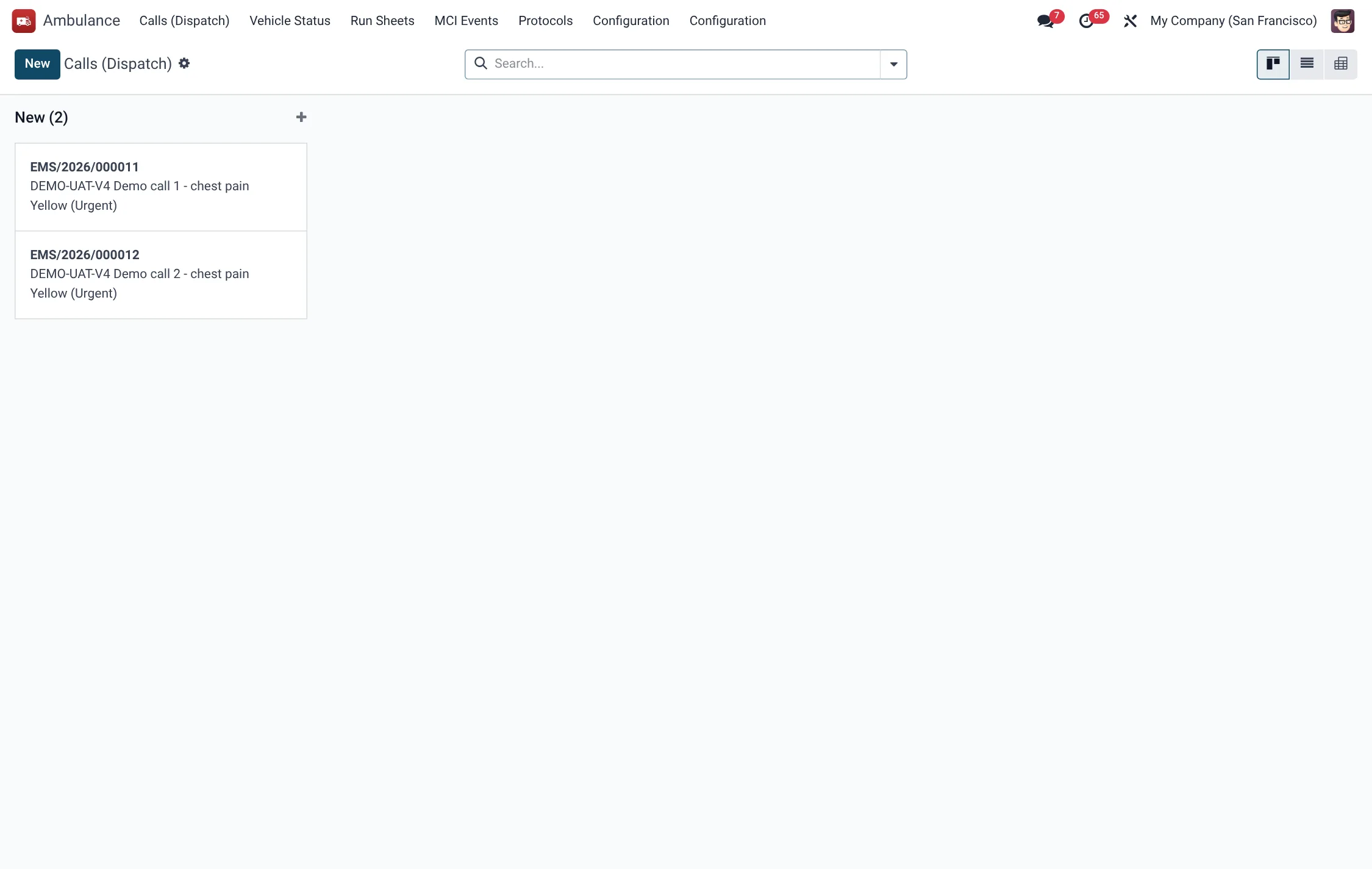
- Ambulance → Calls (Dispatch) — the live call board (model hms.ems.call).
- Ambulance → Run Sheets — pre-hospital patient care records (hms.ems.run.sheet).
- Ambulance → Vehicle Status — the fleet status board (hms.ems.vehicle).
- Ambulance → MCI Events — mass-casualty incidents (hms.ems.mci.event).
- Ambulance → Protocols — clinical protocols (hms.ems.protocol).
- Ambulance → Configuration → Crew Roster — crews and shifts (hms.ems.crew).
- Ambulance → Configuration → Settings — module settings.
Before you start
Make the fleet and crews ready before you take calls. Under Vehicle Status register each vehicle with its type (Basic Life Support, Advanced Life Support, Mobile ICU, Response Motorcycle, Air Ambulance, Mass Casualty Bus or Water Rescue), callsign, registration plate, home base and capability level. Under Configuration → Crew Roster set up crews with their shift type and skill mix. Load your Protocols so paramedics have the right clinical reference on each run.
Handle a call (dispatch lifecycle)
- In Ambulance → Calls (Dispatch) create a call. Record the call source (112, 999, 911, Private, Inter-facility Transfer, Event Standby or Mass Casualty Incident), the chief complaint, the incident type and the address (with latitude/longitude if known).
- Set the triage colour — Red (Immediate), Yellow (Urgent), Green (Delayed) or Black (Deceased) — and the patient count.
- Assign a vehicle and press Dispatch. The call moves New → Dispatched and the timestamp is recorded.
- Press En Route, then On Scene, then Depart Scene as the crew progresses; each press stamps the time and advances the state through En Route, On Scene and Transporting.
- Press At Hospital on arrival, then Clear when the crew is available again (state At Hospital → Cleared).
- Use Open/Create Run Sheet to attach the patient care record, and Cancel if the call is stood down.
Because each transition is timestamped, response-interval reporting (call-to-dispatch, dispatch-to-scene) is computed for you.
Complete a run sheet
- Open the run sheet from the call, or from Ambulance → Run Sheets.
- Record the patient, chief complaint and mechanism / nature of illness.
- Capture neurological status: AVPU (Alert, Voice, Pain, Unresponsive) and the GCS components (eye, verbal, motor) — the total GCS and Revised Trauma Score are computed.
- Add vital-sign rows to the trend, the pain score, interventions and any protocol applied.
- Set the disposition: Transported to ED, Refused / AMA, Treated & Released, Dead on Scene or No Patient, and the receiving facility and doctor.
- Press Complete (state Draft → Completed), then a supervisor presses QA Reviewed; Cancel voids a sheet.
Call field reference
| Field | Meaning | Required |
|---|---|---|
| Call Source | How the call arrived (112, 999, 911…) | Yes |
| Chief Complaint | Caller's stated problem | Yes |
| Incident Type | Trauma, cardiac, respiratory, obstetric, etc. | Recommended |
| Triage Colour | Red / Yellow / Green / Black priority | Default Yellow |
| Address / GPS | Scene location | Yes |
| Vehicle | Assigned ambulance | On dispatch |
| Status | New → Dispatched → En Route → On Scene → Transporting → At Hospital → Cleared | Yes |
Mass-casualty incidents (MCI)
When a single event produces many casualties, declare an MCI Event under Ambulance → MCI Events.
- Create the event, setting the incident type (RTA, Fire, Building Collapse, Flood, Terror Attack, Chemical/HAZMAT, Explosion, Stampede, Mass Poisoning) and severity level (Level 1 through Level 4 by casualty count).
- Name the incident commander, triage officer and transport officer.
- Press Activate Response to move from Declared to Active; casualties are triaged and counted by colour automatically.
- Press Scale Down, then Close as the incident resolves.
Vehicle status board
The Vehicle Status board shows each ambulance's live state — Available, Dispatched, En Route, On Scene, Transporting, At Hospital, Cleaning/Restocking, Out of Service or In Maintenance — so the dispatcher always assigns a truly available unit. Capability level distinguishes BLS, ALS and ICU-capable vehicles.
Roles & access
Three groups govern EMS: EMS Dispatcher (takes calls, assigns vehicles, drives the dispatch lifecycle), EMS Paramedic (completes run sheets and clinical records) and EMS Manager (fleet, crews, protocols, MCI command and QA review).
Protocols & crews
Clinical quality in the field depends on crews working to agreed protocols, so BridgeERP HMS keeps both as configurable master data. Under Ambulance → Protocols you load the clinical protocols the service follows, each tagged with a category and the level required to perform it — BLS, ALS or MICS — so a basic-life-support crew is not prompted to carry out an advanced intervention it is not credentialed for. Under Configuration → Crew Roster each crew is recorded with its shift type and skill mix, and crews are tied to the vehicles they staff. Aligning a vehicle's capability level, its crew's skill, and a protocol's required level means dispatch can match the right resource to the call rather than discovering a capability gap on scene.
Response intervals & timestamps
Every state transition on a call is timestamped at the moment the dispatcher or crew presses the button — call received, dispatched, on scene, departed scene, at hospital, cleared. From these times the system derives the response intervals that EMS performance is judged on, such as call-to-dispatch and dispatch-to-scene. This is why the discipline of pressing each button in real time matters: the audit trail is only as accurate as the moment it was recorded, and back-filled times silently flatter or distort the service's measured performance. The same timestamps make it possible to reconstruct exactly what happened on any given call, which is invaluable for clinical governance and for answering queries after a serious incident.
Tips & troubleshooting
Vehicle types & status
The fleet board distinguishes vehicle capability and tracks each unit's live status so the dispatcher only assigns a truly available unit.
| Vehicle type | Status values |
|---|---|
| Basic Life Support (BLS) | Available |
| Advanced Life Support (ALS) | Dispatched |
| Mobile ICU (MICS) | En Route |
| Response Motorcycle | On Scene |
| Air Ambulance | Transporting |
| Mass Casualty Bus | At Hospital |
| Water Rescue | Cleaning/Restocking |
| – | Out of Service |
| – | In Maintenance |
Run-sheet field reference
The pre-hospital run sheet captures the patient assessment, disposition and review state.
| Field | Values |
|---|---|
| AVPU | Alert, Voice, Pain, Unresponsive |
| GCS | Eye, verbal, motor components; total and Revised Trauma Score computed |
| Disposition | Transported to ED, Refused / AMA, Treated & Released, Dead on Scene, No Patient |
| Receiving facility / doctor | Where the patient was handed over |
| State | Draft → Completed → QA Reviewed (or Cancelled) |
MCI incident types & severity levels
A mass-casualty event is declared with an incident type and a severity level scaled by casualty count.
| Incident type | Severity level |
|---|---|
| Road Traffic Accident | Level 1 (5-15 casualties) |
| Fire | Level 2 (16-50 casualties) |
| Building Collapse | Level 3 (51-100 casualties) |
| Flood | Level 4 (100+ casualties) |
| Terror Attack | – |
| Chemical / HAZMAT | – |
| Explosion | – |
| Stampede | – |
| Mass Poisoning | – |
The MCI event runs through states Declared → Active Response → Scaling Down → Closed.
Protocol categories & levels
Protocols are tagged with a category and the crew level required to perform them, so a BLS crew is never prompted for an intervention it is not credentialed for.
| Category | Level required |
|---|---|
| Airway/Breathing | BLS |
| Cardiac | ALS |
| Trauma | MICS |
| Medical | – |
| Paediatric | – |
| Obstetric | – |
| Environmental | – |
| Toxicology / Overdose | – |
Ambulance menus at a glance
| Menu path | Opens | Model |
|---|---|---|
| Ambulance → Calls (Dispatch) | Live call board | hms.ems.call |
| Ambulance → Run Sheets | Patient care records | hms.ems.run.sheet |
| Ambulance → Vehicle Status | Fleet status board | hms.ems.vehicle |
| Ambulance → MCI Events | Mass-casualty incidents | hms.ems.mci.event |
| Ambulance → Protocols | Clinical protocols | hms.ems.protocol |
| Ambulance → Configuration → Crew Roster | Crews and shifts | hms.ems.crew |