

Requests & cross-matching
This page covers the clinical-supply side of the blood bank: a clinician requests blood for a named patient, the bank crossmatches a compatible unit, issues it to the ward, the unit is transfused at the bedside, and any adverse event is logged in the haemovigilance register. Each step is a controlled state change so a unit can never be given without a passing compatibility result behind it. It is written for blood-bank technicians, ward staff who receive units, and the manager who reviews reactions. The supply of units into inventory is on Donors & units.
Where to find it
- Blood Bank → Requests — clinicians' orders for blood for a patient.
- Blood Bank → Crossmatch Worklist — the compatibility tests in progress.
- Blood Bank → Issues — units released to wards.
- Blood Bank → Transfusions — bedside administration records.
- Blood Bank → Reactions Register — haemovigilance reports.
Before you start
- Available units of the needed group and component must exist in inventory (see Donors & units).
- The patient must be identified, with a known or pending blood group.
- Crossmatch staff records must exist, since each crossmatch records who tested and who verified.
Raising a request
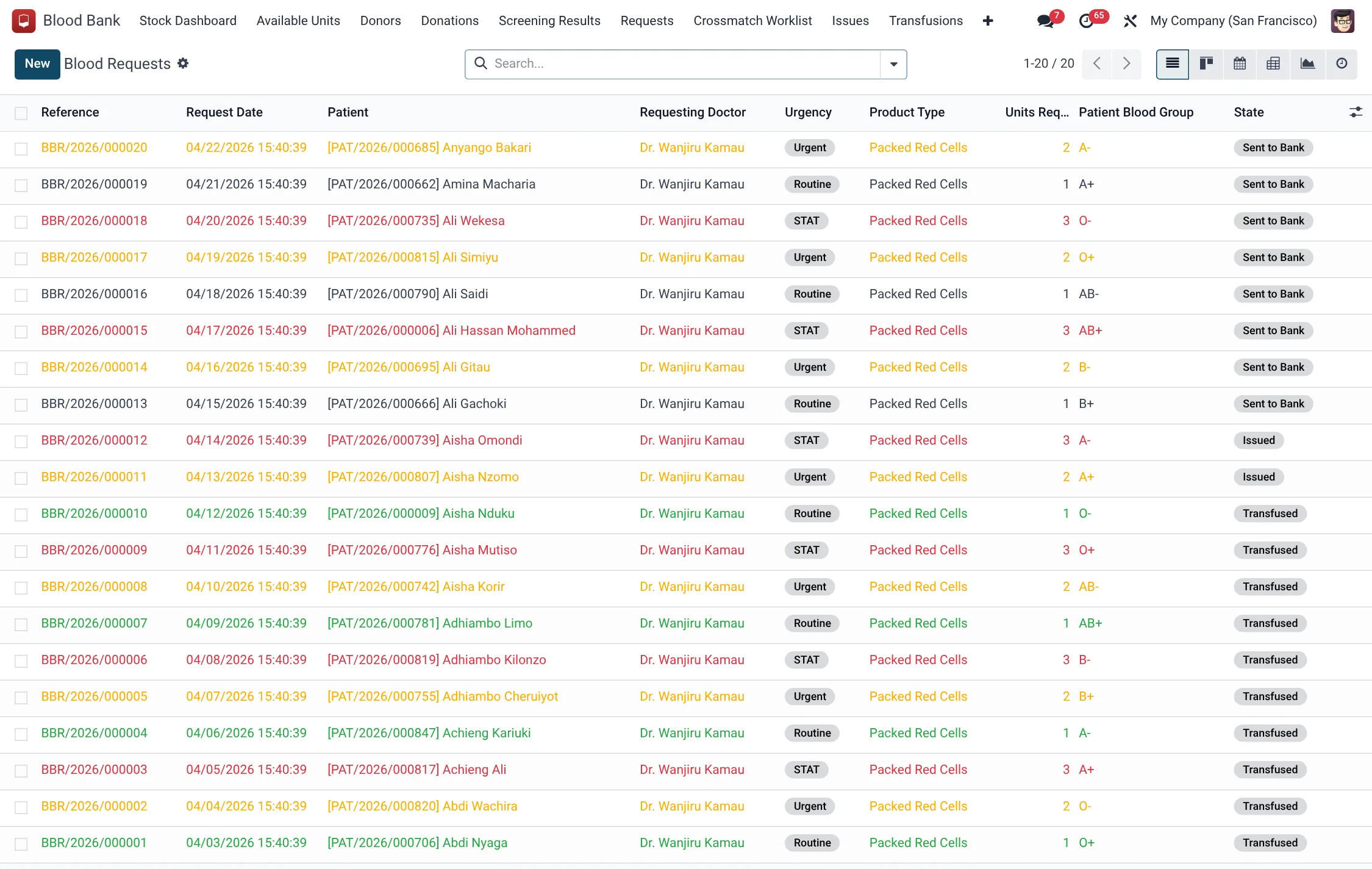
A request (hms.bb.request) is the clinician's order. It names the patient, the product type, the number of units, the clinical indication and the diagnosis, the patient's known blood group and Rh, current and target haemoglobin, and any special requirements (irradiated, leukoreduced, washed, CMV-negative). Its urgency is Routine, Urgent, STAT or MCI/Emergency. The request runs Draft → Sent to Bank → Crossmatching → Crossmatched → Issued → Transfused, or Cancelled.
- Create the request, set the product type, units required and urgency.
- Record the clinical indication and diagnosis, and flag any special requirements.
- Press Send to Bank; the request moves to Sent to Bank.
- Press Start Crossmatch to begin compatibility testing; it moves to Crossmatching.
| Request field | Meaning | Required |
|---|---|---|
| Product Type | Component requested (red cells, plasma, platelets, etc.) | Yes |
| Units Requested | How many units are needed | Yes |
| Urgency | Routine, Urgent, STAT or MCI/Emergency | Yes |
| Clinical Indication | Why the transfusion is needed | Yes |
| Special Requirements | Irradiated, Leukoreduced, Washed, CMV-Negative | No |
Crossmatch worklist
A crossmatch (hms.bb.crossmatch) tests a candidate unit against the patient. It records ABO and Rh compatibility, the antibody-screen result, and the method (Saline/Immediate Spin, Indirect Antiglobulin (AHG), Gel Card or Solid Phase), with the testing and verifying staff. Per-unit results are Compatible, Major Incompatibility, Minor Incompatibility or Weak Positive. The crossmatch runs In Progress → Compatible or Incompatible (or Expired once its validity window passes).
- From the Crossmatch Worklist, select the unit(s) being tested against the request.
- Record ABO and Rh compatibility, the antibody screen and the method.
- Press Mark Compatible when results are clean — this reserves the unit for the patient (the unit becomes Reserved).
- Press Mark Incompatible if any major incompatibility is found; pick another unit.
Issuing a unit
An issue (hms.bb.issue) releases a reserved unit to the ward. It records who collected it and when, and runs Issued → Transfused, or Returned or Expired In Use. If the unit comes back unused within its return window, use Mark Returned so it can re-enter stock; if it sat out too long, use Mark Expired In Use.
- Confirm the unit is crossmatched and Reserved for this patient.
- Create the issue; the unit moves to Issued.
- If the unit returns unused in time, press Mark Returned; otherwise Mark Expired In Use.
Recording the transfusion
A transfusion (hms.bb.transfusion) records bedside administration. It captures start and completed times and any complications — from None through Urticaria, Fever, Dyspnea, Hypotension, Hemolytic Reaction, Allergic Reaction, TACO, TRALI, Sepsis to Anaphylaxis. It runs In Progress → Completed, or Stopped (Reaction) or Abandoned.
- Start the transfusion against the issued unit; it is In Progress.
- Monitor and record vitals and any complication.
- Press Complete for an uneventful transfusion (unit becomes Transfused).
- If a reaction occurs, press Stop for Reaction — this halts the transfusion and links a reaction report.
Crossmatch, issue and transfusion states
Three records carry the unit from a reserved match to the bedside, each with its own status chain. Reading them together shows exactly where a unit is in the issue cycle:
| Record | State | Meaning |
|---|---|---|
| Crossmatch | In Progress | Compatibility testing under way |
| Crossmatch | Compatible | Clean result; unit reserved for the patient |
| Crossmatch | Incompatible | A major incompatibility; pick another unit |
| Crossmatch | Expired | Validity window (72 hours) lapsed; repeat before issue |
| Issue | Issued | Released to the ward |
| Issue | Transfused | Given to the patient |
| Issue | Returned | Came back unused within the window; re-enters stock |
| Issue | Expired In Use | Out of controlled storage too long; cannot be returned |
| Transfusion | In Progress | Administration under way |
| Transfusion | Completed | Uneventful; unit marked transfused |
| Transfusion | Stopped (Reaction) | Halted; a reaction report is linked |
| Transfusion | Abandoned | Not given; ended without completion |
Reactions register
A reaction report (hms.bb.transfusion.reaction) is the haemovigilance record. It grades severity (Mild, Moderate, Severe, Life-Threatening, Fatal) and category (FNHTR, Allergic/Urticarial, Anaphylactic, Acute or Delayed Hemolytic, TACO, TRALI, Bacterial Contamination, Hypotensive, TA-GVHD or Other). It captures symptoms, a repeat ABO confirmation, root-cause analysis, a classification (Confirmed, Probable, Possible, Unrelated) and whether it was reported to NBTS haemovigilance. It runs Open → Investigating → Closed.
| Reaction field | Meaning |
|---|---|
| Severity | Mild → Fatal grading |
| Category | Reaction type (FNHTR, hemolytic, TACO, TRALI, etc.) |
| Classification | Confirmed, Probable, Possible or Unrelated |
| Reported to Haemovigilance | Whether NBTS was notified |
Reaction categories
The haemovigilance record classifies every adverse event into one recognised reaction category, which drives the investigation pathway and any recall of the implicated unit:
| Category | Nature |
|---|---|
| Febrile Non-Hemolytic (FNHTR) | Fever without haemolysis |
| Allergic / Urticarial | Localised allergic skin response |
| Anaphylactic | Severe systemic allergic reaction |
| Acute Hemolytic | Immediate red-cell destruction, often ABO mismatch |
| Delayed Hemolytic | Haemolysis appearing days later |
| TACO | Transfusion-associated circulatory overload |
| TRALI | Transfusion-related acute lung injury |
| Bacterial Contamination | Infected unit causing sepsis |
| Hypotensive | Isolated blood-pressure drop |
| TA-GVHD | Transfusion-associated graft-versus-host disease |
| Other | Any event outside the above |
Severity is graded Mild, Moderate, Severe, Life-Threatening or Fatal, and the investigation runs Open → Investigating → Closed.
Roles & access
- Blood Bank / Technician — crossmatch, issue and record transfusions.
- Blood Bank / Manager — review the Reactions Register and close investigations.
- Blood Bank / User — raise and view requests.
Tips & troubleshooting
| Problem | Fix |
|---|---|
| No compatible unit found | Check group/Rh and special requirements against Available Units stock. |
| Crossmatch shows Expired | Repeat the crossmatch before issuing. |
| Unit returned unused | Mark Returned within the window so it re-enters stock. |
| Transfusion stopped | A linked reaction report opens — complete the haemovigilance investigation. |
Related
- Blood Bank overview — the whole donor-to-patient chain.
- Donors & units — how units reach inventory before they are requested.