

Blood units & inventory
This page covers the supply side of the blood bank: registering donors, running donation sessions, collecting blood, screening it for transfusion-transmissible infections, and turning a screened donation into typed, labelled units that sit in inventory ready to crossmatch. It also covers deferring donors who are not fit to give. It is written for the technicians who collect, the screeners who test, and the bank manager who watches stock. The clinical side — requests, crossmatch and transfusion — is on Requests & transfusions.
Where to find it
- Blood Bank → Donors — the donor register, with blood group, deferral status and donation history.
- Blood Bank → Donor Sessions — recruitment/collection drives that group donations.
- Blood Bank → Donations — individual collection events.
- Blood Bank → Screening Results — the TTI test records that gate release.
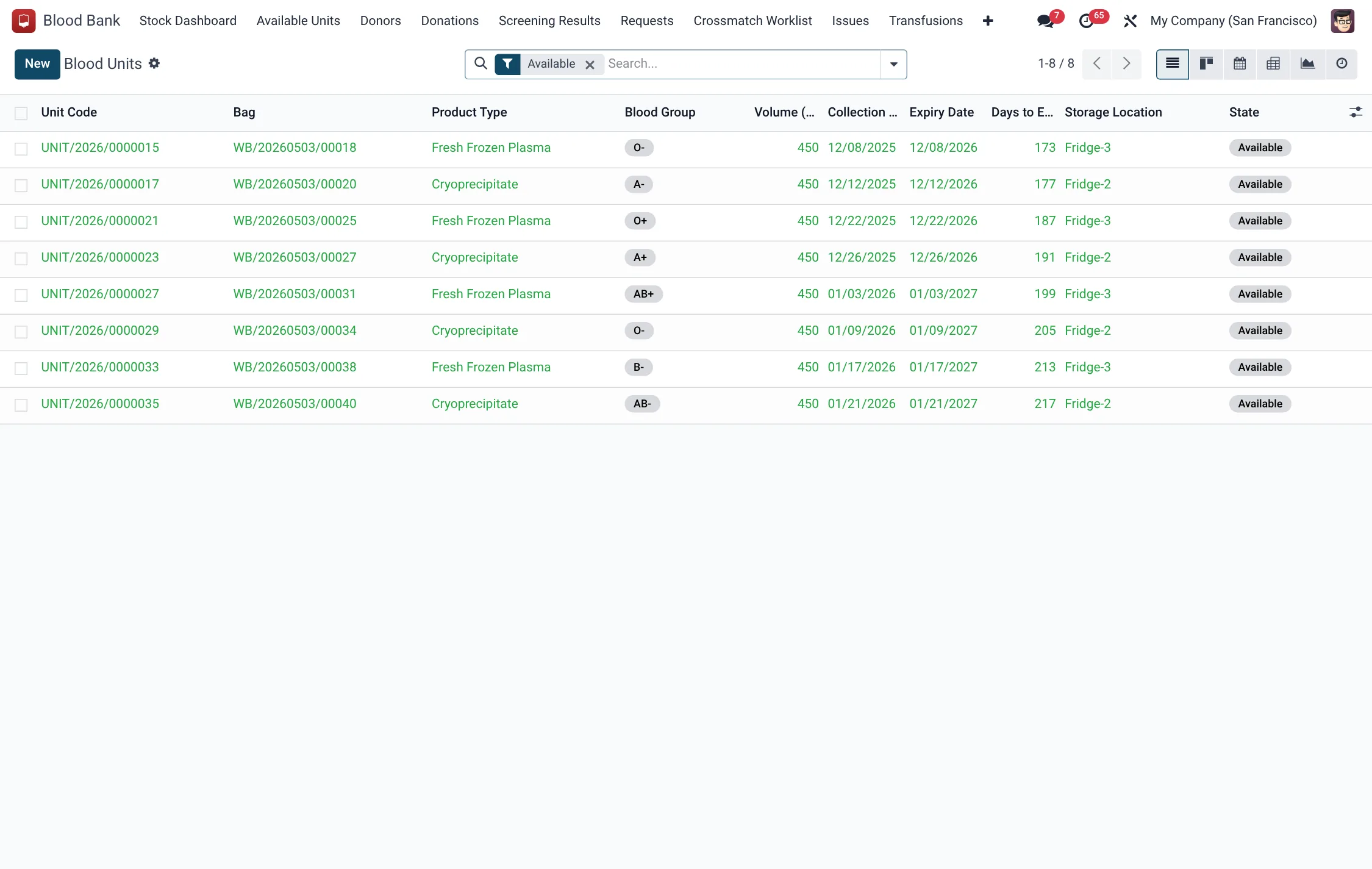
- Blood Bank → Available Units — the live inventory of components.
- Blood Bank → Stock Dashboard — stock by group and component.
- Blood Bank → Configuration → Deferral Reasons — the catalogue of why donors are deferred.
Before you start
- Load Deferral Reasons with the right severity and waiting periods before screening begins.
- Ensure clinical staff records exist, since donations and screenings record who performed them.
- Decide the facility scope so units are stocked against the correct site.
Registering a donor
A donor (hms.bb.donor) is a reusable record. It carries the donor type (Voluntary, Family/Replacement or Autologous), national ID, gender, date of birth, blood group, weight and contact details. The system computes the donor's age, last donation date, total donations and the earliest next eligible date. A donor's deferral status is Eligible, Temporarily Deferred or Permanently Deferred.
- Create the donor and record the donor type, blood group and contact details.
- Confirm the donor is Eligible (use Set Eligible if reinstating a previously deferred donor).
- If the donor is not fit, use Temporary Defer or Permanent Defer and pick a deferral reason and date.
| Donor field | Meaning | Required |
|---|---|---|
| Donor Type | Voluntary, Family/Replacement or Autologous | Yes |
| Gender | Male or Female | Yes |
| Blood Group | A/B/AB/O with +/- (or Unknown until confirmed) | No |
| Deferral Status | Eligible, Temporarily Deferred, Permanently Deferred | Yes |
| Eligible Next | Earliest next donation (last whole-blood + 90 days), computed | Auto |
Collecting a donation
A donation (hms.bb.donation) is the collection event, identified by a unique bag ID. It records the donation type (Whole Blood, Plasma, Platelets or Double Red Cell), volume, bag type, anticoagulant, collection times and the donor's recovery status. It runs In Progress → Completed, or ends Discarded or Deferred.
- Start the donation against the donor; record bag ID, donation type and volume.
- Note collection start and end so the duration computes.
- Record the donor's recovery (Uneventful, Mild Reaction, Vasovagal, Hematoma or Other).
- Press Complete Donation to move it to Completed, or Discard/Defer if collection failed.
Screening for safety
No unit is released until it passes screening. A screening record (hms.bb.screening) holds the mandatory TTI panel — HIV, HBV (HBsAg), HCV, Syphilis and Malaria — each with a method and a result, plus ABO and Rh confirmation. When all five infection results are negative, the record computes All Negative and Releasable. The record's state runs Pending → Passed or Failed.
- Open the screening record for the donation's bag.
- Enter each test method and result; confirm ABO and Rh.
- Press Mark Passed only when every infection test is negative; this makes the resulting unit releasable.
- If any test is reactive, press Mark Failed — the unit cannot be released and the donor is handled per policy.
| Screening test | What it checks | Gates release? |
|---|---|---|
| HIV | Human immunodeficiency virus | Yes — must be negative |
| HBV (HBsAg) | Hepatitis B surface antigen | Yes — must be negative |
| HCV | Hepatitis C virus | Yes — must be negative |
| Syphilis | Treponemal infection | Yes — must be negative |
| Malaria | Malaria parasite screen | Yes — must be negative |
| ABO Confirmation | Re-confirms the unit's ABO group | Must not be discrepant |
| Rh Confirmation | Re-confirms the unit's Rhesus type | Must not be discrepant |
Only when all five infection results are negative does the record compute All Negative and Releasable; an ABO or Rh discrepancy must be resolved before the unit can leave quarantine.
Donation and screening states
Two short status chains gate whether a bag can be processed into releasable stock. A donation must reach Completed and its screening must reach Passed before any resulting unit can leave quarantine:
| Record | State | Meaning |
|---|---|---|
| Donation | In Progress | Collection under way |
| Donation | Completed | Bag collected successfully |
| Donation | Discarded | Collection failed; bag not usable |
| Donation | Deferred | Donor deferred during the session |
| Screening | Pending | Tests not yet entered or resulted |
| Screening | Passed | All TTI tests negative; unit releasable |
| Screening | Failed | A reactive test; unit cannot be released |
Units in inventory
A processed donation yields one or more units (hms.bb.product), each with a unique unit code. The product type is Whole Blood, Packed Red Cells, Leukoreduced Red Cells, Fresh Frozen Plasma, Platelets or Cryoprecipitate. Each unit carries its blood group, Rhesus, anticoagulant, collection date and a computed expiry date, storage temperature and days-to-expiry. Units start Quarantined and move to Available once released, then onward to Reserved, Issued and Transfused, or to Expired, Discarded or Recalled.
| Unit field | Meaning |
|---|---|
| Unit Code | Unique label of the component |
| Product Type | The component type (red cells, plasma, platelets, etc.) |
| Blood Group / Rhesus | The unit's typing, used for crossmatch |
| Expiry Date | Computed from component and additive |
| Days to Expiry | Live countdown for stock rotation |
| State | Quarantined → Available → Reserved → Issued → Transfused |
Deferral reasons
Configuration → Deferral Reasons defines why a donor is held back. Each reason has a code, a severity of Temporary or Permanent, and a default deferral period in days. Temporary deferrals set a return date; permanent deferrals keep the donor out of the pool. Maintaining this catalogue keeps deferrals consistent across screeners.
Roles & access
- Blood Bank / Technician — register donors, collect donations, manage units.
- Blood Bank / Screener — enter and pass/fail TTI screening.
- Blood Bank / Manager — configure deferral reasons, oversee stock.
Tips & troubleshooting
| Problem | Fix |
|---|---|
| Unit stuck Quarantined | Its screening has not passed — complete and Mark Passed. |
| Donor blocked from donating | Check deferral status and Eligible Next date. |
| Bag ID rejected | Bag IDs and unit codes must be unique — use a fresh one. |
| Short-dated units accumulating | Rotate by days-to-expiry; watch the Stock Dashboard. |
Related
- Blood Bank overview — the whole donor-to-patient chain.
- Requests & transfusions — what happens to a unit once it is requested.