

Blood Bank
The Blood Bank manages the safe journey of every unit of blood from the vein of a donor to the vein of a patient. BridgeERP HMS tracks the full chain — register the donor, collect the donation, screen it for transmissible infections, release it as a typed and labelled unit into inventory, crossmatch it against a patient's request, issue it to the ward, record the transfusion, and report any reaction. Every step is a controlled state change, so at any moment you can trace exactly where a unit is and prove it was safe to give. This overview orients blood-bank technicians, screeners and the bank manager before the detail pages.
The chain of custody
Blood safety is fundamentally a chain-of-custody problem: a unit must never be given unless every prior step passed. BridgeERP HMS enforces that as a sequence of records, each gating the next:
- Donor — the person, with blood group, deferral status and donation history.
- Donation — the collection event that fills a bag.
- Screening — the transfusion-transmissible-infection (TTI) tests that must all be negative before release.
- Unit (product) — the typed, dated, labelled component placed into inventory.
- Request — the clinician's order for blood for a named patient.
- Crossmatch — the compatibility test between unit and patient.
- Issue — release of the unit to the ward.
- Transfusion — administration at the bedside.
- Reaction — the haemovigilance report when a transfusion goes wrong.
Where to find it
Everything lives under the top-level Blood Bank application:
- Blood Bank → Donors, Donor Sessions and Donations — recruit donors and collect blood.
- Blood Bank → Screening Results — the TTI test records that gate release.
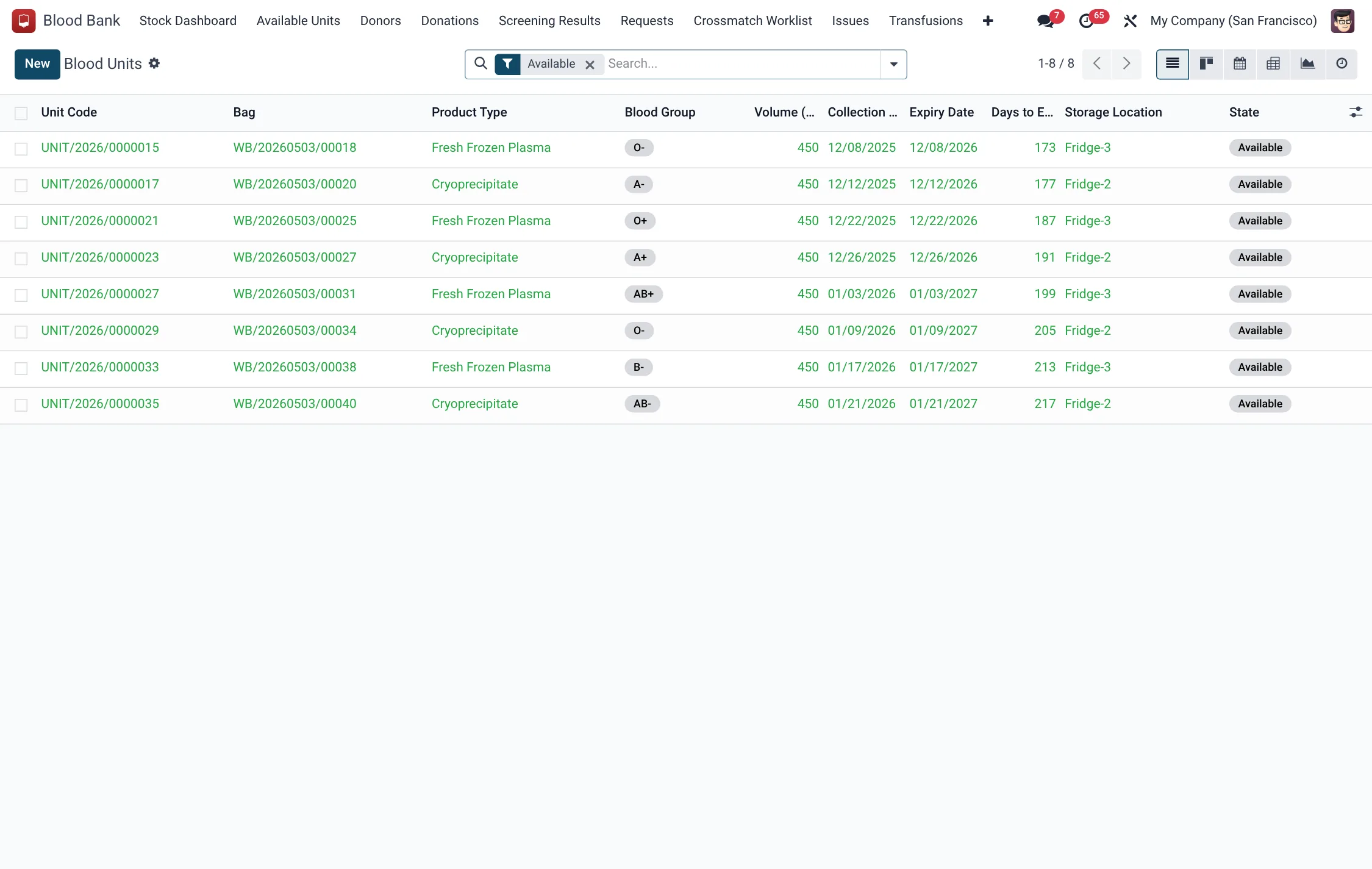
- Blood Bank → Available Units — the live inventory of releasable components.
- Blood Bank → Crossmatch Worklist, Requests, Issues and Transfusions — the clinical-supply side.
- Blood Bank → Reactions Register — haemovigilance reports.
- Blood Bank → Stock Dashboard — stock by group and component.
- Blood Bank → Configuration → Deferral Reasons and Settings.
The donor-to-inventory half is detailed on Donors & units; the request-to-transfusion half on Requests & transfusions.
Blood Bank menus at a glance
Every screen in the bank sits directly under the top-level Blood Bank application. This map shows what each menu opens, roughly in chain order:
| Menu | Opens | Model |
|---|---|---|
| Donors | The reusable donor register | hms.bb.donor |
| Donor Sessions | Recruitment / collection drives | hms.bb.donor.session |
| Donations | Individual collection events | hms.bb.donation |
| Screening Results | TTI test records that gate release | hms.bb.screening |
| Available Units | Live inventory of releasable components | hms.bb.product |
| Requests | Clinicians' orders for blood | hms.bb.request |
| Crossmatch Worklist | Compatibility tests in progress | hms.bb.crossmatch |
| Issues | Units released to wards | hms.bb.issue |
| Transfusions | Bedside administration records | hms.bb.transfusion |
| Reactions Register | Haemovigilance reports | hms.bb.transfusion.reaction |
| Stock Dashboard | Stock by group and component | hms.bb.stock.snapshot |
| Configuration → Deferral Reasons | Catalogue of why donors are deferred | hms.bb.deferral.reason |
Before you start
- Load Deferral Reasons so screeners can defer donors with the correct waiting period.
- Confirm the Settings for the bank (facility scope, storage) are configured.
- Ensure clinical staff records exist, since donations, screenings and crossmatches record who performed and verified them.
How a unit moves through the bank
- A donor is registered and assessed as Eligible.
- A donation is collected; it runs In Progress → Completed.
- The bag is screened; only when all TTI tests are negative does it pass and become Releasable.
- The donation is processed into one or more units, which start Quarantined and move to Available on release.
- A clinician raises a request; the bank crossmatches a compatible unit, which becomes Reserved.
- The unit is issued to the ward (Issued) and transfused (Transfused).
- Any adverse event is logged in the Reactions Register.
Unit lifecycle states
| State | Meaning |
|---|---|
| Quarantined | Collected but not yet released; not issuable |
| Available | Screened, labelled and ready to crossmatch |
| Reserved | Held against a crossmatch for a patient |
| Issued | Released to a ward |
| Transfused | Given to the patient |
| Expired / Discarded / Recalled | Removed from issuable stock |
Donations, screening and components
Three controls do most of the safety work, and it helps to understand them at a glance before working the detail pages. First, a donation is identified by a unique bag ID and can be whole blood or an apheresis collection (plasma, platelets or double red cell); a triple or quadruple bag lets one collection be split into several components. Second, every collection passes a mandatory screening panel — HIV, HBV, HCV, syphilis and malaria — and only a record where all five results are negative becomes Releasable; until then the resulting unit stays Quarantined and cannot be issued. Third, a donation is processed into typed components (packed red cells, plasma, platelets, cryoprecipitate) each with its own expiry rule, so a single bag can serve several different clinical needs.
This separation is what makes the chain auditable: a unit's group, its screening result and its expiry are all recorded against it, so a technician can prove a unit was safe and in-date at the moment it was crossmatched and issued. The detail of each step — donor registration, deferral handling, the TTI panel and the inventory list — is on Donors & units.
Components and shelf life
Different components keep for very different periods, which is why stock rotation matters. The bank therefore tracks each unit's collection date, computed expiry and days-to-expiry so short-dated units are used first.
| Component | Typical use |
|---|---|
| Packed / Leukoreduced Red Cells | Anaemia, surgical and trauma blood loss |
| Whole Blood | Massive acute blood loss |
| Fresh Frozen Plasma | Coagulation-factor replacement |
| Platelets | Thrombocytopenia and bleeding |
| Cryoprecipitate | Fibrinogen and factor replacement |
Donor eligibility states
A donor is reusable, so the bank tracks each person's fitness to give on every visit. A donor's deferral status determines whether a fresh donation can even be started:
| Deferral status | What it means | Can donate? |
|---|---|---|
| Eligible | Fit to give; past any waiting period | Yes |
| Temporarily Deferred | Held back until a return date set from the deferral reason | Not until the date passes |
| Permanently Deferred | Excluded from the donor pool | No |
A deferral reason carries a severity of Temporary or Permanent and a default waiting period in days, so screeners apply consistent return dates across the team. After a whole-blood donation the system also computes an earliest next-eligible date (last donation + 90 days).
Roles & access
| Group | Typical duties |
|---|---|
| Blood Bank / User | View donors, units and requests |
| Blood Bank / Technician | Collect donations, crossmatch, issue and record transfusions |
| Blood Bank / Screener | Enter and pass/fail TTI screening results |
| Blood Bank / Manager | Full oversight, deferral configuration and haemovigilance review |
Stock dashboard
The Blood Bank → Stock Dashboard shows, per blood group and component, the available units, reserved units, units expiring soon and a stock level indicator — the daily control point for spotting shortages before a STAT request arrives.
Tips & troubleshooting
Related
- Donors & units — donors, donations, screening, inventory and deferrals.
- Requests & transfusions — requests, crossmatch, issue, transfusion and reactions.