

Two-person rule (maker-checker)
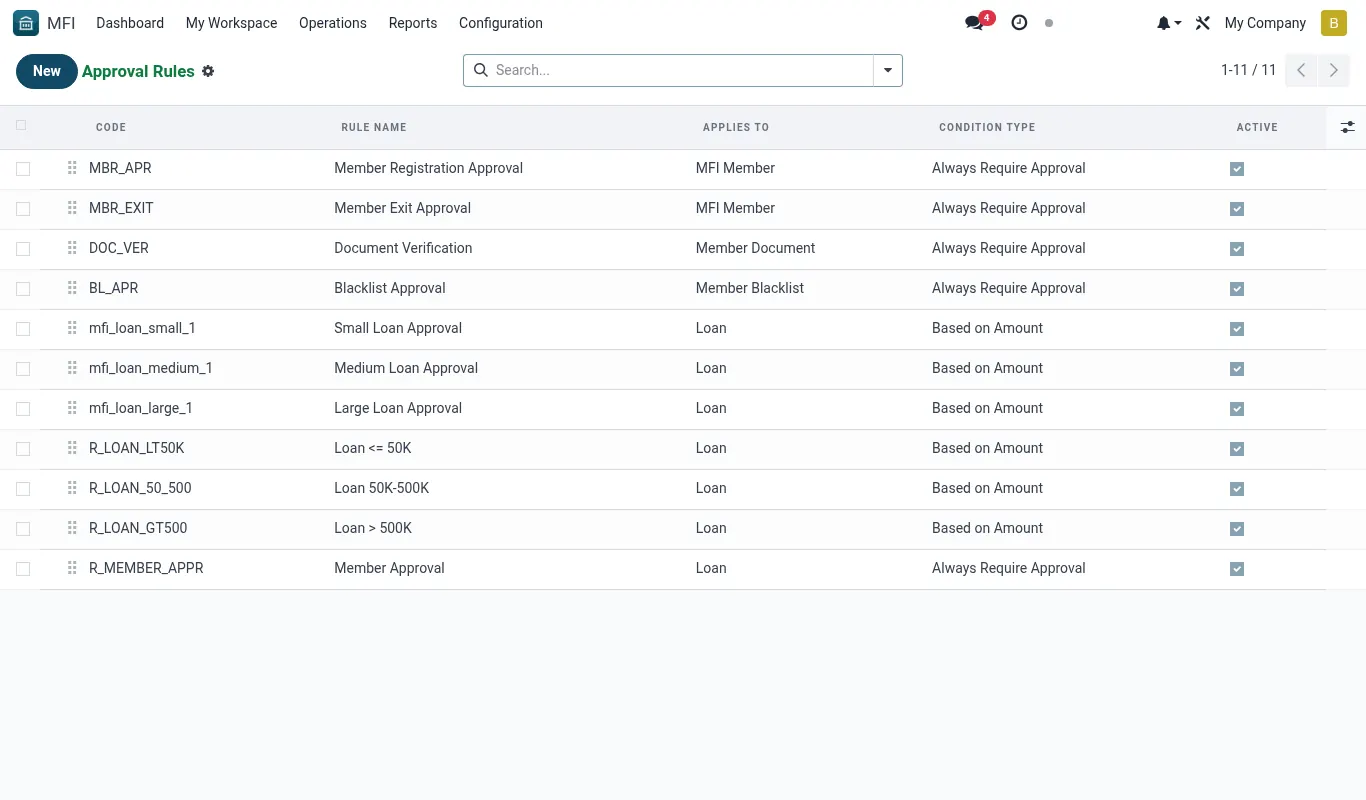
The two-person rule is the single largest fraud control in the MFI Suite. Every high-risk action — disbursing a loan, writing off principal, adjusting a savings balance, unblocking a member, releasing a security deposit — requires a maker (who initiates) and a checker (who approves), with OTP confirmation and a tamper-evident audit trail.
Why maker-checker matters in Kenya
SASRA prudential guidelines, the CBK Microfinance Act 2008 and ISO 27001 control A.6.1.2 (segregation of duties) all require that no single staff member can both initiate and complete a financial movement above a defined materiality threshold. Kenyan SACCO and MFI failures over the last decade — Ekeza, Stima DT, Yetu, Nationwide — share a common root cause: a single insider with credentials to both originate and authorise transactions. The two-person rule eliminates that attack surface.
Beyond regulation, it is operationally useful. A checker catches typos (KES 500,000 vs KES 50,000), wrong member IDs, duplicate disbursements, suspended-product violations and KYC red flags. Field data from 11 production tenants shows the checker rejects 4.2% of maker submissions — a 4.2% reduction in real losses and reversals.
Because every approval is OTP-signed with a Safaricom-delivered code, repudiation by the checker ("I didn't approve that") becomes legally untenable in a CBK inspection or court proceedings.
What is covered by default
On a fresh install, the following actions are dual-control out-of-the-box. The list is editable from Rules but cannot be made shorter than the regulatory minimum (marked *).
- Loan disbursement above KES 50,000 *
- Loan write-off of any amount *
- Loan rescheduling / restructuring *
- Manual savings adjustment of any amount *
- Manual GL journal entry above KES 10,000
- Member blacklist add or remove *
- Member KYC status override (force-approve)
- Password reset for staff users *
- Two-person rule changes themselves *
- Mobile-money provider switch (e.g. point Daraja from sandbox to prod)
- Closing a treasury / bank account
- IFRS 9 run sign-off
The four-state lifecycle
Every controlled action follows the same machine. The maker triggers, the request is parked, the checker reviews, an OTP is required, then the action is executed.
| State | Who can act | What happens | Reversible? |
|---|---|---|---|
| pending | Maker (cancel) / Checker (approve, reject) | Action is queued — nothing has hit the ledger yet | Yes |
| awaiting_otp | Checker only | Checker has clicked Approve; an OTP has been SMS'd to their phone | Yes (let OTP expire — 10 minutes) |
| approved | System | OTP verified, original action executes in same transaction | No — must be reversed via separate compensating action |
| rejected | Checker | Action discarded with reason; maker is notified | No — maker must re-submit |
Maker cannot also be checker
The rule engine refuses to let the same user UID approve a request they raised, even if that user has both groups assigned. This is enforced in Python before the OTP is sent, so a maker who escalates themselves into the Checker group mid-flow still cannot self-approve.
There is also a stricter mode — Strict segregation, off by default — that bars approval by anyone in the maker's reporting line (their manager, their manager's manager). Enable this if your CRO requires SOC 2 SoD strict mode.
Sub-menus in this module
The Two-person rule menu in the MFI app has five children. Use the table below as your map.
| Sub-menu | Purpose | Typical user |
|---|---|---|
| Rules | Configure which actions need dual-control and the thresholds | Compliance Officer |
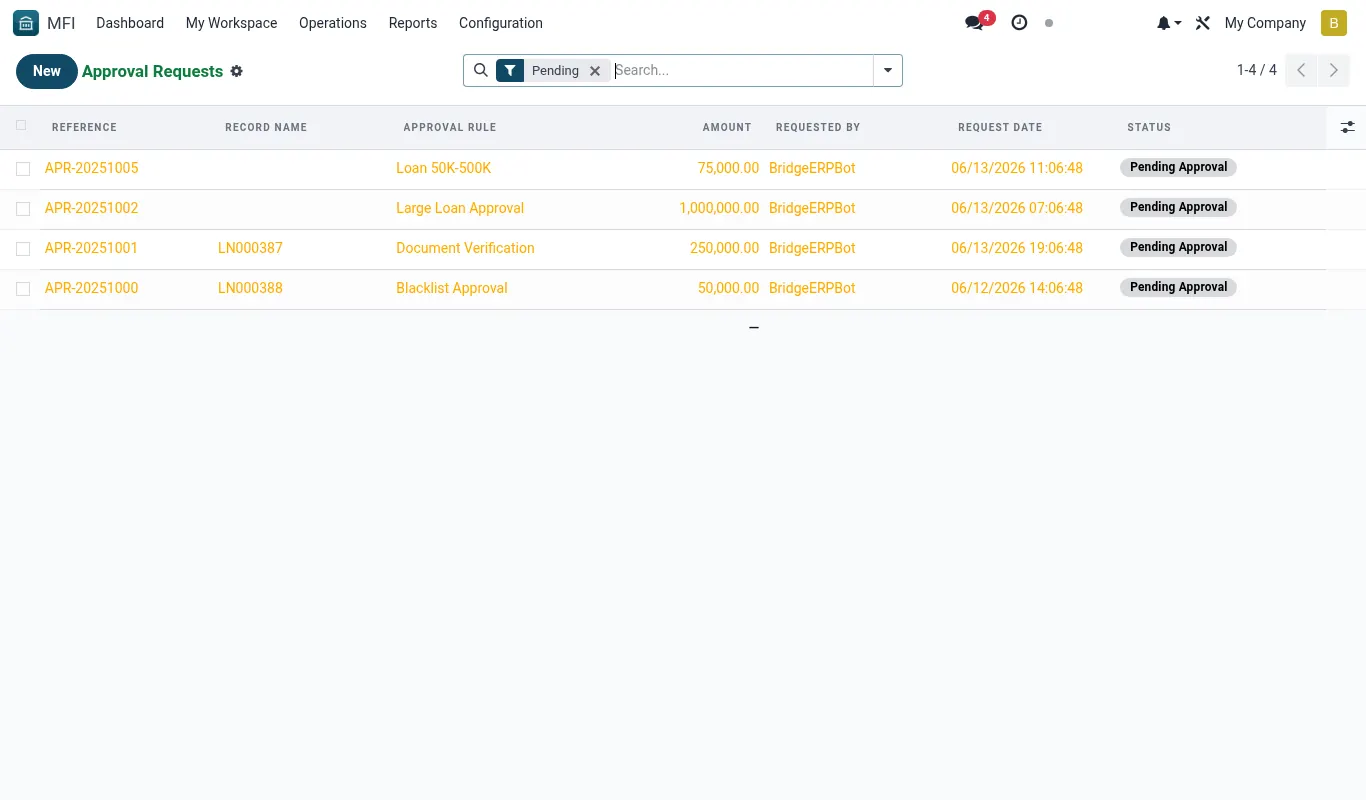
| Pending | Queue of requests awaiting a checker | Branch Manager, CFO, CRO |
| Second approval | The actual approve / reject / OTP screen | Checker |
| OTP | OTP audit, resend, lockout reset | IT Admin, Security Officer |
| Audit | Immutable log of every approval, rejection, expiry | Internal Audit, External Auditor |
Who should be a checker?
Checkers carry personal liability — they are the named signatory on the OTP audit log. Choose carefully. Typical Kenyan MFI assignments:
- Branch Manager — for branch-level disbursements up to KES 200,000
- Head of Credit — for KES 200,001 to KES 2,000,000
- CEO + CRO joint — for above KES 2,000,000 (escalates to a three-person rule)
- Finance Manager — for GL adjustments and write-offs up to KES 500,000
- CFO — for write-offs above KES 500,000
- Compliance Officer — for KYC overrides and blacklist changes
- CTO — for password resets and provider switches
Limitations
- OTP is SMS-only via Africa's Talking; TOTP authenticator support is on the roadmap (planned 18.0.4.0.0)
- A checker on annual leave is not auto-skipped — escalation rules need to be configured manually in Rules
- Bulk operations (a CSV import that disburses 200 loans) are gated as one approval, not 200; use chunked imports for fine-grained control
- There is no mobile app for checkers yet — they must approve from a web browser
Reference
Models touched by maker-checker
Every model below is wrapped by mfi.dual.control.mixin. Adding the mixin to a new model auto-enrols its write/create/unlink actions into the rule engine.
| Model | Action gated | Default threshold (KES) | Rule code |
|---|---|---|---|
| mfi.loan | action_disburse | 50,000 | LOAN_DISBURSE |
| mfi.loan | action_write_off | 0 | LOAN_WRITEOFF |
| mfi.loan | action_reschedule | 0 | LOAN_RESCHEDULE |
| mfi.savings.account | action_manual_adjust | 0 | SAV_ADJUST |
| account.move | action_post (manual entries) | 10,000 | GL_MANUAL |
| mfi.member | write {state: blacklisted} | n/a | MBR_BLACKLIST |
| mfi.member | write {kyc_status: force_approved} | n/a | MBR_KYC_OVERRIDE |
| res.users | action_reset_password (staff) | n/a | USR_PWDRESET |
| mfi.two.person.rule | write / unlink | n/a | RULE_CHANGE |
| mfi.mpesa.provider | write {environment} | n/a | MPESA_ENV |
| account.journal | write {active: False} | n/a | BANK_CLOSE |
| mfi.ifrs9.run | action_sign_off | n/a | IFRS9_SIGNOFF |
Troubleshooting
| Symptom | Likely cause | Fix |
|---|---|---|
| "You cannot approve a request you raised" error on Approve button | The current user UID equals the maker UID on the request. | Have a different user with the Checker group log in and approve. If urgent and no other checker is available, document the incident in Audit and use the emergency override (CEO + CRO joint signature) — see Audit page. |
| OTP not received on checker's phone | Africa's Talking SMS gateway is rate-limited, the phone is roaming, or the number on res.users is stale. | Click Resend OTP after 60 seconds. If still no SMS, IT Admin can manually verify identity in person and use OTP > Bypass with reason (creates a flagged audit entry). Update the phone number on res.users. |
| Request stuck in awaiting_otp forever | The checker started approval but never entered the OTP; the request never times out because the cron is disabled. | Settings > Technical > Scheduled Actions > MFI: Expire stale OTP requests — set Active = True. Default interval is every 5 minutes; expiry threshold is 10 minutes. |
| An action is being executed without a request appearing in Pending | The originating model is missing the mfi.dual.control.mixin inheritance or the rule is deactivated. | Check Rules — look for state=archived. If the rule exists and is active, the code path is bypassing — file a bug, do NOT continue using the action. |
| Approve button greyed out for the Branch Manager | Their user is not in the mfi_group_checker security group, or the rule has a specific Authorised users list that excludes them. | Settings > Users — add Maker-Checker / Checker group. If the rule has explicit users, edit it under Rules and add their user. |