

Transfers
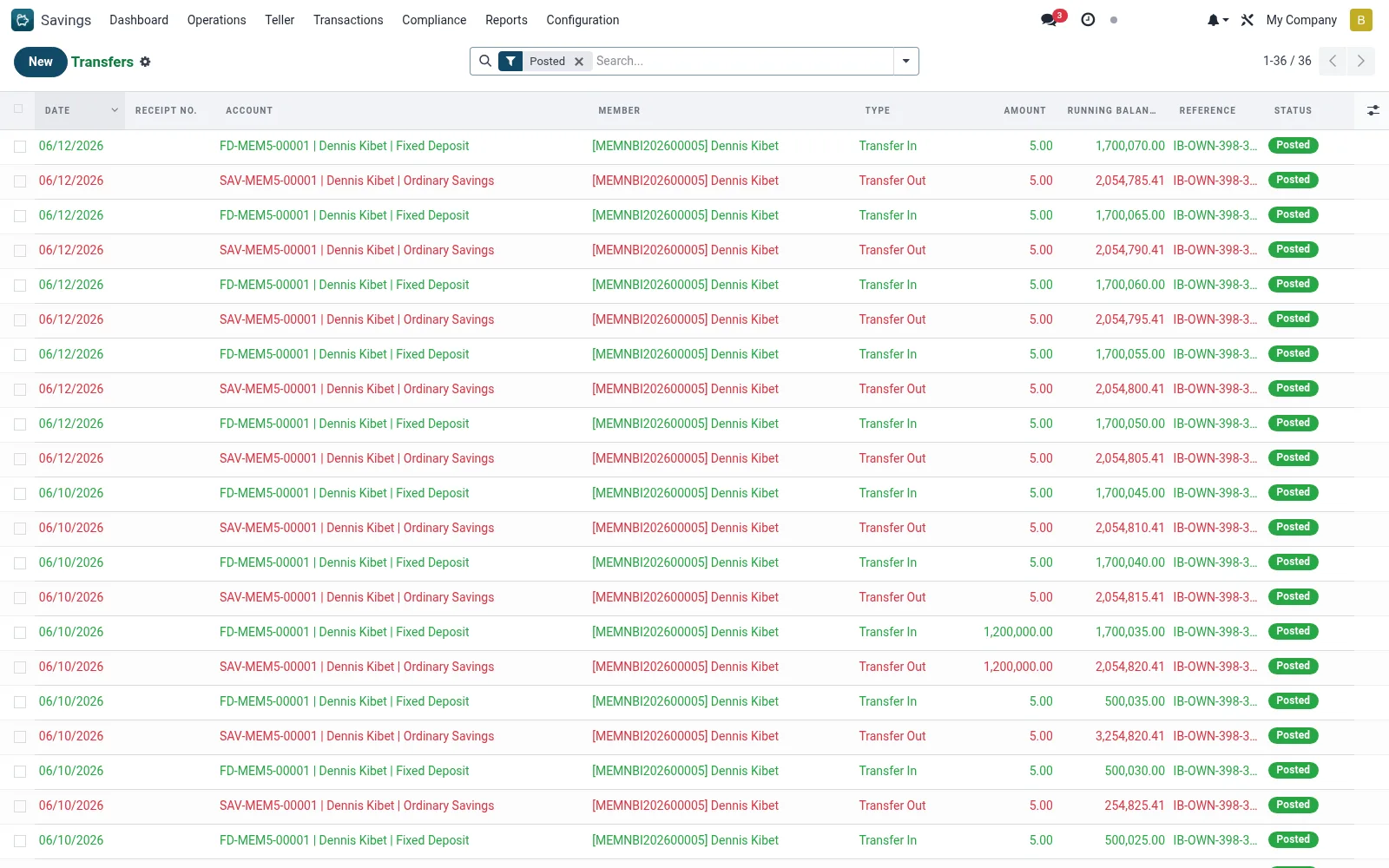
Transfers lists internal movements where funds shift between two savings accounts, recording the paired debit and credit legs. Use it to review account-to-account transfers, confirm both legs posted correctly and resolve transfer queries.
Workflow
- Open Savings > Transactions > Transfers.
- Filter by date or account to locate a transfer.
- Open the record to confirm both the source debit and destination credit.
- Verify the amounts net to zero across the two legs.
- Raise a reversal if a transfer was posted in error.
Fields reference
Every field on this screen, drawn from the live data model.
| Field | Type | Required | Description |
|---|---|---|---|
Reversal Transactionreversed_id | Link → mfi.savings.transaction | — | The reversal transaction that reversed this one |
Reversal Ofreversal_of_id | Link → mfi.savings.transaction | — | The original transaction this reversal undoes |
Reversal Directionreversal_direction | Choice: Credit (Money In), Debit (Money Out) | — | For reversal transactions: whether this added or removed money |
Transfer Reftransfer_id | Text | — | Shared identifier linking transfer_out and transfer_in legs. |
FX Detailsfx_note | Text | — | If cash was received in a different currency from the account currency. |
Accountaccount_id | Link → mfi.savings.account | Yes | Account |
Typetransaction_type | Choice: Deposit, Withdrawal, Interest Posting, Fee/Charge, Transfer In, Transfer Out, Loan Auto-Debit, Dividend Credit | Yes | Type |
Amountamount | Money | Yes | Amount |
Datetransaction_date | Date | Yes | Date |
Statusstate | Choice: Draft, Posted, Reversed | Yes | Status |
Has Messagehas_message | Yes/No | — | Has Message |
Membermember_id | Link → mfi.member | — | Member |
Phonemember_phone | Text | — | Phone |
ID Numbermember_id_number | Text | — | ID Number |
Branchbranch_id | Link → mfi.branch | — | Branch |
Currencycurrency_id | Link → res.currency | — | Currency |
Companycompany_id | Link → res.company | — | Company |
Is Creditis_credit | Yes/No | — | Is Credit |
Running Balancerunning_balance | Money | — | Running Balance |
Value Datevalue_date | Date | — | Value Date |
Referencereference | Text | — | Reference |
Receipt No.receipt_number | Text | — | Receipt No. |
Channelchannel_id | Link → mfi.loan.repayment.channel | — | Channel |
Mobile Numbermobile_number | Text | — | Mobile Number |
Bank Referencebank_reference | Text | — | Bank Reference |
Processed Byreceived_by | Link → res.users | — | Processed By |
Notesnotes | Long text | — | Notes |
Teller Commissionteller_commission | Money | — | Teller Commission |
Voucher No.voucher_number | Text | — | Voucher No. |
Voucher Requiredvoucher_required | Yes/No | — | Voucher Required |
Tellerteller_id | Link → res.users | — | Teller |
Journal Entrymove_id | Link → account.move | — | Journal Entry |
Actions & buttons
Buttons available on this screen and what they do:
- Post Transaction
- Reverse Transaction
- Print Receipt
Status lifecycle
Records on this screen move through these statuses:
Draft → Posted → Reversed
Notes & rules
- mfi.savings.transaction filtered to transfer movements.
- Each transfer pairs a debit on the source with a credit on the destination.
- Both legs share a common reference for traceability.
Was this page helpful?