

Account Statement (PDF)
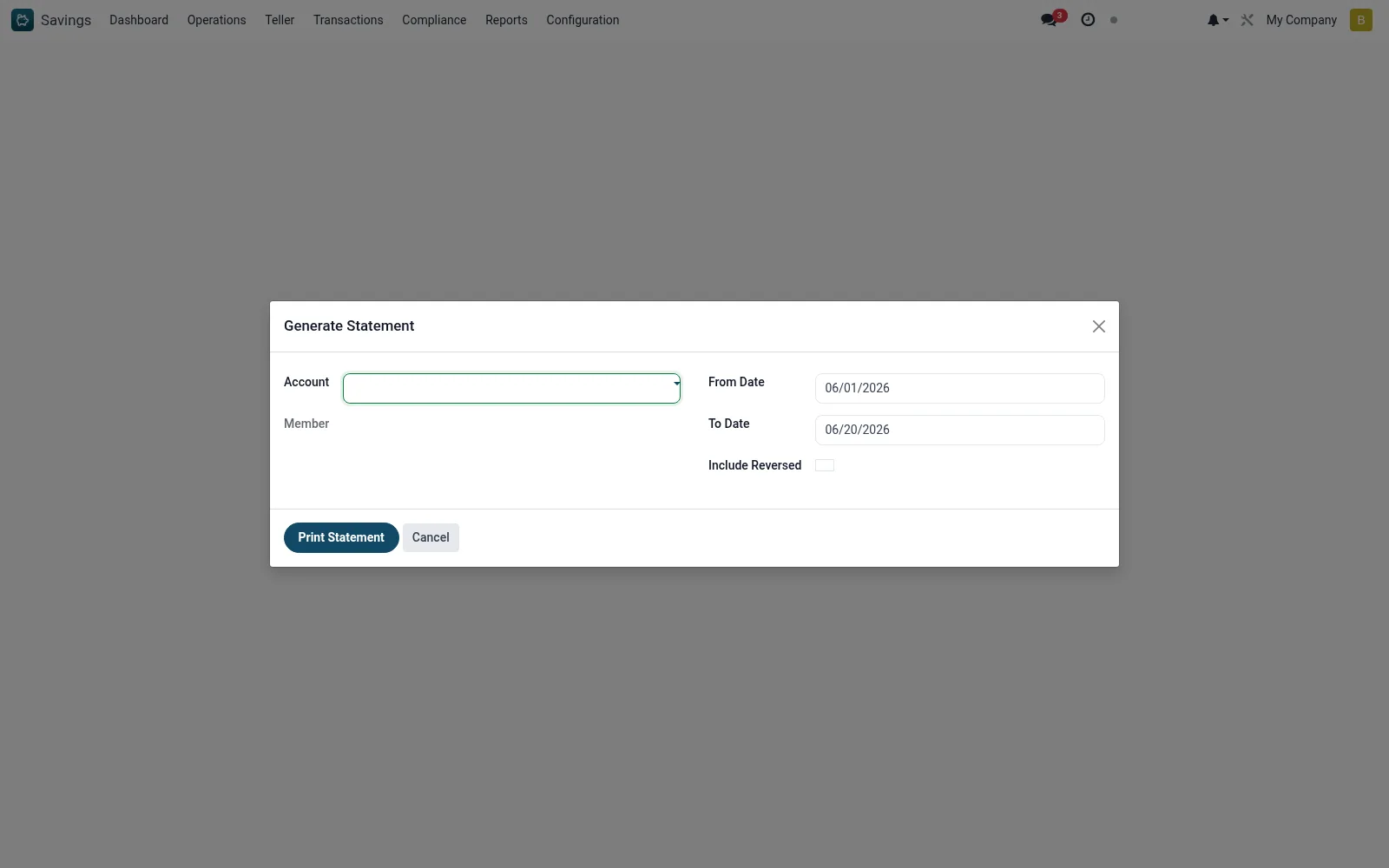
Account Statement (PDF) produces a member-facing statement for a single savings account over a chosen period - opening balance, every transaction, interest and fees, and closing balance. It is the document issued to members on request and for KYC or proof-of-funds purposes.
Workflow
- Open Savings > Reports > Print Reports > Account Statement (PDF).
- Select the member's savings account.
- Set the statement period (from and to dates).
- Generate the statement PDF.
- Issue it to the member or attach it to their record.
Fields reference
Every field on this screen, drawn from the live data model.
| Field | Type | Required | Description |
|---|---|---|---|
Accountaccount_id | Link → mfi.savings.account | Yes | Account |
From Datedate_from | Date | Yes | From Date |
To Datedate_to | Date | Yes | To Date |
Membermember_id | Link → mfi.member | — | Member |
Currencycurrency_id | Link → res.currency | — | Currency |
Include Reversedinclude_reversed | Yes/No | — | Include Reversed |
Actions & buttons
Buttons available on this screen and what they do:
- Print Statement
Notes & rules
- Wizard on mfi.savings.statement.wizard producing a PDF.
- Shows opening balance, all movements and closing balance.
- Issued to members and used for proof-of-funds requests.
Was this page helpful?