

Branch Comparison
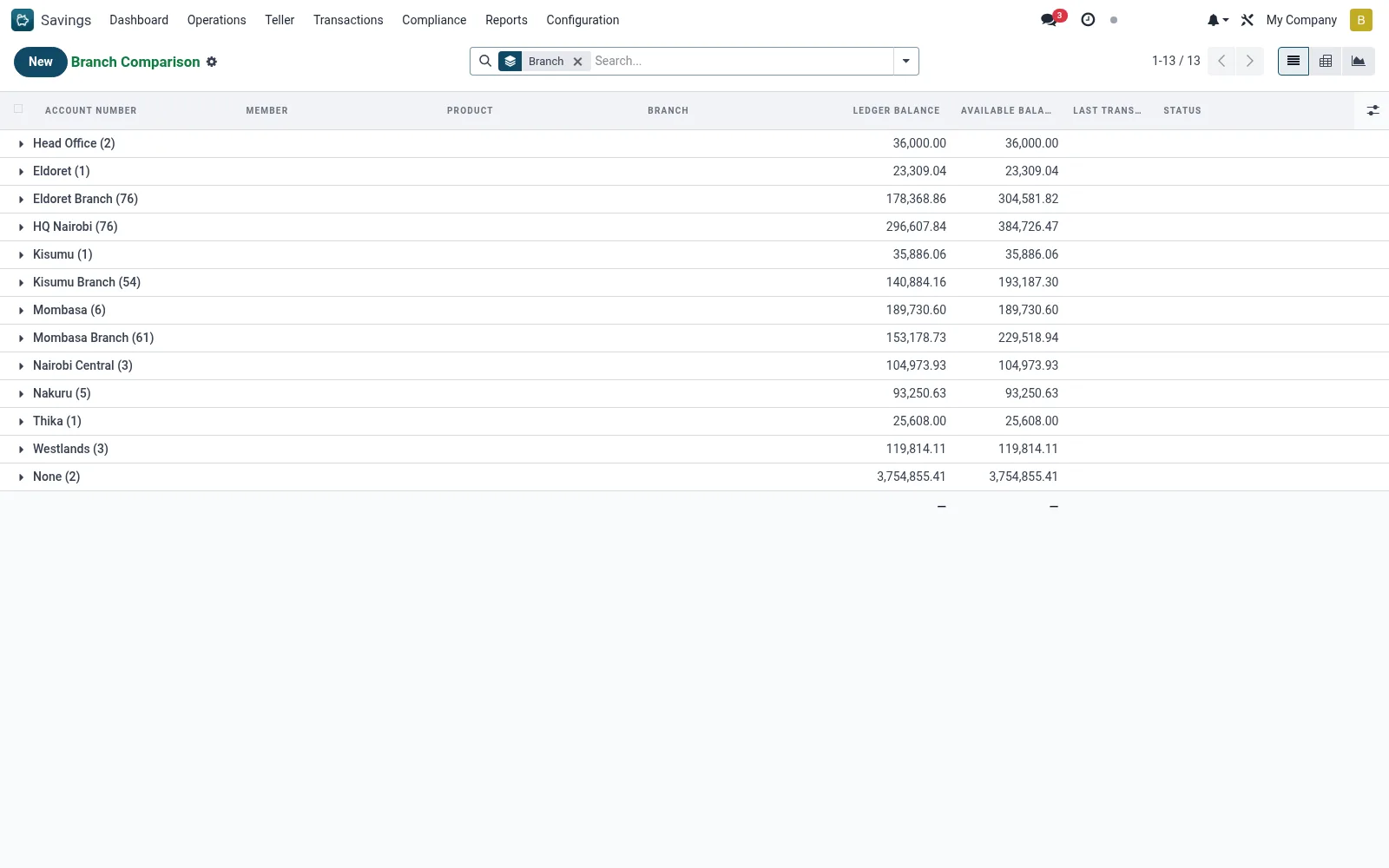
Branch Comparison benchmarks savings performance across branches - total balances, account counts, deposit growth and dormancy - so management can compare branch productivity side by side and target underperforming locations.
Workflow
- Open Savings > Reports > Branch Comparison.
- Group the savings data by branch.
- Select the measures to compare (balances, counts, growth).
- Use graph view for a visual branch-by-branch comparison.
- Drill into a branch's accounts to investigate outliers.
Fields reference
Every field on this screen, drawn from the live data model.
| Field | Type | Required | Description |
|---|---|---|---|
Portal Access URLaccess_url | Text | — | Customer Portal URL |
Ledger Balanceledger_balance | Money | — | Total balance including holds |
Flaggedis_flagged | Yes/No | — | Flag suspicious or high-risk accounts for review |
Membermember_id | Link → mfi.member | Yes | Member |
Productproduct_id | Link → mfi.savings.product | Yes | Product |
Companycompany_id | Link → res.company | Yes | Company |
Statusstate | Choice: Draft, Submitted, Approved, Active, Dormant, Frozen, Abandoned, Unclaimed | Yes | Status |
Access warningaccess_warning | Long text | — | Access warning |
Has Messagehas_message | Yes/No | — | Has Message |
Account Numberaccount_number | Text | — | Account Number |
Namename | Text | — | Name |
Branchbranch_id | Link → mfi.branch | — | Branch |
Currencycurrency_id | Link → res.currency | — | Currency |
Product Typeproduct_type | Choice: Ordinary Savings, Fixed Deposit, Recurring Deposit, Current Account, Mandatory Savings | — | Product Type |
Color Indexcolor | Number | — | Color Index |
Prioritypriority | Choice: Normal, Important | — | Priority |
Kanban Statekanban_state | Choice: In Progress, Ready, Blocked | — | Kanban State |
Application Dateapplication_date | Date | — | Application Date |
Approved Dateapproved_date | Date | — | Approved Date |
Approved Byapproved_by | Link → res.users | — | Approved By |
Activation Dateactivation_date | Date | — | Activation Date |
Closure Dateclosure_date | Date | — | Closure Date |
Closure Reasonclosure_reason | Text | — | Closure Reason |
Last Transactionlast_transaction_date | Date | — | Last Transaction |
Dormant Sincedormant_since | Date | — | Dormant Since |
Abandoned Sinceabandoned_since | Date | — | Abandoned Since |
Unclaimed Sinceunclaimed_since | Date | — | Unclaimed Since |
Available Balanceavailable_balance | Money | — | Available Balance |
On Holdhold_amount | Money | — | On Hold |
Locked (Min Balance)locked_amount | Money | — | Locked (Min Balance) |
Total Depositstotal_deposits | Money | — | Total Deposits |
Total Withdrawalstotal_withdrawals | Money | — | Total Withdrawals |
Total Interest Earnedtotal_interest_earned | Money | — | Total Interest Earned |
Total Fees Chargedtotal_fees_charged | Money | — | Total Fees Charged |
Accrued Interestaccrued_interest | Money | — | Accrued Interest |
Last Interest Calculationlast_interest_calc_date | Date | — | Last Interest Calculation |
Last Interest Postinglast_interest_posting_date | Date | — | Last Interest Posting |
Effective Rate (%)effective_rate | Decimal | — | Effective Rate (%) |
Today Withdrawalsdaily_withdrawal_amount | Money | — | Today Withdrawals |
Month Withdrawalsmonthly_withdrawal_amount | Money | — | Month Withdrawals |
Withdrawals This Monthmonthly_withdrawal_count | Number | — | Withdrawals This Month |
Linked Loanlinked_loan_id | Link → mfi.loan | — | Linked Loan |
Nominee Namenominee_name | Text | — | Nominee Name |
Nominee Relationshipnominee_relationship | Text | — | Nominee Relationship |
Nominee Phonenominee_phone | Text | — | Nominee Phone |
Actions & buttons
Buttons available on this screen and what they do:
- Submit
- Approve
- Activate
- Re-Affirm KYC
- Deposit
- M-Pesa STK Push
- Withdraw
- Statement
- Passbook
- Freeze
- Unfreeze
- Reactivate
- Close Account
- Reset
Status lifecycle
Records on this screen move through these statuses:
Draft → Submitted → Approved → Active → Dormant → Frozen → Abandoned → Unclaimed → Closed
Notes & rules
- Cross-branch analysis over mfi.savings.account.
- Compares balances, counts and dormancy by branch.
- Supports branch productivity benchmarking.
Was this page helpful?