

Verifications
Records each electronic KYC verification run against a member through an external provider, such as national ID lookups, sanctions or PEP screening, or document authentication. The result and provider response are stored, giving an auditable basis for accepting or rejecting a member's identity.
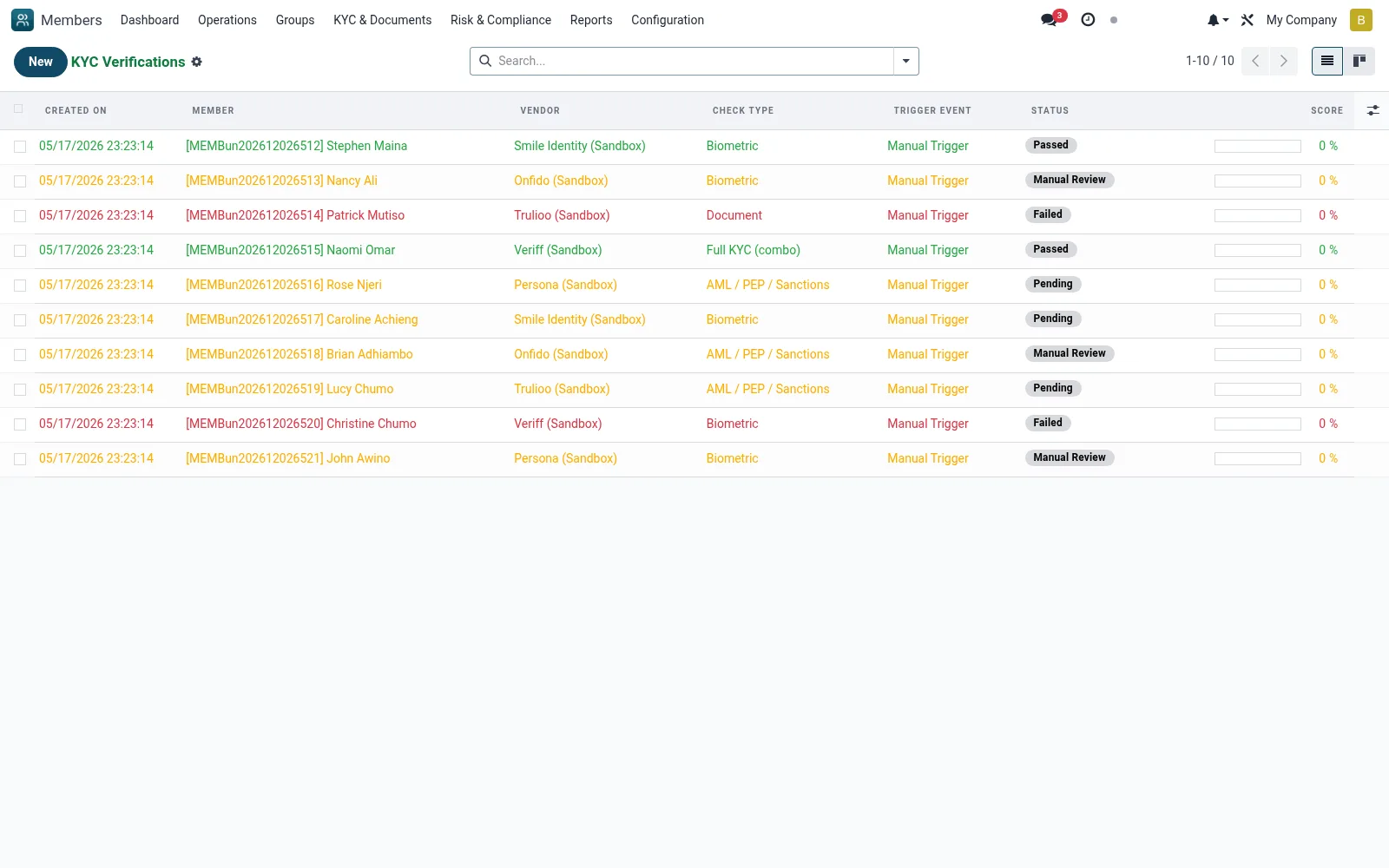
Workflow
- Go to KYC Aggregator then Verifications
- Open or trigger a verification for a member
- Select the vendor and the check type to run
- Review the returned status and matched data
- Use the outcome to clear or hold the member's KYC gate
Fields reference
Every field on this screen, drawn from the live data model.
| Field | Type | Required | Description |
|---|---|---|---|
Scorescore | Decimal | — | 0-100 confidence score from vendor |
Vendor Referencevendor_ref | Text | — | ID returned by the vendor (smile_job_id, onfido check id, IPRS request id). |
Driver Class Useddriver_class_used | Text | — | Concrete driver AbstractModel name that executed the call. |
Membermember_id | Link → mfi.member | Yes | Member |
Vendorvendor_id | Link → kyc.vendor | Yes | Vendor |
Check Typecheck_type | Choice: ID Verification, Biometric, Liveness, Document, AML / PEP / Sanctions, KYB (Business), Address, Full KYC (combo) | Yes | Check Type |
Has Messagehas_message | Yes/No | — | Has Message |
Referencename | Text | — | Reference |
Vendor Codevendor_code | Choice: Smile Identity (Africa), Onfido (Global), Trulioo (Doc Verification), Veriff (AI), Persona (KYB), Sumsub, IPRS Kenya (Gov), NIN Nigeria | — | Vendor Code |
Statusstatus | Choice: Pending, In Progress, Passed, Failed, Manual Review, Expired | — | Status |
Raw Request Jsonraw_request_json | Long text | — | Raw Request Json |
Raw Response Jsonraw_response_json | Long text | — | Raw Response Json |
Http Statushttp_status | Number | — | Http Status |
Attempt Countattempt_count | Number | — | Attempt Count |
Submitted Atsubmitted_at | Date & time | — | Submitted At |
Completed Atcompleted_at | Date & time | — | Completed At |
Expires Atexpires_at | Date & time | — | Expires At |
Failure Reasonfailure_reason | Text | — | Failure Reason |
Trigger Eventtrigger_event | Choice: Registration, Loan Application, Dormancy Recovery, Periodic Review, Regulatory, Manual Trigger | — | Trigger Event |
Triggered Bytriggered_by_id | Link → res.users | — | Triggered By |
Notesnotes | Long text | — | Notes |
Companycompany_id | Link → res.company | — | Company |
Actions & buttons
Buttons available on this screen and what they do:
- Submit
- Simulate PASS (sandbox)
- Simulate FAIL (sandbox)
- Manual Review
Notes & rules
- Model kyc.verification
- Calls external KYC vendors
- Result feeds the member's KYC status
- Each run logged for the audit trail
Was this page helpful?