

Pending Verification
The queue of uploaded documents awaiting officer verification. It enforces the KYC control that captured documents are checked against the member and the source before they count toward onboarding, preventing activation on unverified identity evidence.
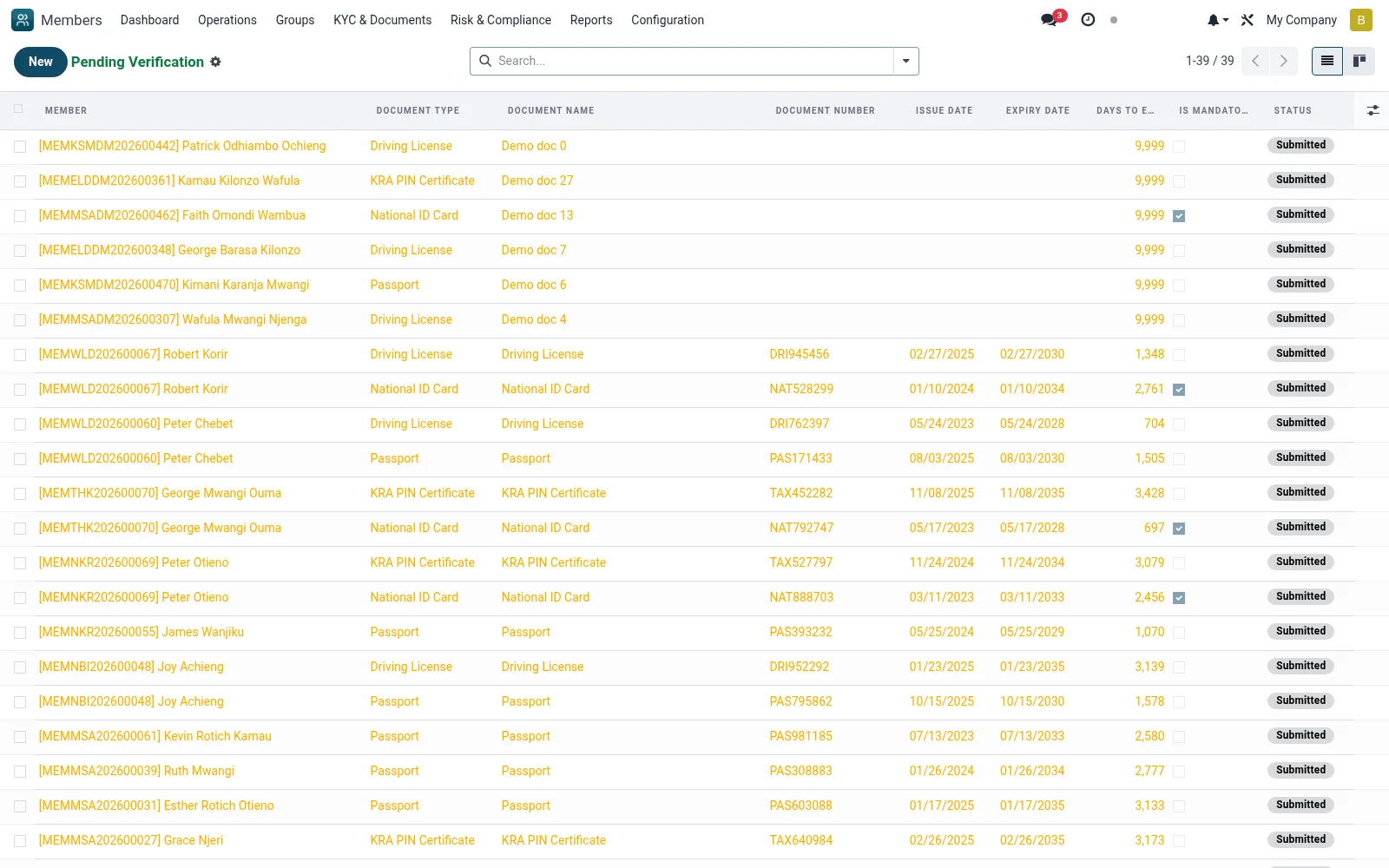
Workflow
- Open KYC and Documents then Pending Verification
- Open a document and compare it against the member's details
- Confirm authenticity, legibility and matching identity data
- Click Verify to accept, or reject with a reason
- Clear the queue so eligible members can be approved
Fields reference
Every field on this screen, drawn from the live data model.
| Field | Type | Required | Description |
|---|---|---|---|
Membermember_id | Link → mfi.member | Yes | Member |
Document Typedocument_type_id | Link → mfi.member.document.type | Yes | Document Type |
Document Categorydocument_type | Choice: National ID, Passport, Driving License, Birth Certificate, Marriage Certificate, Death Certificate, Utility Bill, Bank Statement | Yes | Document Category |
Document Namename | Text | Yes | Document Name |
Has Messagehas_message | Yes/No | — | Has Message |
Descriptiondescription | Long text | — | Description |
Document Numberdocument_number | Text | — | Document Number |
Issue Dateissue_date | Date | — | Issue Date |
Expiry Dateexpiry_date | Date | — | Expiry Date |
Issuing Authorityissuing_authority | Text | — | Issuing Authority |
Place of Issueissue_place | Text | — | Place of Issue |
File Namefile_name | Text | — | File Name |
File Sizefile_size | Number | — | File Size |
File Typefile_type | Text | — | File Type |
Back Side Namefile_back_name | Text | — | Back Side Name |
Is Mandatoryis_mandatory | Yes/No | — | Is Mandatory |
Statusstate | Choice: Draft, Submitted, Under Review, Verified, Rejected, Expired | — | Status |
Verified Byverified_by_id | Link → res.users | — | Verified By |
Verification Dateverified_date | Date | — | Verification Date |
Rejection Reasonrejection_reason | Long text | — | Rejection Reason |
Rejected Byrejected_by_id | Link → res.users | — | Rejected By |
Rejection Daterejection_date | Date | — | Rejection Date |
Is Expiredis_expired | Yes/No | — | Is Expired |
Days to Expirydays_to_expiry | Number | — | Days to Expiry |
Expiry Warning Sentexpiry_warning_sent | Yes/No | — | Expiry Warning Sent |
Notesnotes | Long text | — | Notes |
Companycompany_id | Link → res.company | — | Company |
Documents App Recorddocuments_app_id | Link → documents.document | — | Documents App Record |
Actions & buttons
Buttons available on this screen and what they do:
- Submit
- Verify
- Reject
Status lifecycle
Records on this screen move through these statuses:
Draft → Submitted → Under Review → Verified → Rejected → Expired
Notes & rules
- Model mfi.member.document filtered to pending
- KYC maker-checker verification step
- Verified documents satisfy the consent/KYC gate
- Rejections return to the member for re-submission
Was this page helpful?