

Settings
Settings exposes the global configuration for the Savings module - default products, dormancy thresholds, minimum balances, interest-posting frequency, numbering sequences and channel toggles such as M-Pesa. These settings govern how the whole savings book behaves and should be reviewed during implementation.
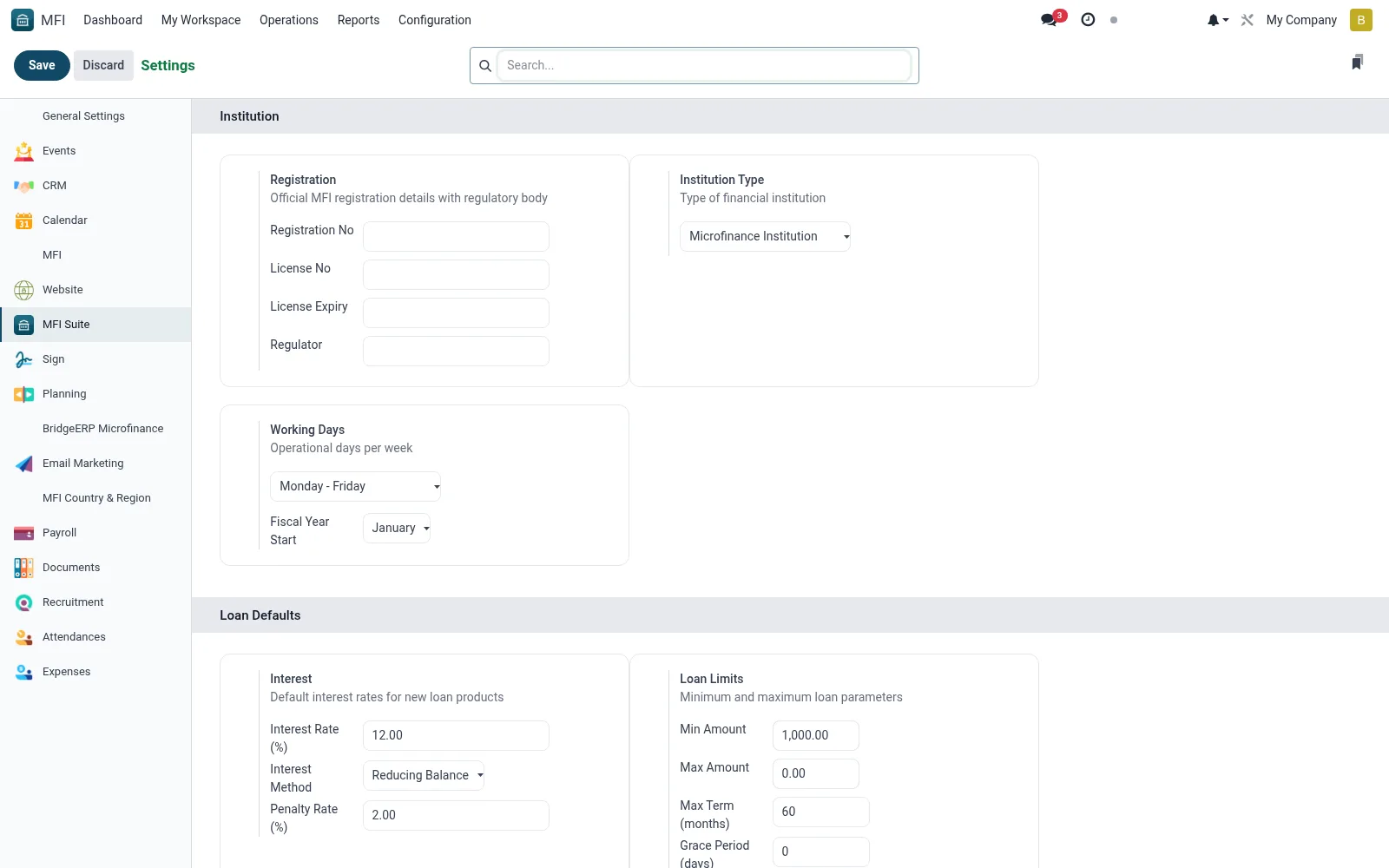
Workflow
- Open Savings > Configuration > Settings.
- Review dormancy, minimum-balance and interest-posting defaults.
- Configure account-numbering sequences and channel options.
- Enable or disable mobile-money and OTP features as required.
- Save; the settings apply across the savings module.
Fields reference
Every field on this screen, drawn from the live data model.
| Field | Type | Required | Description |
|---|---|---|---|
Custom Report Footerreport_footer | Rich text | — | Footer text displayed at the bottom of all reports. |
Multi-Currenciesgroup_multi_currency | Yes/No | — | Allows to work in a multi currency environment |
Company Country Codecompany_country_code | Text | — | The ISO country code in two chars. You can use this field for quick search. |
Google Map API Keygeoloc_provider_googlemap_key | Text | — | Visit https://developers.google.com/maps/documentation/geocoding/get-api-key for more information. |
Minimum scorerecaptcha_min_score | Decimal | — | By default, should be one of 0.1, 0.3, 0.7, 0.9. 1.0 is very likely a good interaction, 0.0 is very likely a bot |
Token Map Boxmap_box_token | Text | — | Necessary for some functionalities in the map view |
Alias Domainalias_domain_id | Link → mail.alias.domain | — | If you have setup a catch-all email domain redirected to the BridgeERP server, enter the domain name here. |
Restrict Template Renderingrestrict_template_rendering | Yes/No | — | Users will still be able to render templates. However only Mail Template Editors will be able to create new dynamic templates or modify existing ones. |
Use Twilio ICE serversuse_twilio_rtc_servers | Yes/No | — | If you want to use twilio as TURN/STUN server provider |
SFU Server keysfu_server_key | Text | — | Base64 encoded key |
Tenor API keytenor_api_key | Text | — | Add a Tenor GIF API key to enable GIFs support. https://developers.google.com/tenor/guides/quickstart#setup |
Tenor content filtertenor_content_filter | Choice: High, Medium, Low, Off | — | https://developers.google.com/tenor/guides/content-filtering |
Tenor Gif Limittenor_gif_limit | Number | — | Fetch up to the specified number of GIF. |
Message Translation API Keygoogle_translate_api_key | Text | — | A valid Google API key is required to enable message translation. https://cloud.google.com/translate/docs/setup |
Companycompany_id | Link → res.company | Yes | Company |
Web App Nameweb_app_name | Text | — | Web App Name |
Is Root Companyis_root_company | Yes/No | — | Is Root Company |
Default Access Rightsuser_default_rights | Yes/No | — | Default Access Rights |
Allow users to import data from CSV/XLS/XLSX/ODS filesmodule_base_import | Yes/No | — | Allow users to import data from CSV/XLS/XLSX/ODS files |
Allow the users to synchronize their calendar with Google Calendarmodule_google_calendar | Yes/No | — | Allow the users to synchronize their calendar with Google Calendar |
Allow the users to synchronize their calendar with Outlook Calendarmodule_microsoft_calendar | Yes/No | — | Allow the users to synchronize their calendar with Outlook Calendar |
Allow integration with the mail pluginsmodule_mail_plugin | Yes/No | — | Allow integration with the mail plugins |
Use external authentication providers (OAuth)module_auth_oauth | Yes/No | — | Use external authentication providers (OAuth) |
LDAP Authenticationmodule_auth_ldap | Yes/No | — | LDAP Authentication |
Manage Inter Companymodule_account_inter_company_rules | Yes/No | — | Manage Inter Company |
VoIPmodule_voip | Yes/No | — | VoIP |
Unsplash Image Librarymodule_web_unsplash | Yes/No | — | Unsplash Image Library |
SMSmodule_sms | Yes/No | — | SMS |
Partner Autocompletemodule_partner_autocomplete | Yes/No | — | Partner Autocomplete |
GeoLocalizemodule_base_geolocalize | Yes/No | — | GeoLocalize |
reCAPTCHAmodule_google_recaptcha | Yes/No | — | reCAPTCHA |
Cloudflare Turnstilemodule_website_cf_turnstile | Yes/No | — | Cloudflare Turnstile |
Document Templateexternal_report_layout_id | Link → ir.ui.view | — | Document Template |
Show Effectshow_effect | Yes/No | — | Show Effect |
Number of Companiescompany_count | Number | — | Number of Companies |
Number of Active Usersactive_user_count | Number | — | Number of Active Users |
Number of Languageslanguage_count | Number | — | Number of Languages |
Company Namecompany_name | Text | — | Company Name |
Company Informationscompany_informations | Long text | — | Company Informations |
Profiling enabled untilprofiling_enabled_until | Date & time | — | Profiling enabled until |
Get product pictures using barcodemodule_product_images | Yes/No | — | Get product pictures using barcode |
APIgeoloc_provider_id | Link → base.geo_provider | — | API |
Technical Namegeoloc_provider_techname | Text | — | Technical Name |
Site Keyrecaptcha_public_key | Text | — | Site Key |
Secret Keyrecaptcha_private_key | Text | — | Secret Key |
Actions & buttons
Buttons available on this screen and what they do:
- Manage Users
- Add Languages
- Update Info
- Manage Companies
- Configure Document Layout
- Review All Templates
- Incoming Email Servers
- Outgoing Email Servers
- Configure Digest Emails
- Activity Types
- ICE Servers
- View My Services
- Default Access Rights
- Manage API Keys
Notes & rules
- Configuration on res.config.settings scoped to Savings.
- Controls dormancy, minimum balance, interest frequency and channels.
- Set during implementation and reviewed when policy changes.
Was this page helpful?