

Transactions
The ledger of all PesaLink transfers (mfi.pesalink.transaction), inbound and outbound, with their settlement status and bank references. Each record tracks the ISO 20022 message exchange from instruction through acknowledgement to final settlement. Operations staff monitor it to confirm funds reached the counterparty bank.
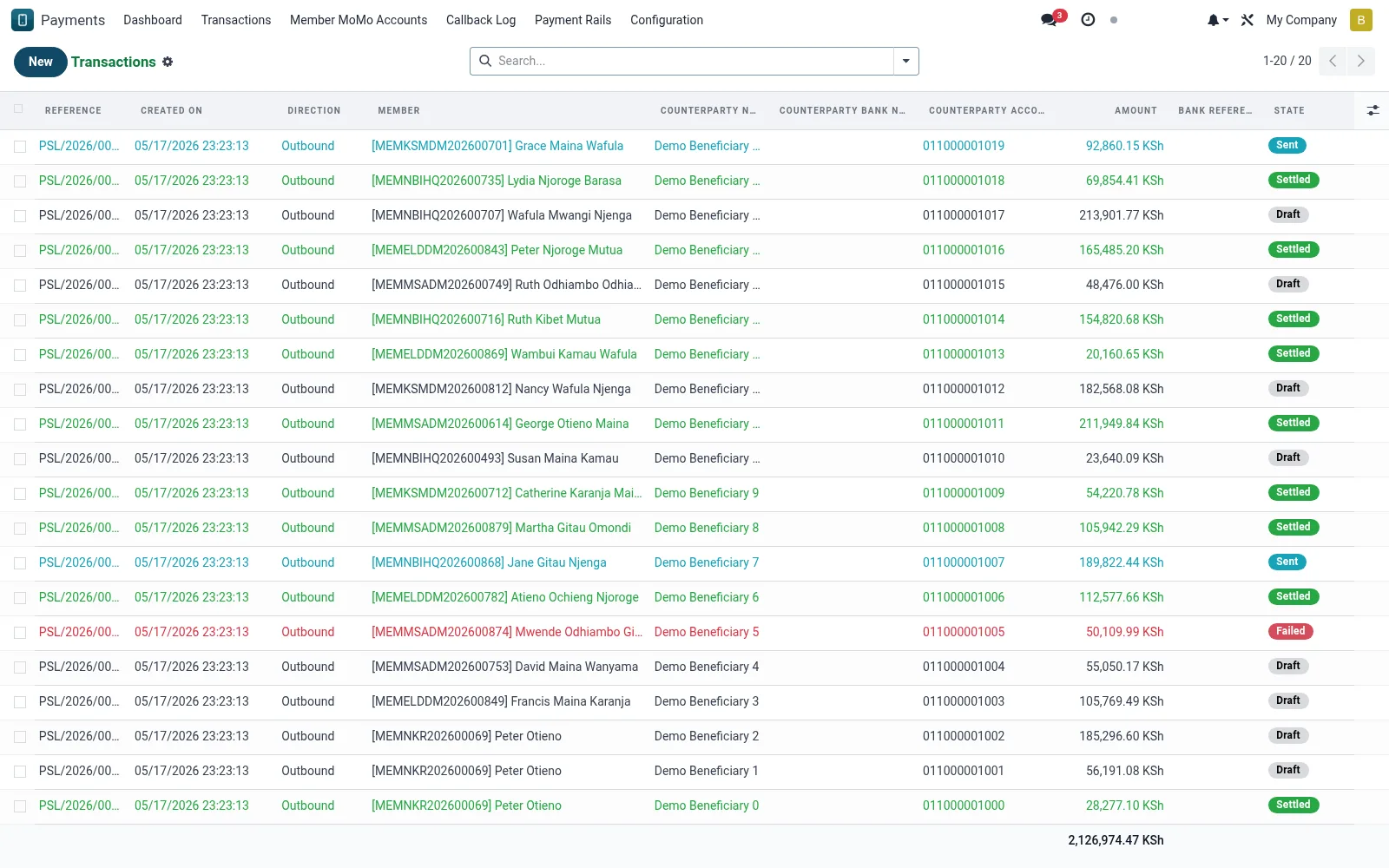
Workflow
- Open Transactions under PesaLink to list all interbank transfers.
- Filter by direction, status or counterparty bank.
- Open a record to view the ISO 20022 references and status history.
- Confirm settlement acknowledgement from the destination bank.
- Raise a dispute from any transfer that settled incorrectly.
Fields reference
Every field on this screen, drawn from the live data model.
| Field | Type | Required | Description |
|---|---|---|---|
End-to-End IDend_to_end_id | Text | — | Stable client reference echoed by the rail. |
Bank Referencebank_reference | Text | — | Sponsor-bank side reference / FT ID. |
Savings Transactionsavings_transaction_id | Link → mfi.savings.transaction | — | The mfi.savings.transaction created for the money-leg. |
Counterparty Bank Codecounterparty_bank_code | Text | — | Local Pesalink bank code (3-digit). |
Directiondirection | Choice: Outbound, Inbound | Yes | Direction |
Providerprovider_id | Link → mfi.pesalink.provider | Yes | Provider |
Counterparty Namecounterparty_name | Text | Yes | Counterparty Name |
Counterparty Accountcounterparty_account | Text | Yes | Counterparty Account |
Amountamount | Money | Yes | Amount |
Currencycurrency_id | Link → res.currency | Yes | Currency |
Statestate | Choice: Draft, Sent, Settled, Failed, Reversed | Yes | State |
Has Messagehas_message | Yes/No | — | Has Message |
Referencename | Text | — | Reference |
Membermember_id | Link → mfi.member | — | Member |
Savings Accountsavings_account_id | Link → mfi.savings.account | — | Savings Account |
Counterparty Bank BICcounterparty_bank_bic | Text | — | Counterparty Bank BIC |
Counterparty Bank Namecounterparty_bank_name | Text | — | Counterparty Bank Name |
Purpose Codepurpose_code | Text | — | Purpose Code |
Remittance Inforemittance_info | Text | — | Remittance Info |
Initiated Atinitiated_at | Date & time | — | Initiated At |
Settled Atsettled_at | Date & time | — | Settled At |
Failed Atfailed_at | Date & time | — | Failed At |
Failure Reasonfailure_reason | Long text | — | Failure Reason |
pacs.008 XMLpacs008_xml | Long text | — | pacs.008 XML |
Raw Request (masked)raw_request | Long text | — | Raw Request (masked) |
Raw Responseraw_response | Long text | — | Raw Response |
Disputesdispute_ids | List | — | Disputes |
Dispute Countdispute_count | Number | — | Dispute Count |
Companycompany_id | Link → res.company | — | Company |
Actions & buttons
Buttons available on this screen and what they do:
- Initiate Transfer
- Query Status
- Mark Settled
- Open Dispute
Status lifecycle
Records on this screen move through these statuses:
Draft → Sent → Settled → Failed → Reversed
Notes & rules
- Holds both inbound credits and outbound debits over PesaLink.
- Status follows the ISO 20022 acknowledgement lifecycle.
- Bank reference ties the record to the counterparty's statement.
- Failed or returned transfers are flagged for reconciliation.
Was this page helpful?