

Pending Approval
A filtered queue of member applications awaiting officer or committee approval before they become active. It enforces the maker-checker control central to microfinance onboarding: an officer captures the CIF and KYC, but a supervisor must confirm identity documents and consent are complete before the member can transact. Records here are blocked from opening savings or loan accounts until approved.
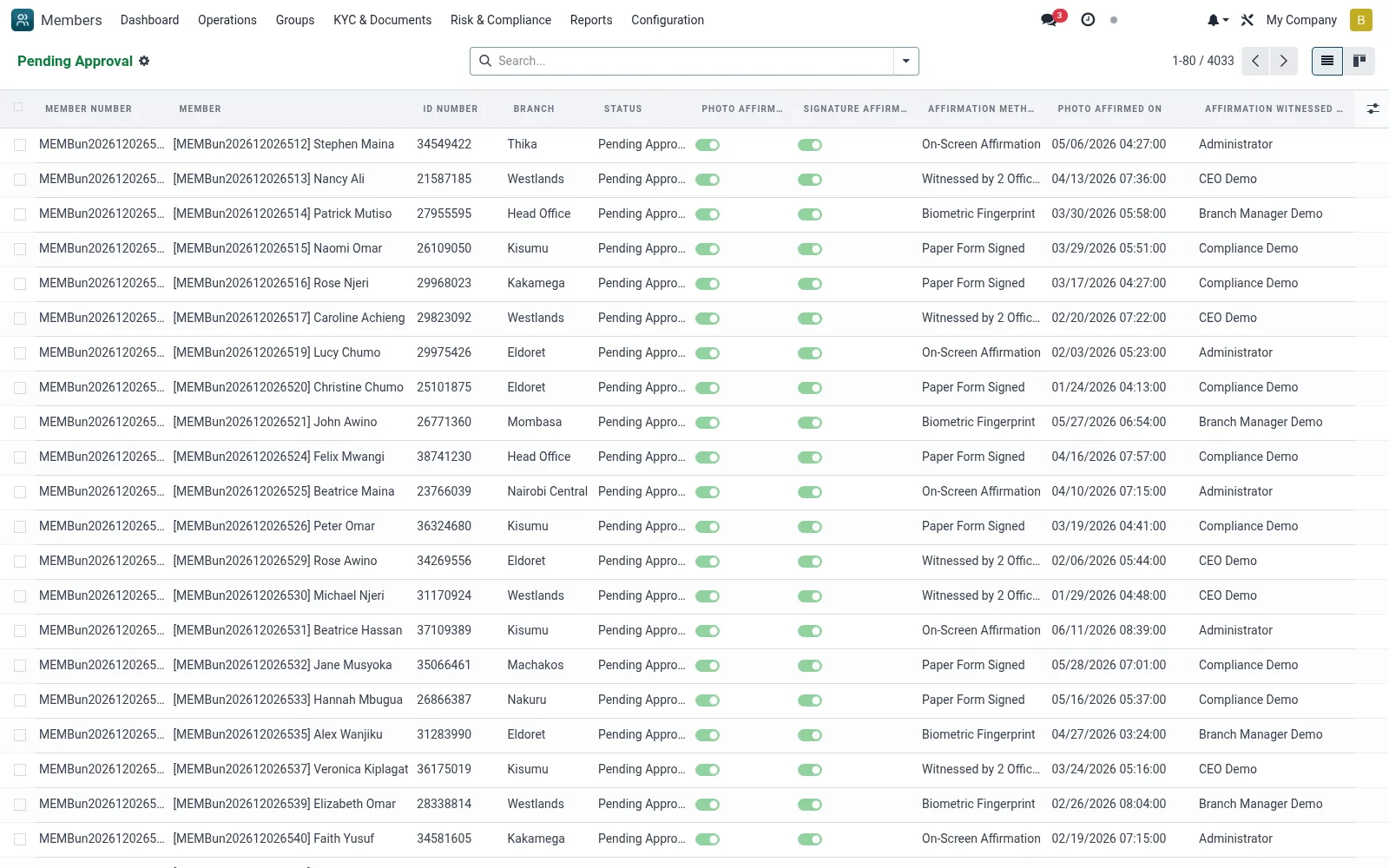
Workflow
- Open Operations then Pending Approval
- Select an application and review captured KYC documents and the consent gate
- Confirm the national ID, photo and required document types are present and verified
- Click Approve to activate the member, or Reject and return with a reason
- Repeat for the rest of the queue to clear the onboarding backlog
Fields reference
Every field on this screen, drawn from the live data model.
| Field | Type | Required | Description |
|---|---|---|---|
Portal Access URLaccess_url | Text | — | Customer Portal URL |
Legacy Member Nolegacy_member_no | Text | — | Previous system member number |
Huduma Nambahuduma_number | Text | — | Kenyan Huduma Namba (10-digit national ID aggregator). |
IPRS Verifiediprs_verified | Yes/No | — | True when Kenyan IPRS (Integrated Population Registration Service) has confirmed identity. |
Member Typemember_type | Choice: Individual, Group Representative, Corporate/Institution, Joint Account | Yes | Member Type |
First Namefirst_name | Text | Yes | First Name |
Last Namelast_name | Text | Yes | Last Name |
Gendergender | Choice: Male, Female, Other | Yes | Gender |
Date of Birthdate_of_birth | Date | Yes | Date of Birth |
Primary ID Typeid_type | Choice: National ID, Passport, Driving License, Voter ID, Military ID, Refugee ID, Alien ID, Birth Certificate | Yes | Primary ID Type |
ID Numberid_number | Text | Yes | ID Number |
Mobile Phonemobile | Text | Yes | Mobile Phone |
Access warningaccess_warning | Long text | — | Access warning |
Has Messagehas_message | Yes/No | — | Has Message |
Member Numbermember_no | Text | — | Member Number |
Titletitle | Choice: Mr., Mrs., Ms., Miss, Dr., Prof., Hon., Rev. | — | Title |
Middle Namemiddle_name | Text | — | Middle Name |
Maiden Namemaiden_name | Text | — | Maiden Name |
Full Namefull_name | Text | — | Full Name |
Ageage | Number | — | Age |
Age Groupage_group | Choice: Youth (18-35), Adult (36-55), Senior (56+) | — | Age Group |
Marital Statusmarital_status | Choice: Single, Married, Divorced, Widowed, Separated | — | Marital Status |
Spouse Namespouse_name | Text | — | Spouse Name |
Spouse Phonespouse_phone | Text | — | Spouse Phone |
Spouse Occupationspouse_occupation | Text | — | Spouse Occupation |
Number of Dependentsnumber_of_dependents | Number | — | Number of Dependents |
Nationalitynationality_id | Link → res.country | — | Nationality |
Country of Birthcountry_of_birth_id | Link → res.country | — | Country of Birth |
Place of Birthplace_of_birth | Text | — | Place of Birth |
Education Leveleducation_level | Choice: No Formal Education, Primary, Secondary, Diploma, Bachelor's Degree, Master's Degree, Doctorate, Other | — | Education Level |
Religionreligion | Text | — | Religion |
Ethnicityethnicity | Text | — | Ethnicity |
Photo Capture Datephoto_capture_date | Date | — | Photo Capture Date |
Photo Latitudephoto_latitude | Decimal | — | Photo Latitude |
Photo Longitudephoto_longitude | Decimal | — | Photo Longitude |
Fingerprint Enrolledfingerprint_enrolled | Yes/No | — | Fingerprint Enrolled |
ID Issue Dateid_issue_date | Date | — | ID Issue Date |
ID Expiry Dateid_expiry_date | Date | — | ID Expiry Date |
Place of Issueid_issue_place | Text | — | Place of Issue |
Issuing Authorityid_issue_authority | Text | — | Issuing Authority |
Secondary ID Typesecondary_id_type | Choice: National ID, Passport, Driving License, Voter ID, Other | — | Secondary ID Type |
Secondary ID Numbersecondary_id_number | Text | — | Secondary ID Number |
Tax ID / KRA PINtax_id | Text | — | Tax ID / KRA PIN |
Business Registration Nobusiness_registration_no | Text | — | Business Registration No |
IPRS Verified Oniprs_verified_date | Date & time | — | IPRS Verified On |
Actions & buttons
Buttons available on this screen and what they do:
- Submit
- Approve
- Reject
- Activate
- Affirm KYC
- Re-Affirm KYC
- Suspend
- Mark Dormant
- Reactivate
- Blacklist
- Exit Member
- Calculate Credit Score
- Verify IPRS
- Pull CRB Report
Status lifecycle
Records on this screen move through these statuses:
Application → Pending Approval → Approved → Active → Dormant → Suspended → Blacklisted → Exited → Deceased → Rejected
Notes & rules
- Model mfi.member filtered to pending status
- Maker-checker / dual-control compliance step
- Approval blocked until KYC and consent are complete
- On approval the member moves to Active Members
Was this page helpful?