

All Members
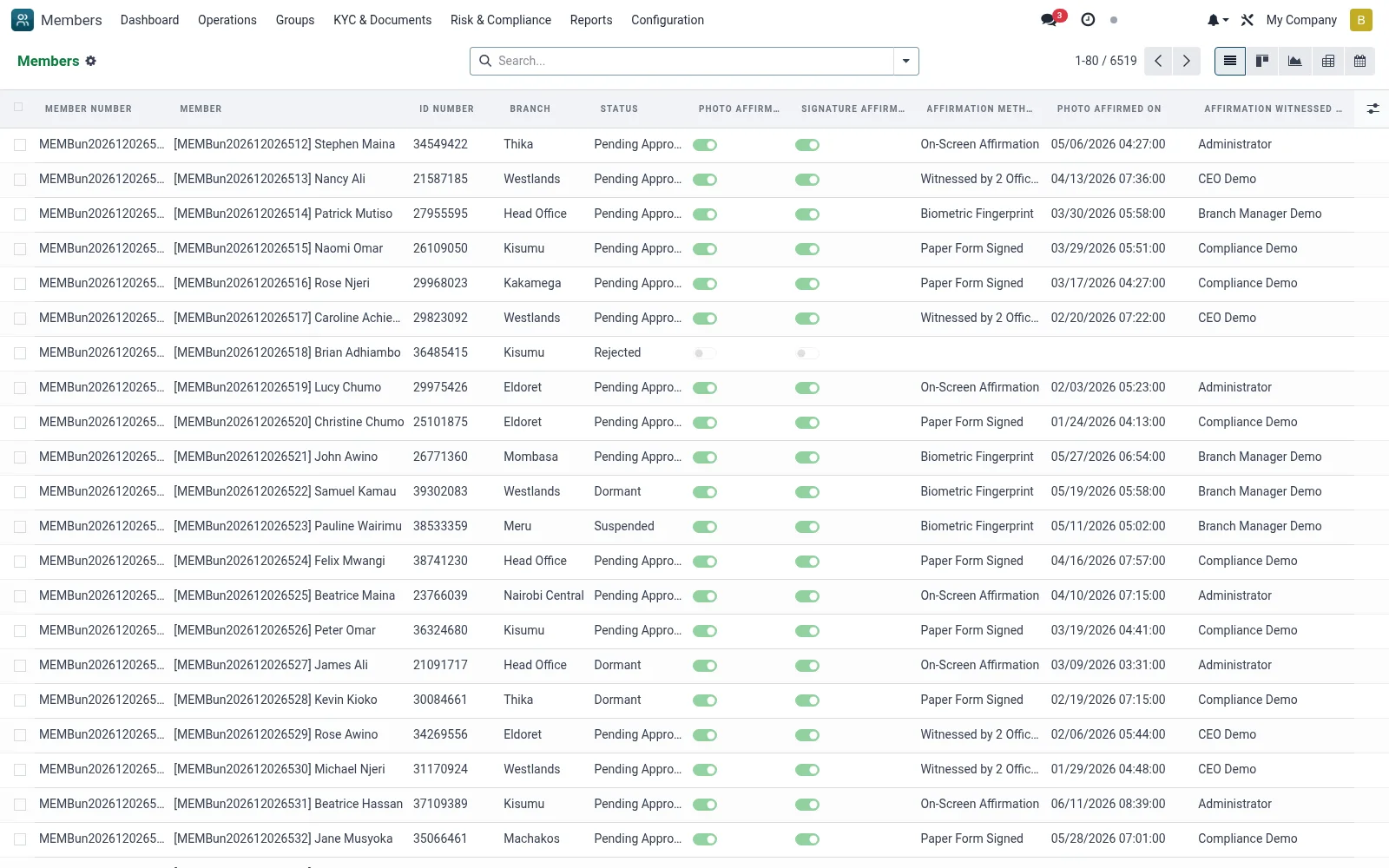
The master register of every member CIF in the institution, regardless of status. Each record holds the member's personal details, contacts, photo, category, branch, joining date, KYC state and links to their savings and loan accounts, making it the single source of truth for member identity. Officers open a member here to view the full 360 profile, edit details or trigger status actions like freeze, activate or close.
Workflow
- Go to Operations then All Members
- Click New to create a member CIF and capture personal, contact and next-of-kin details
- Assign a member category and home branch
- Attach the KYC documents and photo, then submit for approval
- Use list, kanban, graph or pivot views to slice the register by branch, category or status
- Open any record to reach the member 360 timeline and service-state buttons
Fields reference
Every field on this screen, drawn from the live data model.
| Field | Type | Required | Description |
|---|---|---|---|
Portal Access URLaccess_url | Text | — | Customer Portal URL |
Legacy Member Nolegacy_member_no | Text | — | Previous system member number |
Huduma Nambahuduma_number | Text | — | Kenyan Huduma Namba (10-digit national ID aggregator). |
IPRS Verifiediprs_verified | Yes/No | — | True when Kenyan IPRS (Integrated Population Registration Service) has confirmed identity. |
Member Typemember_type | Choice: Individual, Group Representative, Corporate/Institution, Joint Account | Yes | Member Type |
First Namefirst_name | Text | Yes | First Name |
Last Namelast_name | Text | Yes | Last Name |
Gendergender | Choice: Male, Female, Other | Yes | Gender |
Date of Birthdate_of_birth | Date | Yes | Date of Birth |
Primary ID Typeid_type | Choice: National ID, Passport, Driving License, Voter ID, Military ID, Refugee ID, Alien ID, Birth Certificate | Yes | Primary ID Type |
ID Numberid_number | Text | Yes | ID Number |
Mobile Phonemobile | Text | Yes | Mobile Phone |
Access warningaccess_warning | Long text | — | Access warning |
Has Messagehas_message | Yes/No | — | Has Message |
Member Numbermember_no | Text | — | Member Number |
Titletitle | Choice: Mr., Mrs., Ms., Miss, Dr., Prof., Hon., Rev. | — | Title |
Middle Namemiddle_name | Text | — | Middle Name |
Maiden Namemaiden_name | Text | — | Maiden Name |
Full Namefull_name | Text | — | Full Name |
Ageage | Number | — | Age |
Age Groupage_group | Choice: Youth (18-35), Adult (36-55), Senior (56+) | — | Age Group |
Marital Statusmarital_status | Choice: Single, Married, Divorced, Widowed, Separated | — | Marital Status |
Spouse Namespouse_name | Text | — | Spouse Name |
Spouse Phonespouse_phone | Text | — | Spouse Phone |
Spouse Occupationspouse_occupation | Text | — | Spouse Occupation |
Number of Dependentsnumber_of_dependents | Number | — | Number of Dependents |
Nationalitynationality_id | Link → res.country | — | Nationality |
Country of Birthcountry_of_birth_id | Link → res.country | — | Country of Birth |
Place of Birthplace_of_birth | Text | — | Place of Birth |
Education Leveleducation_level | Choice: No Formal Education, Primary, Secondary, Diploma, Bachelor's Degree, Master's Degree, Doctorate, Other | — | Education Level |
Religionreligion | Text | — | Religion |
Ethnicityethnicity | Text | — | Ethnicity |
Photo Capture Datephoto_capture_date | Date | — | Photo Capture Date |
Photo Latitudephoto_latitude | Decimal | — | Photo Latitude |
Photo Longitudephoto_longitude | Decimal | — | Photo Longitude |
Fingerprint Enrolledfingerprint_enrolled | Yes/No | — | Fingerprint Enrolled |
ID Issue Dateid_issue_date | Date | — | ID Issue Date |
ID Expiry Dateid_expiry_date | Date | — | ID Expiry Date |
Place of Issueid_issue_place | Text | — | Place of Issue |
Issuing Authorityid_issue_authority | Text | — | Issuing Authority |
Secondary ID Typesecondary_id_type | Choice: National ID, Passport, Driving License, Voter ID, Other | — | Secondary ID Type |
Secondary ID Numbersecondary_id_number | Text | — | Secondary ID Number |
Tax ID / KRA PINtax_id | Text | — | Tax ID / KRA PIN |
Business Registration Nobusiness_registration_no | Text | — | Business Registration No |
IPRS Verified Oniprs_verified_date | Date & time | — | IPRS Verified On |
Actions & buttons
Buttons available on this screen and what they do:
- Submit
- Approve
- Reject
- Activate
- Affirm KYC
- Re-Affirm KYC
- Suspend
- Mark Dormant
- Reactivate
- Blacklist
- Exit Member
- Calculate Credit Score
- Verify IPRS
- Pull CRB Report
Status lifecycle
Records on this screen move through these statuses:
Application → Pending Approval → Approved → Active → Dormant → Suspended → Blacklisted → Exited → Deceased → Rejected
Notes & rules
- Model mfi.member; views list, kanban, form, graph, pivot, calendar
- Key fields: member number, national ID, category, branch, status, KYC state
- Status flow: draft/pending to active to dormant to frozen to closed
- Feeds savings, loans and group membership across the suite
Was this page helpful?