

Pipeline
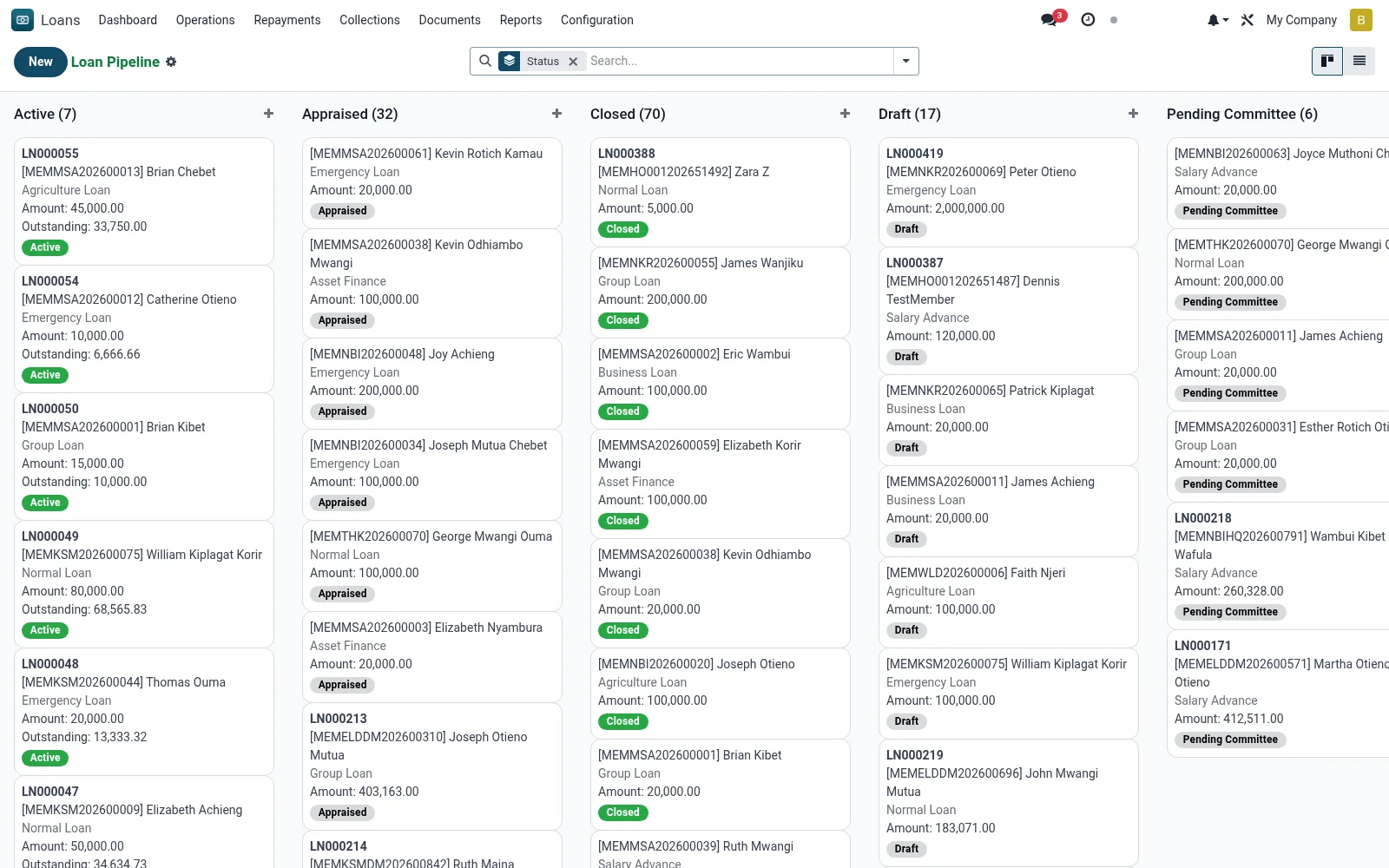
The Pipeline is the kanban-driven origination board that tracks each application through its workflow stages so loan officers can manage their work queue and managers can see bottlenecks. Cards are dragged between stages such as Draft, Appraisal, Committee and Approved to advance the credit process.
Workflow
- Review applications grouped into workflow columns on the kanban board.
- Drag a card forward once its stage requirements are met (KYC, appraisal, approval).
- Open a card to complete the appraisal or attach required documents.
- Submit eligible applications to the credit committee from the form.
- Watch for stalled cards lingering in a stage and follow up.
Fields reference
Every field on this screen, drawn from the live data model.
| Field | Type | Required | Description |
|---|---|---|---|
Portal Access URLaccess_url | Text | — | Customer Portal URL |
Dormantis_dormant | Yes/No | — | Flagged when no repayment activity within dormancy period |
Statusstate | Choice: Draft, Submitted, Under Appraisal, Appraised, Committee Review, Approved, Disbursed, Active | Yes | Status |
Membermember_id | Link → mfi.member | Yes | Member |
Loan Productproduct_id | Link → mfi.loan.product | Yes | Loan Product |
Branchbranch_id | Link → mfi.branch | Yes | Branch |
Applied Amountapplied_amount | Money | Yes | Applied Amount |
Loan Term (Months)loan_term | Number | Yes | Loan Term (Months) |
Access warningaccess_warning | Long text | — | Access warning |
Has Messagehas_message | Yes/No | — | Has Message |
Loan Numberloan_number | Text | — | Loan Number |
Namename | Text | — | Name |
Currencycurrency_id | Link → res.currency | — | Currency |
Companycompany_id | Link → res.company | — | Company |
Loan Officerofficer_id | Link → res.users | — | Loan Officer |
Lending Groupgroup_id | Link → mfi.member.group | — | Lending Group |
Approved Amountapproved_amount | Money | — | Approved Amount |
Disbursed Amountdisbursed_amount | Money | — | Disbursed Amount |
Loan Purposepurpose | Long text | — | Loan Purpose |
Loan Typeloan_type | Choice: Individual Loan, Group Loan, Emergency Loan, Asset Finance, Agriculture Loan, Education Loan, Business Loan, Salary Advance | — | Loan Type |
Interest Methodinterest_method | Choice: Flat Rate, Declining Balance (Reducing), Equal Principal Payments | — | Interest Method |
Annual Interest Rate (%)interest_rate | Decimal | — | Annual Interest Rate (%) |
Repayment Frequencyrepayment_frequency | Choice: Daily, Weekly, Bi-Weekly (Fortnightly), Monthly, Quarterly, Bullet (Lump Sum at End) | — | Repayment Frequency |
Grace Period - Principal (Months)grace_period_principal | Number | — | Grace Period - Principal (Months) |
Grace Period - Interest (Months)grace_period_interest | Number | — | Grace Period - Interest (Months) |
Application Dateapplication_date | Date | — | Application Date |
Appraisal Dateappraisal_date | Date | — | Appraisal Date |
Approval Dateapproval_date | Date | — | Approval Date |
Disbursement Datedisbursement_date | Date | — | Disbursement Date |
First Repayment Datefirst_repayment_date | Date | — | First Repayment Date |
Maturity Datematurity_date | Date | — | Maturity Date |
Closure Dateclosure_date | Date | — | Closure Date |
Total Principaltotal_principal | Money | — | Total Principal |
Total Interesttotal_interest | Money | — | Total Interest |
Total Feestotal_fees | Money | — | Total Fees |
Total Penaltiestotal_penalties | Money | — | Total Penalties |
Total Repayabletotal_repayable | Money | — | Total Repayable |
Principal Paidprincipal_paid | Money | — | Principal Paid |
Interest Paidinterest_paid | Money | — | Interest Paid |
Fees Paidfees_paid | Money | — | Fees Paid |
Penalties Paidpenalties_paid | Money | — | Penalties Paid |
Total Paidtotal_paid | Money | — | Total Paid |
Outstanding Principaloutstanding_principal | Money | — | Outstanding Principal |
Outstanding Interestoutstanding_interest | Money | — | Outstanding Interest |
Total Outstandingoutstanding_total | Money | — | Total Outstanding |
Actions & buttons
Buttons available on this screen and what they do:
- Submit
- Start Appraisal
- Complete Appraisal
- Approve
- Disburse
- Split into Tranches
- Calculate ECL
- Make Repayment
- Close Loan
- Reject
- Cancel
- Reset to Draft
- Generate NOC
- E-Sign Contract
Status lifecycle
Records on this screen move through these statuses:
Draft → Submitted → Under Appraisal → Appraised → Committee Review → Approved → Disbursed → Active → Closed → Written Off
Notes & rules
- Model: mfi.loan filtered to in-process states.
- Stages reflect the origination workflow up to approval.
- Feeds the Credit Committee and Disbursements screens.
Was this page helpful?