

Dispense register & stock
This page covers the inventory side of the pharmacy: how dispensed items move stock, how lots and expiry are tracked, how near-expiry and low-stock alerts are surfaced and acted on, and how controlled drugs are logged and reported to the regulator. The aim is a pharmacy that never dispenses an expired lot, never silently runs out, and can account for every controlled-substance transaction.
Where to find it
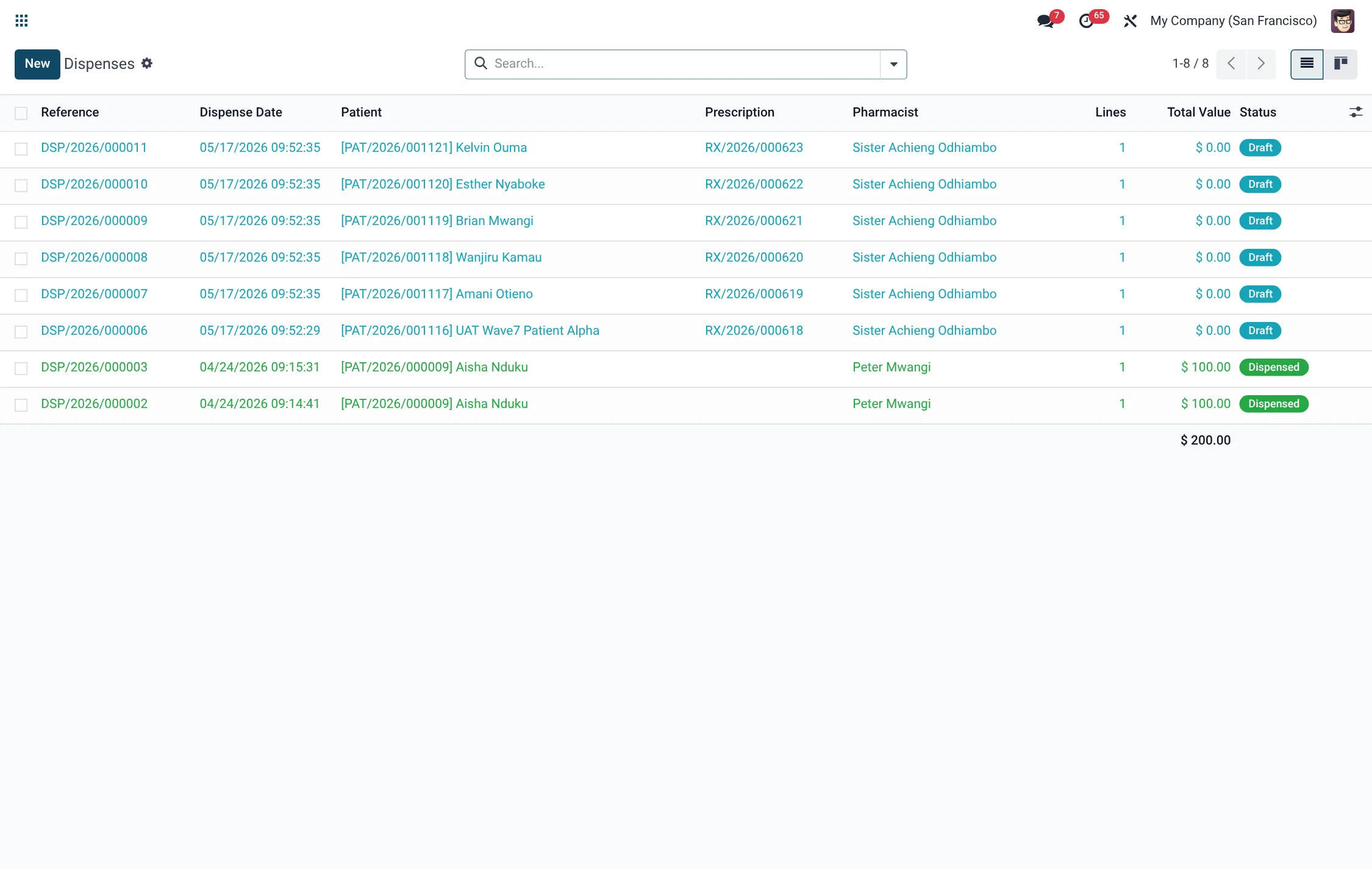
- Pharmacy → BridgeERP Pharmacy POS → Operations → POS Dispenses — the counter dispense register.
- Pharmacy → BridgeERP Pharmacy POS → Operations → Sessions / Orders — POS sessions and orders.
- Pharmacy → BridgeERP Pharmacy POS → Reports → Daily Sales — daily sales reporting.
- Pharmacy → Configuration → Settings — module options including stock behaviour.
Expiry alerts, reorder helpers and the controlled-substance register are reached from the pharmacy dashboard and the dispense records they relate to.
Before you start
Products must be set up as tracked medications with lots and expiry dates, and each Pharmacy Location must map to a stock location so dispensing can draw from on-hand inventory. Reorder rules (minimum and maximum quantities) drive the low-stock helper. See Dispensing, BCMA & IV pumps for how a dispense consumes stock.
How dispensing moves stock
When a dispense is completed, stock is consumed using first-expiry-first-out (FEFO) lot selection, so the lot closest to expiry is used first. A delivery picking is generated for the move, and the dispense line records the lot and its expiry that were actually issued. Cancelling a dispensed record reverses the stock move. This means on-hand quantities and lot histories always reflect real dispensing activity.
Step-by-step: manage near-expiry stock
- Open the drug-expiry alerts (from the pharmacy dashboard). Each row is a near-expiry lot with its product, lot, expiry date, quantity on hand, location and days to expiry.
- Work the list by expiry band — Expired first, then ≤ 30 days, ≤ 60 days, ≤ 90 days.
- For each lot, take the appropriate action: quarantine and remove expired stock, rotate near-expiry lots forward, or arrange return.
- Click Acknowledge on a handled alert — the acknowledging user and time are recorded so the review is auditable.
| Expiry band | Meaning |
|---|---|
| Expired | Past expiry — must not be dispensed; remove immediately. |
| ≤ 30 days | Imminent; rotate to the front or use first. |
| ≤ 60 days | Approaching; monitor and prioritise. |
| ≤ 90 days | Early warning; plan usage or return. |
Step-by-step: reorder low stock
- Open the drug reorder helper. It lists products below their reorder point, showing minimum and maximum quantities, quantity on hand, the shortfall, dose form, therapeutic class and whether the item is WHO-essential.
- Review the shortfall and raise replenishment for the items that need it, prioritising essential medicines.
- The helper can notify the responsible users of the low-stock list so replenishment is not missed.
Controlled drugs
When a dispense includes a controlled substance, an entry is written to the controlled-substance register as part of completing the dispense, and dispenses that require it enforce a second authoriser / witness. This produces a running log of controlled-drug movements tied to the dispense, the patient and the pharmacist.
Regulatory register and reporting
For pharmacy-board reporting, BridgeERP HMS produces a periodic regulatory register that aggregates controlled-substance transactions over a date range into per-drug summary and detail lines. It moves through Draft → Generated → Submitted, recording a submission reference and date once filed, so the hospital has a defensible audit trail of what was reported and when.
| Status | Meaning |
|---|---|
| Draft | Period defined; not yet compiled. |
| Generated | Transactions aggregated into the register. |
| Submitted | Filed to the regulator; reference and date recorded. |
POS dispense register and sales
Counter activity is captured under POS Dispenses, Orders and Sessions, with a Daily Sales report and an Override Audit Log for any counter override. Because POS dispenses are recorded as dispense records, OTC and walk-in sales share the same stock, lot and expiry handling as clinical dispensing.
Lots and traceability
Because medications are tracked by lot, every dispense records the exact lot and expiry that left the shelf. This gives the pharmacy two things it cannot get from a simple quantity count: a precise expiry picture per lot, so near-expiry stock can be rotated before it is wasted; and a recall path, so if a manufacturer recalls a batch the pharmacy can identify which dispenses — and therefore which patients — received it. Keeping lot and expiry data accurate at goods-receipt is what makes both the expiry alerts and the controlled-substance reconciliation trustworthy downstream.
Roles & access
Pharmacists can read and write dispense, stock and controlled-log records; cashiers operate OTC sales at the POS; managers and admins maintain locations, reorder rules and the regulatory register. The controlled-substance log is visible to pharmacists and managers, supporting separation between dispensing and oversight.
Tips & troubleshooting
Expiry-alert field reference
Each near-expiry alert row carries the lot detail an operator needs to act:
| Field | Meaning |
|---|---|
| Product | The medication on the near-expiry lot. |
| Lot | The specific stock lot. |
| Expiry Date | The lot expiration date. |
| Quantity On Hand | Units of this lot still in stock. |
| Location | Where the lot is held. |
| Days to Expiry | Computed days remaining (0 if expired). |
| Expiry Band | Expired / ≤ 30 / ≤ 60 / ≤ 90 days. |
| Acknowledged / By / At | Whether handled, and by whom and when. |
Reorder-helper field reference
The low-stock helper lists every product below its minimum orderpoint with the data to replenish it:
| Field | Meaning |
|---|---|
| Product | The medication below reorder point. |
| Minimum Qty | Reorder-point minimum from the orderpoint rule. |
| Maximum Qty | Target maximum to replenish toward. |
| Qty On Hand | Current stock for the product. |
| Shortfall | Minimum minus on-hand — how much is short. |
| Dose Form | Tablet, syrup, injection and so on. |
| Therapeutic Class | Classification of the medicine. |
| WHO Essential | Whether the item is a WHO-essential medicine. |
| Warehouse / Location | Where the shortfall sits. |
Roles & access for stock and controlled drugs
Stock, register and controlled-log access follows the HMS pharmacy groups:
| Group | Dispense & stock | Controlled-substance log | Regulatory register |
|---|---|---|---|
| Pharmacist | Read & write | Read & write | Read |
| Cashier | OTC sales at POS | — | — |
| HMS Manager | Full | Read & oversee | Generate & submit |
| HMS Admin | Full | Full | Full |