

Dispensing
This page walks through dispensing a prescription end to end: assembling the dispense, running the allergy and interaction safety checks, completing the physical dispense with first-expiry-first-out stock selection, and then administering the dose at the bedside under barcode verification (BCMA) or via a smart IV pump. The goal is a closed loop from the pharmacy shelf to the patient's arm, with a check at every handover.
Where to find it
- Pharmacy → Dispense Bench → Open Bench — the pharmacist's working bench; Quick Dispense for rapid single-item dispensing.
- Pharmacy → BCMA → Administrations — the bedside administration records.
- Pharmacy → BCMA → Open Scanner / Sessions — the nurse scanner and scan sessions.
Before you start
A dispense usually originates from a prescription written during a consultation, but ad-hoc dispenses are allowed. You need a Pharmacy Location with stock and lots, a Pharmacist on staff, and — for the bedside steps — printed wristband and drug barcodes plus configured Override Reasons. Controlled-substance handling and stock are covered on Dispense register, stock & controlled drugs.
Step-by-step: dispense a prescription
- From the prescription, use Open New Dispense, or create one on the bench. The dispense opens in Draft with the Patient, Pharmacist and Pharmacy Location populated.
- Confirm the Dispense Lines — product, strength, form, quantity and unit price. The ordered quantity carries from the prescription line.
- Click Verify Safety Checks. The system screens for patient allergies and drug–drug interactions and records any Allergy Warning or Interaction Warning. If a major or moderate interaction is flagged, enter an Override Justification before proceeding. On success the dispense moves to Verified.
- Click Dispense. Stock is moved using first-expiry-first-out lot selection, a delivery picking is created, the controlled-substance register is written where required, and the dispense moves to Dispensed. The parent prescription progresses toward fully-dispensed.
- Use Print Label and Print Receipt to produce the patient-facing label and receipt.
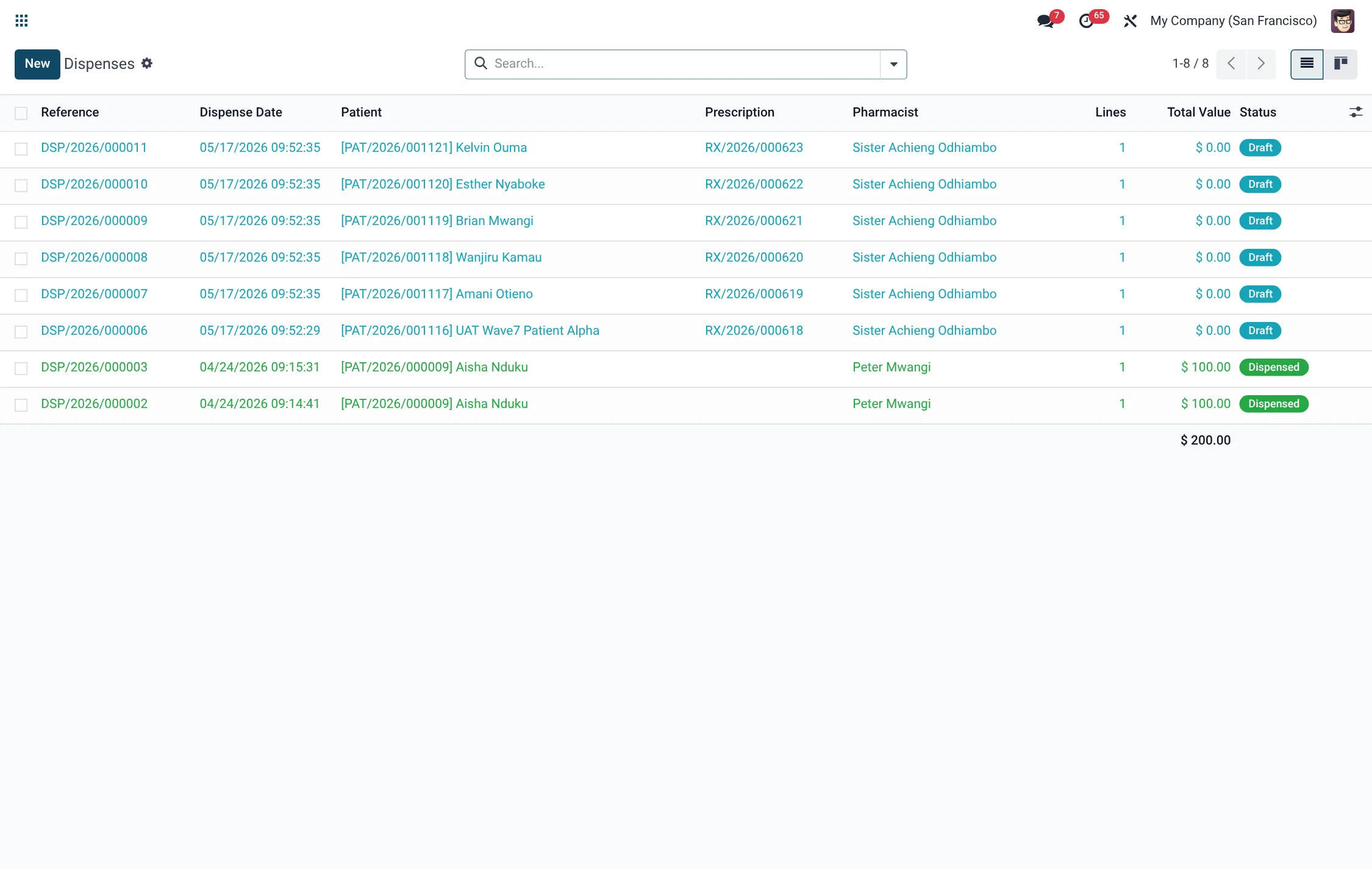
Dispense field reference
| Field | Meaning | Required |
|---|---|---|
| Prescription | Source prescription; empty for ad-hoc. | No |
| Patient | Recipient of the medication. | Yes |
| Pharmacist | Dispensing pharmacist. | Yes |
| Pharmacy Location | Location stock is drawn from. | Yes |
| Allergy Warning / Interaction Warning | Findings from the safety check. | Auto |
| Override Justification | Clinical reason an interaction was overridden. | If overriding |
| Witness (2nd Authoriser) | Second signer when double authentication applies. | If required |
| Delivery Picking | Stock move generated on dispense. | Auto |
Step-by-step: administer at the bedside (BCMA)
- The nurse opens a scan session from Pharmacy → BCMA → Open Scanner (or Sessions).
- Scan the patient's wristband and the drug barcode. The system populates the administration and evaluates the 5 Rights: right patient, right drug, right dose, right route, right time.
- Review the 5 Rights Check Result (shown as n / 5). Record the Dose Given, Dose Unit and Route Administered.
- Click Administer — the administration moves to Administered with the time stamp. If a right does not pass, you must select an Override Reason (and note) to proceed; otherwise the record becomes an exception.
- If the patient declines, click Refuse (Refused by Patient); if the dose was not given in its window, mark Missed. Doses can also be Held.
Administration status reference
| Status | Meaning |
|---|---|
| Draft | Started; not yet verified. |
| Verified | Scans and checks complete. |
| Administered | Dose given to the patient. |
| Refused by Patient | Patient declined the dose. |
| Missed | Dose not given in its window. |
| Held | Dose intentionally held. |
| Cancelled | Administration voided. |
Step-by-step: program a smart IV pump
- Create an IV smart-pump programming order for the patient and select the drug from the DERS drug library.
- Enter the programmed dose / rate. The order is validated against the library's guardrails.
- If a hard limit is breached, the program does not pass and cannot proceed; a soft limit breach is recorded as a guardrail violation but can be acknowledged. Resolve violations before connecting the pump.
Shift handoff & exceptions
At the end of a shift, nurses generate a Shift Handoff report (BCMA → Shift Handoff) that gathers the session's administrations for sign-off, and any open Exceptions are carried to the next shift. This gives an auditable record of what was given, refused, missed or overridden during the shift.
Roles & access
Verify and Dispense are restricted to the pharmacist group. Bedside administration is performed by nurses operating scan sessions; a witness for controlled doses is drawn from the nurse role. Doctors can view but not action dispenses. Managers oversee exceptions, overrides and IV guardrail breaches.
Counselling and the dispense bench
The dispense bench surfaces practical prompts as the pharmacist works: whether an item needs cold-chain handling, whether patient counselling is required, and any bench alerts raised on the dispense. Recording that counselling was given, and respecting the cold-chain flag at hand-over, closes the loop on the soft-skill and storage requirements that sit alongside the mechanical act of dispensing. Use Quick Dispense for a fast single-item issue, and Open Bench when a prescription needs the full check-and-counsel pass.
Tips & troubleshooting
Dispense status reference
A dispense is a controlled state machine; each transition is driven by a named button:
| Status | Button to reach it | What happens |
|---|---|---|
| Draft | (new) / Reset to Draft | Lines assembled from the prescription or ad-hoc; not yet checked. |
| Verified | Verify Safety Checks | Allergy and interaction checks pass or are justified. |
| Dispensed | Dispense | FEFO stock move, picking created, controlled register written, prescription progressed. |
| Cancelled | Cancel | Reversed; any executed stock move is reversed. |
The BCMA 5 Rights at the bedside
The scan evaluates five rights; the administration stores each pass/fail and the overall result:
| Right | Confirmed when… |
|---|---|
| Right Patient | Scanned wristband matches the patient on the order. |
| Right Drug | Scanned drug barcode matches the prescribed drug. |
| Right Dose | Dose given equals the prescribed dose. |
| Right Route | Route administered matches the order. |
| Right Time | Administration falls in the scheduled window. |
IV smart-pump guardrails
Pump programs are validated against the DERS drug library before the pump is connected:
| Outcome | Behaviour |
|---|---|
| Within limits | Program passes; the pump can be connected. |
| Soft-limit breach | Recorded as a guardrail violation; can be acknowledged and proceed. |
| Hard-limit breach | Program does not pass and cannot proceed; must be corrected. |