

Charges & bills
A bill is only as accurate as the charges on it, and charges are only correct when the charge master, the tariff and the router rules behind them are sound. This page covers the front half of the revenue cycle: how the Charge Master defines every billable item, how charges are captured and routed as care is delivered, how the DRG Grouper bundles inpatient episodes, and how a billing officer assembles those charges into a locked, invoiced bill. It is written for billing officers and cashiers who build bills, and for the revenue-cycle manager who maintains the master data underneath them.
Where to find it
- Billing → RCM → Charges → Charge Master — the catalogue of every billable item with its price, service type and revenue account.
- Billing → RCM → Charges → DRG Grouper — the diagnosis-related-group table used to bundle inpatient episodes into a single case payment.
- Billing → RCM → Charges → Router Rules — the rules that send a charge to the right cost centre and revenue account.
- Billing → RCM → Contracts → Payer Contracts — negotiated rates that override list prices for a given payer.
Individual charge lines and the bills they roll up to are reached from the bill record itself; collection of the resulting balance is covered on Payments & claims.
Before you start
Charge capture depends on master data being loaded first:
- Every service the hospital sells must exist in the Charge Master with a list price, a service type and a revenue account.
- Service Tariffs must be configured, because a charge takes its service type from the tariff it is linked to.
- If a payer has negotiated rates, load them as a Payer Contract so the correct rate is applied instead of list price.
- Departments and facilities must exist so router rules can target them.
The charge master
The Charge Master is the single source of truth for what each service costs and where its revenue lands. Each record carries an internal code, an optional CPT/HCPCS and ICD-10-PCS code, and a Local Code for the NHIF/SHA or insurer code. The Service Type classifies the item, which drives routing and reporting.
| Field | Meaning | Required |
|---|---|---|
| Description | Human-readable name of the billable item | Yes |
| Internal Code | The hospital's own item code | Yes |
| CPT/HCPCS Code | International procedure code, if used | No |
| Local Code | NHIF/SHA or insurer billing code | No |
| Service Type | Consultation, Admission/Bed-night, Laboratory, Imaging/Radiology, Pharmacy, Procedure/Surgery, Supplies/Consumables or Therapy | No |
| List Price | Standard price before any contract or discount | No |
| Revenue Account | Where billed revenue posts | No |
| Requires Prior Auth | Flags items that must be cleared with the payer first | No |
| High-Cost Item | Marks items for closer auth and denial scrutiny | No |
Charge capture and routing
Charges are mostly created for you. As clinicians deliver care, the originating document — a consultation, a lab request, a dispense or a radiology order — raises an hms.charge line against the patient's visit. Each charge records its Source Reference (the originating document number) and is priced from its service tariff. A charge moves through Draft → Billed → Invoiced → Paid, and can be set to Cancelled.
Routing decides which cost centre and revenue account a charge lands in. The Router Rules evaluate by service type and optionally by department, facility or insurance scheme, then send the charge to the configured Route To Cost Center and Route To Revenue Account. Rules run in sequence order, so the most specific rule should sit highest.
- Confirm the service exists in the Charge Master with a correct service type.
- Create a Router Rule naming that service type and, if needed, the department, facility or scheme it applies to.
- Set the target cost centre and revenue account.
- Order the rule by sequence so specific rules win over general ones.
Charge and bill states
Both an individual charge and the bill that rolls charges up move through their own status chain. Knowing where a record sits tells you what you can still edit and what has already been committed to an invoice:
| Record | State | Meaning |
|---|---|---|
| Charge | Draft | Captured but not yet on a billed invoice |
| Charge | Billed | Gathered onto a bill |
| Charge | Invoiced | The bill it belongs to has been invoiced |
| Charge | Paid | Settled in full |
| Charge | Cancelled | Voided and excluded from billing |
| Bill | Draft | Open for charge capture and edits |
| Bill | Open | Charges gathered; split computed |
| Bill | Locked | Frozen against edits; lock date stamped |
| Bill | Invoiced | Patient and insurer invoices produced |
| Bill | Paid | Patient share fully collected |
| Bill | Cancelled | Voided |
DRG grouping for inpatients
For admissions, the DRG Grouper turns an episode's diagnoses into a single case-based payment instead of line-by-line charges. Each grouper record holds a DRG code and description, a Major Diagnostic Category, a relative weight and a base payment, and links the primary and secondary ICD-10 codes that map to it. The Grouper type can be Africa-DRG, ICD-10-AM (Australian) or CMS-DRG, so the hospital can match the grouping standard its payers recognise.
| DRG field | Meaning | Required |
|---|---|---|
| DRG Code | The diagnosis-related-group identifier | Yes |
| DRG Description | Human-readable name of the group | Yes |
| Major Diagnostic Category | The MDC the group belongs to | No |
| Grouper | Africa-DRG, ICD-10-AM (Australian) or CMS-DRG | Yes |
| Relative Weight | The case weight applied to base payment | No |
| Base Payment | The case payment before weighting | No |
| Primary / Secondary ICD-10 Codes | Diagnoses that map to this group | No |
Building a bill into an invoice
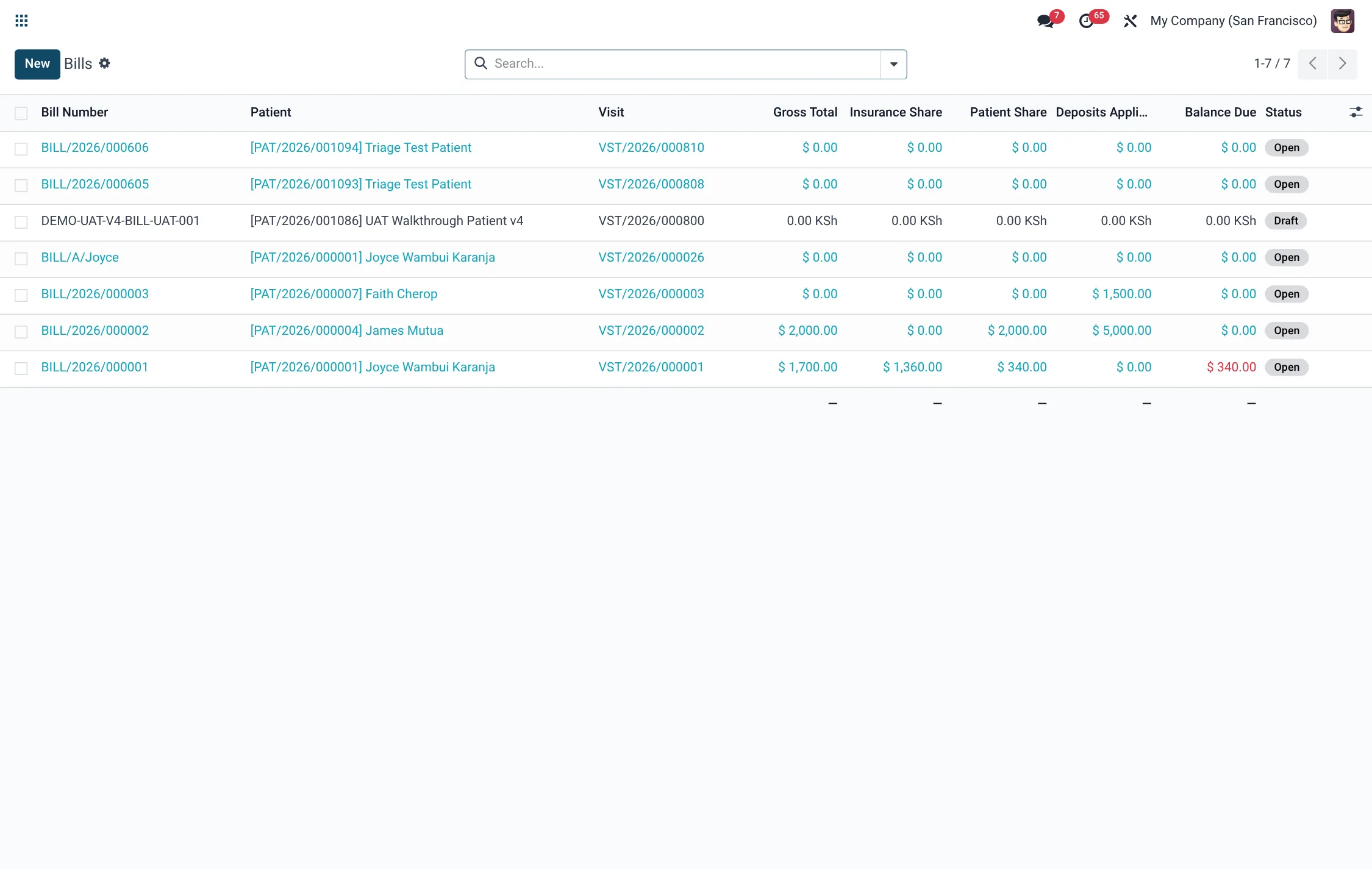
A bill (hms.bill) gathers every charge for a visit and computes the split between the patient and the insurer. It carries the totals, the Pre-Authorisation Number where one applies, and a status that runs Draft → Open → Locked → Invoiced → Paid (or Cancelled).
- Open the visit's bill; confirm all expected charges are listed and the Total, Insurance Share and Patient Share look right.
- Apply any discount; the Discount Total and Balance Due update.
- Press Lock to freeze the bill against further edits; it moves to Locked and a lock date is stamped.
- Press Generate Invoice; the bill becomes Invoiced and patient and insurer invoices are produced.
- If a correction is needed, press Unlock (Reopen), fix the charges, then re-lock and re-invoice.
| Bill field | Meaning |
|---|---|
| Total | Sum of all charges before split |
| Insurance Share | Portion billed to the payer |
| Patient Share | Portion owed by the patient |
| Deposit Total | Pre-paid deposits applied to the bill |
| Paid Total | Amount collected so far |
| Balance Due | What remains outstanding |
Roles & access
- HMS Charge / Bill cashier (facility) — capture and bill within their own facility.
- HMS Charge / Bill manager (all) — work charges and bills across every facility.
- RCM User / RCM Manager — maintain the Charge Master, DRG Grouper, Router Rules and Payer Contracts.
Tips & troubleshooting
| Problem | Fix |
|---|---|
| Charge billed at zero | The service has no list price or no tariff — complete the Charge Master entry. |
| Charge posts to the wrong account | Add or re-order a Router Rule so a more specific rule wins on sequence. |
| Cannot edit a charge | The bill is Locked or Invoiced — Unlock the bill first. |
| Payer rate ignored | No active Payer Contract line for that charge — add the negotiated rate. |
Related
- Billing overview — the whole revenue cycle.
- Payments & claims — collecting the bill and recovering the insurer share.