

All Cards
The master register of every card in the programme across its whole lifecycle — stock, issued, active, blocked and expired. Staff view the masked PAN, status, linked account and expiry, and run activation, PIN reset and renewal actions. It is the authoritative inventory and status source for the card portfolio.
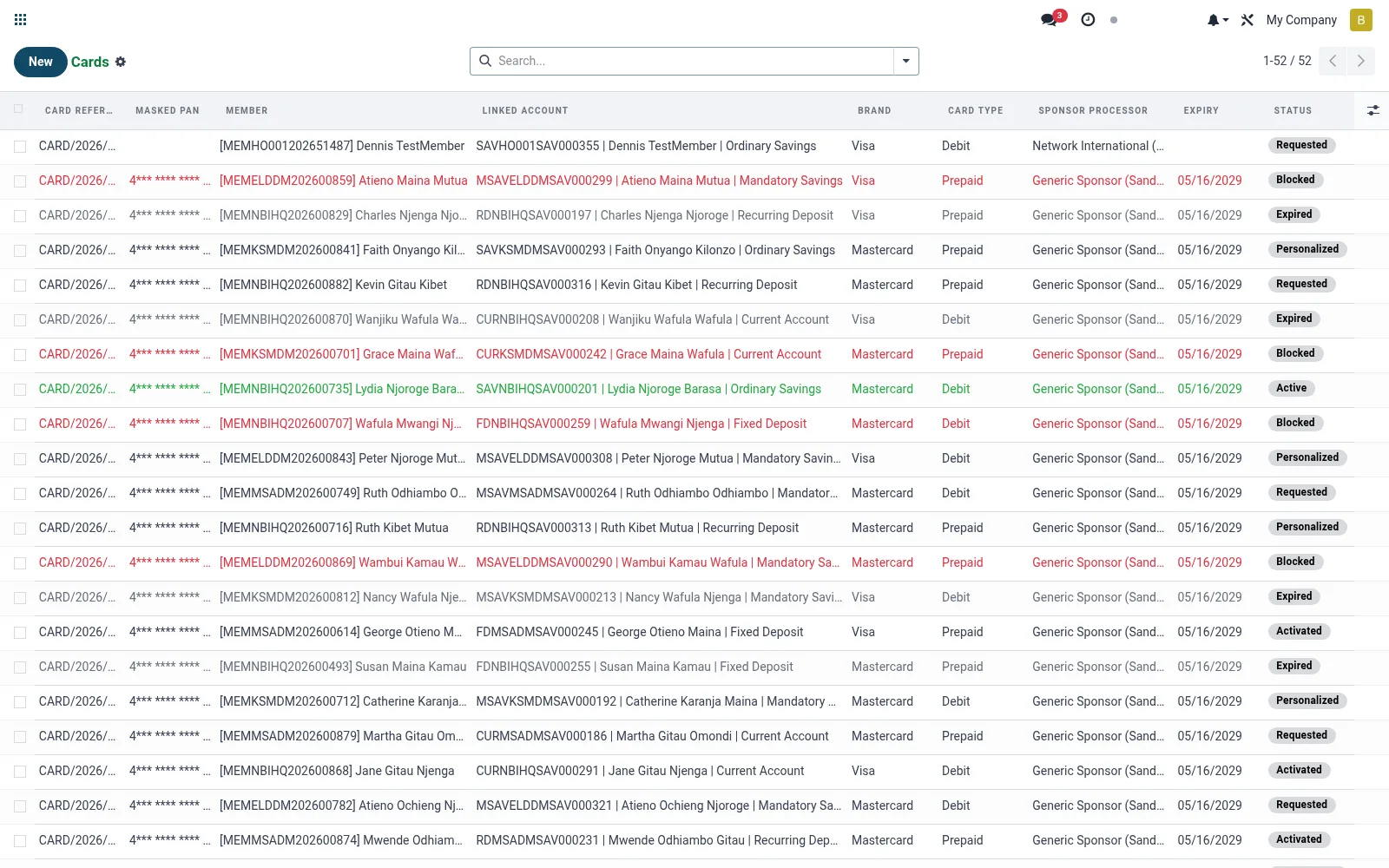
Workflow
- Open All Cards to see the full card inventory and statuses.
- Open a card to view its masked number, account link and expiry.
- Activate a newly delivered card and trigger PIN setup.
- Reset or reissue a PIN when a member requests it.
- Renew or retire a card as it reaches expiry.
Fields reference
Every field on this screen, drawn from the live data model.
| Field | Type | Required | Description |
|---|---|---|---|
Website Messageswebsite_message_ids | List | — | Website communication history |
Masked PANpan_masked | Text | — | e.g. 4000********1234. Safe for display. |
PAN (encrypted)pan_encrypted | Text | — | Fernet-encrypted PAN. System group only. |
PAN (plaintext, system-only)pan_plain | Text | — | Decrypts pan_encrypted on read. Writing this field re-encrypts into pan_encrypted; raw plaintext is never persisted. |
CVV Hashcvv_hash | Text | — | SHA-256 hash of CVV2 (never the raw CVV). |
Membermember_id | Link → mfi.member | Yes | Member |
Linked Accountaccount_id | Link → mfi.savings.account | Yes | Linked Account |
Companycompany_id | Link → res.company | Yes | Company |
Card Typecard_type | Choice: Debit, Prepaid | Yes | Card Type |
Brandbrand | Choice: Visa, Mastercard, Verve, Local Scheme | Yes | Brand |
Statusstate | Choice: Requested, Personalized, Activated, Active, Blocked, Replaced, Expired, Destroyed | Yes | Status |
My Activity Deadlinemy_activity_date_deadline | Date | — | My Activity Deadline |
Has Messagehas_message | Yes/No | — | Has Message |
Ratingsrating_ids | List | — | Ratings |
Card Referencename | Text | — | Card Reference |
Currencycurrency_id | Link → res.currency | — | Currency |
Expiryexpiry_date | Date | — | Expiry |
PIN Hashpin_hash | Text | — | PIN Hash |
PIN Saltpin_salt | Text | — | PIN Salt |
Sponsor Processorsponsor_processor_id | Link → mfi.card.processor | — | Sponsor Processor |
Sponsor Card Referencesponsor_card_ref | Text | — | Sponsor Card Reference |
Issuance Dateissuance_date | Date | — | Issuance Date |
Activation Dateactivation_date | Date | — | Activation Date |
Blocked Dateblocked_date | Date | — | Blocked Date |
Block Reasonblocked_reason | Choice: Member Request, Lost, Stolen, Suspected Fraud, Compromised, Internal/Compliance | — | Block Reason |
Replacement Ofreplacement_of_id | Link → mfi.card | — | Replacement Of |
Replaced Byreplaced_by_id | Link → mfi.card | — | Replaced By |
Daily ATM Limitdaily_atm_limit | Money | — | Daily ATM Limit |
Daily POS Limitdaily_pos_limit | Money | — | Daily POS Limit |
Transactionstransaction_ids | List | — | Transactions |
Transaction Counttransaction_count | Number | — | Transaction Count |
Hot-List Entrieshot_list_ids | List | — | Hot-List Entries |
Activeactive | Yes/No | — | Active |
Actions & buttons
Buttons available on this screen and what they do:
- Approve
- Personalize
- Activate
- Block
- Replace
- Mark Expired
- Destroy
Status lifecycle
Records on this screen move through these statuses:
Requested → Personalized → Activated → Active → Blocked → Replaced → Expired → Destroyed
Notes & rules
- Model mfi.card; statuses such as stock, requested, issued, active, blocked, expired.
- Stores masked PAN, expiry, card product and linked funding account.
- PIN management and activation are performed from this screen.
- Blocking from here cross-references the Hot-List.
Was this page helpful?