

All Branches
All Branches is the master directory of every outlet in the institution, each branch record carrying its code, type, zone, address, operating limits and assigned staff. It is the organisational anchor that scopes members, accounts, tills and reporting to a location. Setting up branches correctly here underpins multi-branch consolidation and per-branch performance analysis.
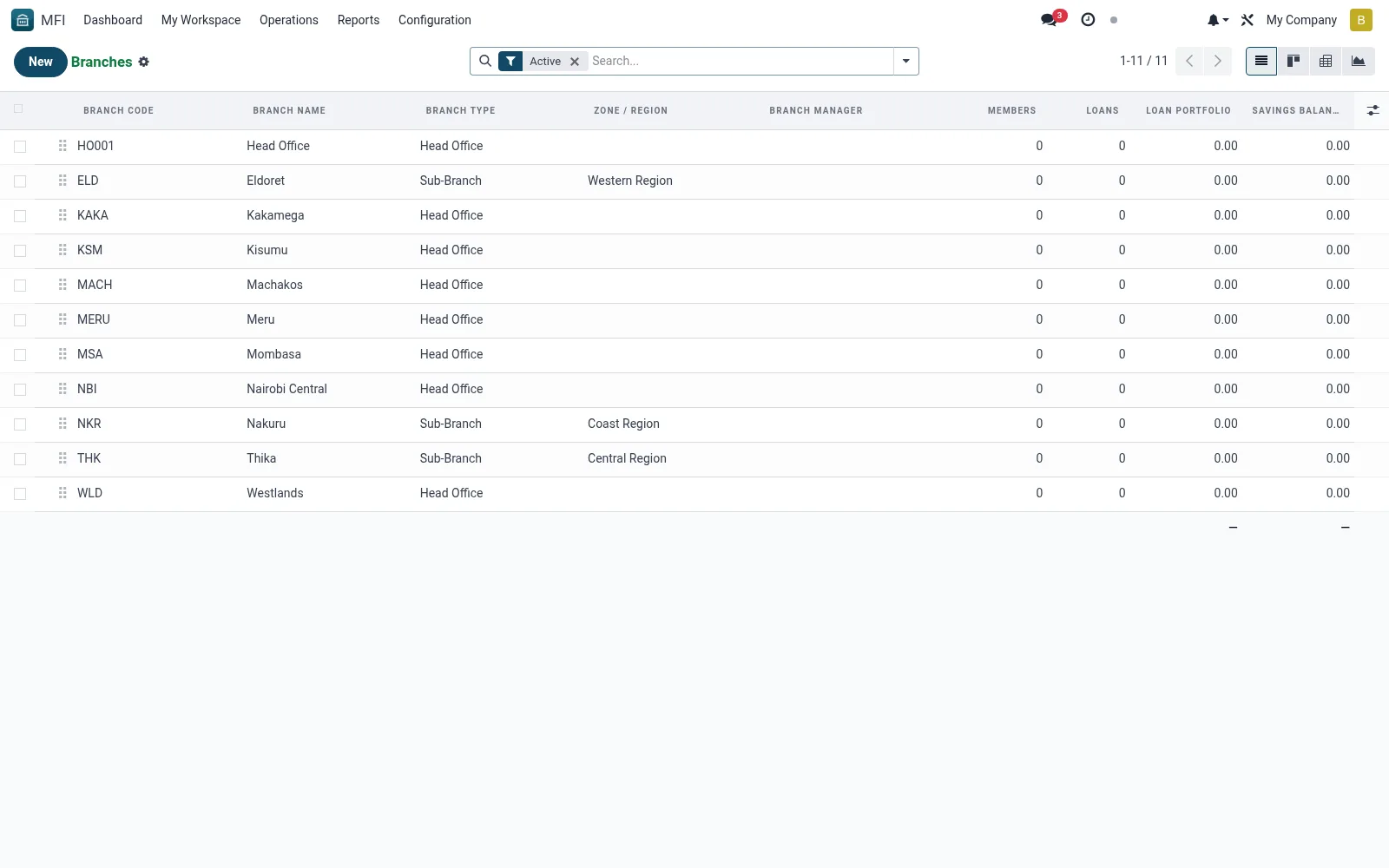
Workflow
- Open MFI > Operations > Branches > All Branches
- Click New to create a branch and enter its code and name
- Assign a branch type and zone/region
- Set address, contact and any cash or approval limits
- Save, then use kanban or pivot views to monitor the network
Fields reference
Every field on this screen, drawn from the live data model.
| Field | Type | Required | Description |
|---|---|---|---|
Website Messageswebsite_message_ids | List | — | Website communication history |
Maximum Cash Holdingmax_cash_holding | Money | — | Maximum cash this branch can hold |
Loan Approval Limitapproval_limit | Money | — | Maximum loan amount this branch can approve |
Branch Namename | Text | Yes | Branch Name |
Branch Codecode | Text | Yes | Branch Code |
Branch Typebranch_type_id | Link → mfi.branch.type | Yes | Branch Type |
Companycompany_id | Link → res.company | Yes | Company |
My Activity Deadlinemy_activity_date_deadline | Date | — | My Activity Deadline |
Has Messagehas_message | Yes/No | — | Has Message |
Ratingsrating_ids | List | — | Ratings |
Sequencesequence | Number | — | Sequence |
Activeactive | Yes/No | — | Active |
Is Head Officeis_head_office | Yes/No | — | Is Head Office |
Parent Branchparent_id | Link → mfi.branch | — | Parent Branch |
Child Brancheschild_ids | List | — | Child Branches |
Sub-Brancheschild_count | Number | — | Sub-Branches |
Zone / Regionzone_id | Link → mfi.branch.zone | — | Zone / Region |
Branch Managermanager_id | Link → res.users | — | Branch Manager |
Assistant Managerassistant_manager_id | Link → res.users | — | Assistant Manager |
Staff Membersstaff_ids | Tags | — | Staff Members |
Staff Countstaff_count | Number | — | Staff Count |
Streetstreet | Text | — | Street |
Street2street2 | Text | — | Street2 |
Citycity | Text | — | City |
Statestate_id | Link → res.country.state | — | State |
Countrycountry_id | Link → res.country | — | Country |
ZIPzip | Text | — | ZIP |
Phonephone | Text | — | Phone |
Mobilemobile | Text | — | Mobile |
Emailemail | Text | — | |
Websitewebsite | Text | — | Website |
Latitudelatitude | Decimal | — | Latitude |
Longitudelongitude | Decimal | — | Longitude |
Opening Timeopening_time | Decimal | — | Opening Time |
Closing Timeclosing_time | Decimal | — | Closing Time |
Working Daysworking_days | Choice: Monday - Friday, Monday - Saturday, All Days | — | Working Days |
Can Disburse Loanscan_disburse_loans | Yes/No | — | Can Disburse Loans |
Can Accept Depositscan_accept_deposits | Yes/No | — | Can Accept Deposits |
Can Open Accountscan_open_accounts | Yes/No | — | Can Open Accounts |
Total Membersmember_count | Number | — | Total Members |
Active Membersactive_member_count | Number | — | Active Members |
Active Loansactive_loan_count | Number | — | Active Loans |
Loan Portfolioloan_portfolio | Money | — | Loan Portfolio |
Savings Balancesavings_balance | Money | — | Savings Balance |
Savings Accountssavings_account_count | Number | — | Savings Accounts |
Actions & buttons
Buttons available on this screen and what they do:
- Refresh Statistics
Notes & rules
- Model mfi.branch -- list, kanban, form, pivot, graph views
- Key fields: code, branch type, zone, limits, staff
- Related: Zones/Regions, Branch Types, Branch Analysis
- Used by operations admins and executives
Was this page helpful?