

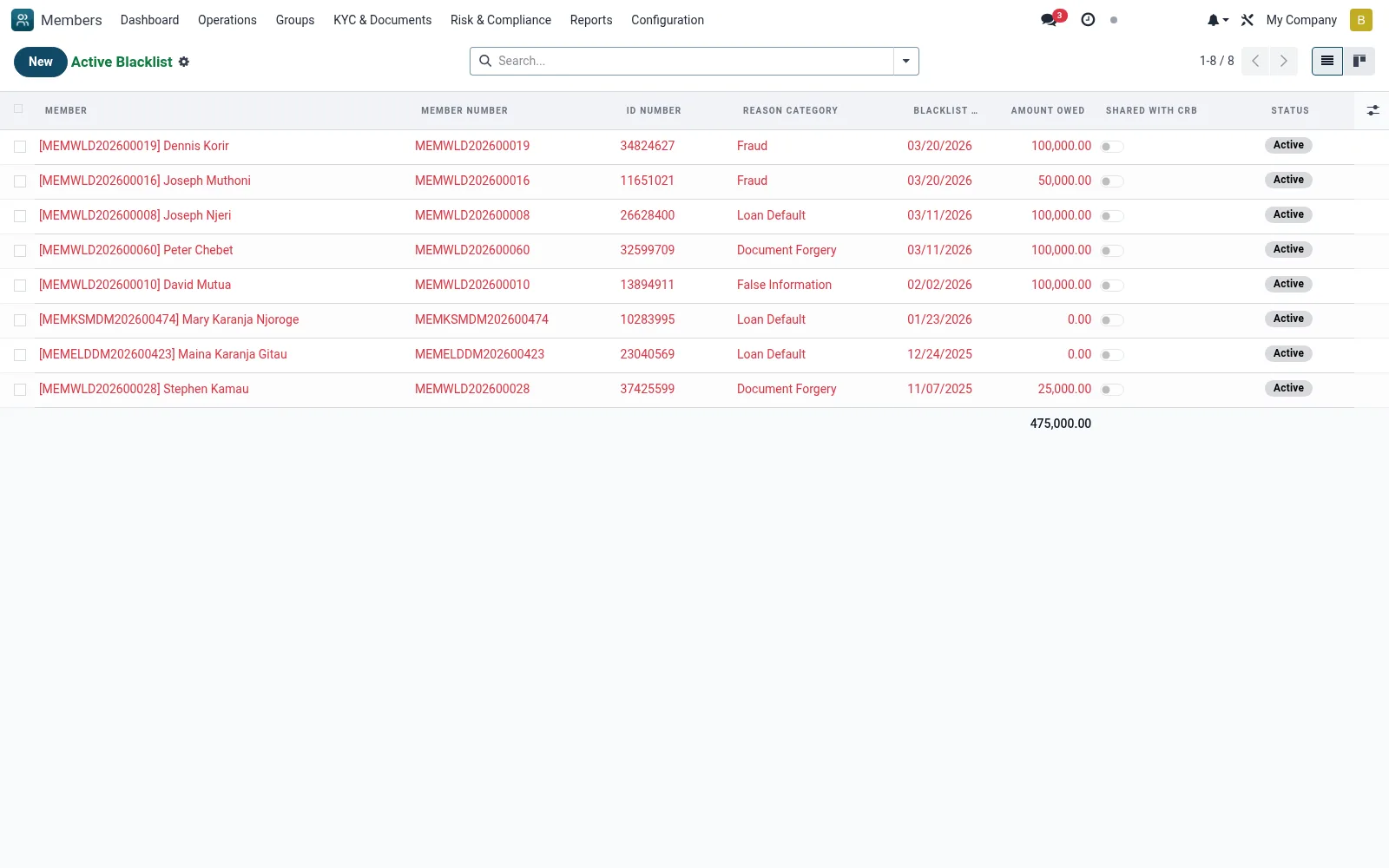
Active Blacklist
Filtered to currently enforced blacklist entries. This is the live exclusion list officers and the loan module check against before onboarding a member or disbursing a loan, ensuring lapsed or lifted entries are excluded from the block.
Workflow
- Open Risk and Compliance then Active Blacklist
- Search for a member or identity before onboarding or disbursing
- Open an entry to review the reason and review date
- Escalate any entry due for review
- Remove or expire an entry once the block no longer applies
Fields reference
Every field on this screen, drawn from the live data model.
| Field | Type | Required | Description |
|---|---|---|---|
Membermember_id | Link → mfi.member | Yes | Member |
Blacklist Dateblacklist_date | Date | Yes | Blacklist Date |
Reason Categoryblacklist_reason | Choice: Loan Default, Fraud, Document Forgery, False Information, Theft, Gross Misconduct, Court Order, Other | Yes | Reason Category |
Reason Detailsreason_details | Long text | Yes | Reason Details |
Has Messagehas_message | Yes/No | — | Has Message |
Member Numbermember_no | Text | — | Member Number |
Full Namemember_name | Text | — | Full Name |
ID Numberid_number | Text | — | ID Number |
Mobile Phonemobile | Text | — | Mobile Phone |
Branchbranch_id | Link → mfi.branch | — | Branch |
Amount Owedamount_owed | Decimal | — | Amount Owed |
Currencycurrency_id | Link → res.currency | — | Currency |
Evidence Documentsevidence_attachment_ids | Tags | — | Evidence Documents |
Decision Datedecision_date | Date | — | Decision Date |
Decided Bydecided_by_id | Link → res.users | — | Decided By |
Committee Referencecommittee_reference | Text | — | Committee Reference |
Permanent Banis_permanent | Yes/No | — | Permanent Ban |
Review Datereview_date | Date | — | Review Date |
Expiry Dateexpiry_date | Date | — | Expiry Date |
Statusstate | Choice: Active, Under Review, Lifted, Expired | — | Status |
Lifted Datelifted_date | Date | — | Lifted Date |
Lifted Bylifted_by_id | Link → res.users | — | Lifted By |
Reason for Liftinglifted_reason | Long text | — | Reason for Lifting |
Shared with CRBshared_with_crb | Yes/No | — | Shared with CRB |
CRB Referencecrb_reference | Text | — | CRB Reference |
Shared with Other MFIsshared_with_other_mfis | Yes/No | — | Shared with Other MFIs |
Notesnotes | Long text | — | Notes |
Blacklisted Byblacklisted_by_id | Link → res.users | — | Blacklisted By |
Companycompany_id | Link → res.company | — | Company |
Actions & buttons
Buttons available on this screen and what they do:
- Start Review
- Lift Blacklist
Status lifecycle
Records on this screen move through these statuses:
Active → Under Review → Lifted → Expired
Notes & rules
- Model mfi.member.blacklist filtered to active
- Live exclusion list enforced at onboarding/disbursement
- Checked by member and loan workflows
- Pairs with the full Blacklist register
Was this page helpful?