

Policies
The central register of every member insurance policy issued through the institution. Staff see status, cover amount, premium schedule and the underwriting partner, and can renew, lapse or cancel cover. It is the system of record that links each member to live protection and to premium receivables.
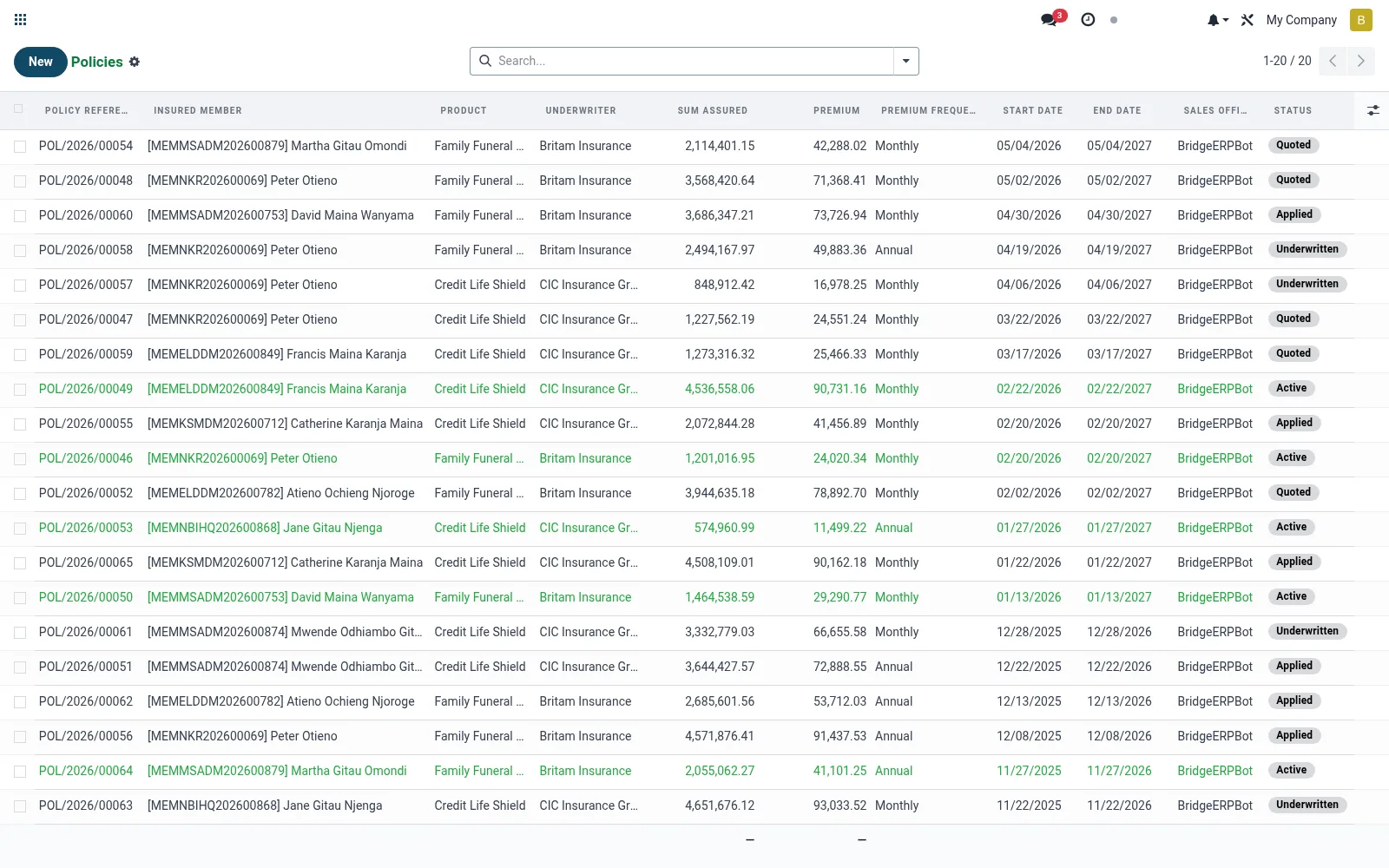
Workflow
- Open Policies to browse active, lapsed and pending records.
- Open a policy to inspect cover, premium schedule and beneficiary.
- Use the activation button to bind a draft policy with the underwriter.
- Record premium collections against the schedule as they fall due.
- Lapse or cancel a policy when premiums stop or the member opts out.
Fields reference
Every field on this screen, drawn from the live data model.
| Field | Type | Required | Description |
|---|---|---|---|
Website Messageswebsite_message_ids | List | — | Website communication history |
Underwriter Policy No.policy_number_underwriter | Text | — | Reference returned by the underwriter |
Commission %commission_pct | Decimal | — | Frozen at activation; falls back to product/underwriter default |
Productproduct_id | Link → mfi.bancassurance.product | Yes | Product |
Insured Membermember_id | Link → mfi.member | Yes | Insured Member |
Sum Assuredsum_assured | Money | Yes | Sum Assured |
Premiumpremium_amount | Money | Yes | Premium |
Premium Frequencypremium_frequency | Choice: One-off, Monthly, Quarterly, Annual | Yes | Premium Frequency |
Start Datestart_date | Date | Yes | Start Date |
Statusstate | Choice: Quoted, Applied, Underwritten, Active, Lapsed, Claimed, Renewed, Cancelled | Yes | Status |
My Activity Deadlinemy_activity_date_deadline | Date | — | My Activity Deadline |
Has Messagehas_message | Yes/No | — | Has Message |
Ratingsrating_ids | List | — | Ratings |
Policy Referencename | Text | — | Policy Reference |
Underwriterunderwriter_id | Link → mfi.bancassurance.underwriter | — | Underwriter |
Product Typeproduct_type | Choice: Credit Life, Funeral, Health, Motor, Fire & Property, Agricultural / Crop & Livestock, Personal Accident, Property | — | Product Type |
Beneficiarybeneficiary_member_id | Link → mfi.member | — | Beneficiary |
Beneficiary Name (free text)beneficiary_name | Text | — | Beneficiary Name (free text) |
Beneficiary Relationshipbeneficiary_relationship | Text | — | Beneficiary Relationship |
Sales Officerofficer_id | Link → res.users | — | Sales Officer |
End Dateend_date | Date | — | End Date |
Commission (this premium)commission_amount | Money | — | Commission (this premium) |
Total Commission Earnedtotal_commission_paid | Money | — | Total Commission Earned |
Premium Debit Accountpremium_debit_account_id | Link → mfi.savings.account | — | Premium Debit Account |
Standing Orderstanding_order_id | Link → mfi.standing.order | — | Standing Order |
Claimsclaim_ids | List | — | Claims |
Commission Ledgercommission_ids | List | — | Commission Ledger |
Claim Countclaim_count | Number | — | Claim Count |
Notesnotes | Rich text | — | Notes |
Currencycurrency_id | Link → res.currency | — | Currency |
Companycompany_id | Link → res.company | — | Company |
Branchbranch_id | Link → mfi.branch | — | Branch |
Actions & buttons
Buttons available on this screen and what they do:
- Apply
- Submit for Underwriting
- Activate
- Open Claim
- Renew
- Lapse
- Cancel
Status lifecycle
Records on this screen move through these statuses:
Quoted → Applied → Underwritten → Active → Lapsed → Claimed → Renewed → Cancelled
Notes & rules
- Model mfi.bancassurance.policy; statuses typically draft, active, lapsed, cancelled, expired.
- Holds sum assured, premium amount/frequency, start and end dates, underwriter.
- Premium collection drives accounts-receivable and remittance to the partner.
- Linked upstream to the quote wizard and downstream to Claims and Commissions.
Was this page helpful?