

Share Accounts
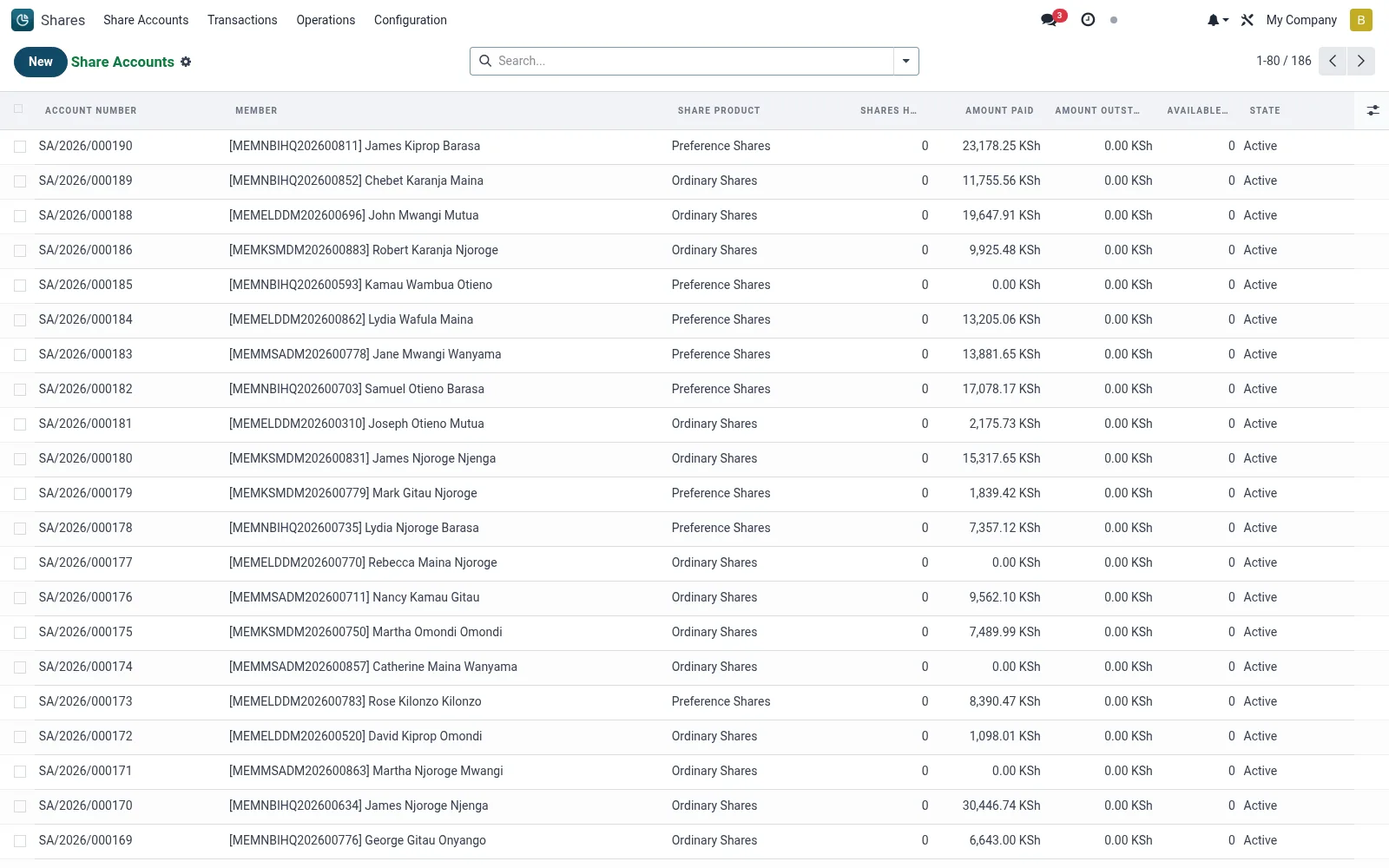
Share Accounts hold each member's running share-capital position across the classes they subscribe to. A record shows the member, the share product (class), allotted and held units, paid-up value, and current status, and is the anchor for purchases, transfers, dividends and pledges. Balances here drive eligibility checks elsewhere in the suite, such as minimum-shareholding rules for loan qualification.
Workflow
- Open Shares then Share Accounts to list every member share holding.
- Use filters and group-by to narrow to a member, share class or status.
- Click a row to open the account and review held units, paid-up value and movement history.
- Create a new account by selecting the member and the share product, then save to open the position.
- Drill into the linked transactions to reconcile the balance against postings.
Fields reference
Every field on this screen, drawn from the live data model.
| Field | Type | Required | Description |
|---|---|---|---|
Contactpartner_id | Link → res.partner | — | Canonical res.partner record for mail/portal/accounting/documents. |
Membermember_id | Link → mfi.member | Yes | Member |
Share Productproduct_id | Link → mfi.share.product | Yes | Share Product |
Companycompany_id | Link → res.company | Yes | Company |
Has Messagehas_message | Yes/No | — | Has Message |
Account Numberaccount_number | Text | — | Account Number |
Currencycurrency_id | Link → res.currency | — | Currency |
Par Valuepar_value | Money | — | Par Value |
Shares Heldshares_held | Number | — | Shares Held |
Amount Paidamount_paid | Money | — | Amount Paid |
Amount Outstandingamount_outstanding | Money | — | Amount Outstanding |
Shares Pledgedshares_pledged | Number | — | Shares Pledged |
Available Sharesavailable_shares | Number | — | Available Shares |
Nomineesnominee_ids | Tags | — | Nominees |
Transactionstransaction_ids | List | — | Transactions |
Certificatescertificate_ids | List | — | Certificates |
Pledgespledge_ids | List | — | Pledges |
Statestate | Choice: Draft, Active, Frozen, Closed | — | State |
Opened Dateopened_date | Date | — | Opened Date |
Closed Dateclosed_date | Date | — | Closed Date |
Branchbranch_id | Link → mfi.branch | — | Branch |
Transaction Counttransaction_count | Number | — | Transaction Count |
Certificate Countcertificate_count | Number | — | Certificate Count |
Dividend Countdividend_count | Number | — | Dividend Count |
Documentsdocument_count | Number | — | Documents |
Actions & buttons
Buttons available on this screen and what they do:
- Activate
- Freeze
- Unfreeze
- Close
- Open Full Screen
Status lifecycle
Records on this screen move through these statuses:
Draft → Active → Frozen → Closed
Notes & rules
- Each account is keyed to one member and one share class; a member may hold several accounts.
- Paid-up value is derived from allotted units multiplied by the par value on the share product.
- Status reflects whether the holding is active, dormant, fully redeemed or forfeited.
- Holdings here feed cross-module eligibility tests such as minimum share capital for borrowing.
Was this page helpful?