

iBANK — internet banking portal
iBANK is the desktop and mobile-web front door for digitally-fluent members. It runs on the same BridgeERP instance as the backoffice but on a dedicated website with member-only access. URL pattern: https://{tenant}/ibank.
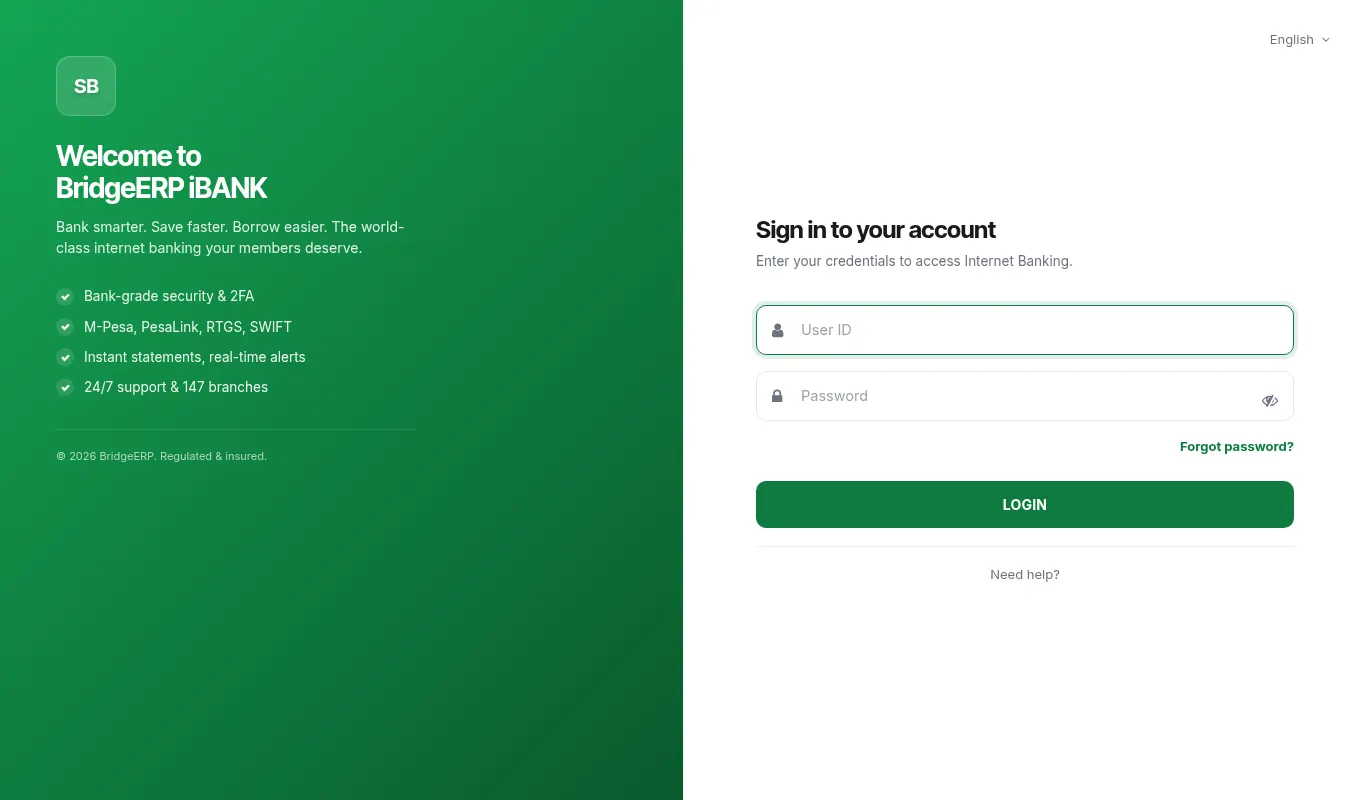
Member login flow
PIN is hashed with bcrypt cost factor 12. There is no "recover PIN" via e-mail — the member must visit a teller with photo ID, or use the WhatsApp self-service PIN reset (verifies via Safaricom MNO lookup).
- Member visits https://{tenant}/ibank/login
- Enters Member ID (e.g. MWM-2024-04123) and 4-6 digit PIN
- If PIN correct → dashboard
- If member has step-up rules enabled → SMS OTP for first login of the day
- Failed attempts: 3 wrong PINs → 30-minute account lockout, member is notified by SMS
Dashboard widgets
First screen after login. Six widgets by default:
- Savings balance — current + previous month
- Active loans — count, principal outstanding, next instalment date
- Recent transactions — last 10 across all accounts
- Notifications — upcoming repayments, KYC expiry, statement availability
- Quick actions — Transfer, Deposit, Loan apply, Statement download
- Helpdesk — contact branch button, chat widget (if WhatsApp channel enabled)
Transaction features
| Feature | What it does | Limits |
|---|---|---|
| Internal transfer | Move funds between own accounts (e.g. shares to savings) | No KES limit; instant |
| Member-to-member | Transfer to another member of same MFI | KES 300,000/txn, KES 500,000/day |
| M-Pesa cash-in | Top up savings via M-Pesa STK push | KES 300,000/txn (Safaricom limit) |
| M-Pesa cash-out | Withdraw to own M-Pesa | KES 70,000/txn (Safaricom limit), KES 300,000/day |
| Bank transfer | Withdraw to KCB/Equity/Co-op/etc. via PesaLink | KES 1,000,000/txn |
| Loan repayment | Repay any open loan from savings or M-Pesa | No limit |
| Standing order | Recurring transfer on a schedule | — |
| Statement download | PDF/CSV of any account, any range | — |
Loan self-service
- Apply for a new loan — fill the form, attach docs, submit; goes to officer queue
- Track application status — Submitted / Under review / Approved / Disbursed / Rejected
- Schedule view — full amortisation, paid vs upcoming, principal/interest split
- Early settlement quote — instant calculation showing settlement KES today
- Restructure request — submit hardship form, goes to credit head queue
KYC self-update
Members update phone, address, e-mail, photo, occupation themselves. The change goes to mfi.kyc.request and a compliance officer reviews. ID number and full name cannot be self-changed — those require a teller visit.
If KYC expires (last verification > 12 months ago) iBANK shows a yellow banner; if it's been > 18 months iBANK blocks high-value transactions until refreshed.
Deployment & branding
- Subdomain: ibank.{tenant} or {tenant}/ibank — configurable
- Logo, colour palette, hero image — Website module > Configuration > iBANK Theme
- Footer links — Contact, FAQ, Terms, Privacy, ODPC compliance statement
- Language: English + Swahili out of the box; add others via Settings > Translations
- Mobile responsiveness — Bootstrap 5 grid, tested down to 320px
Security model
- Sessions: 15-minute idle timeout, 8-hour max
- Concurrent sessions: 2 allowed (e.g. laptop + phone), third login boots oldest
- CSRF protection on every form
- Rate limiting: 60 requests / minute / IP
- Failed login lockout: 3 wrong → 30 min, 6 wrong → 24 hours, alert sent to compliance
- All HTTPS via Let's Encrypt certs auto-renewed
- Step-up SMS OTP for: any transfer > KES 50,000, PIN change, address change, M-Pesa number change
Worked scenarios
Scenario — Member pays rent at month-end via iBANK
| Character | Role |
|---|---|
| Kimani Mwangi | Member, software engineer in Westlands |
| Jane Wambui | Compliance Officer (passive) |
Timeline
- Day 30, 18:30: Kimani opens https://mwananchi.co.ke/ibank from laptop (Login page renders)
- 18:30: Enters MWM-2022-00891 + PIN (First login of day → SMS OTP sent)
- 18:31: Enters OTP 384217 (Dashboard loads — savings KES 42,300)
- 18:32: Clicks Quick action > Bank transfer (PesaLink) (Form with beneficiary picker)
- 18:32: Picks saved beneficiary "Landlord — Equity 1234567890" (Beneficiary verified via PesaLink)
- 18:33: Enters KES 25,000, reference "Rent June 2026" (Below step-up threshold (KES 50k) → no OTP)
- 18:33: Clicks Send (PesaLink fires; status "In progress")
- 18:34: Status "Completed" — receipt PDF downloadable (Savings now KES 17,300)
- 18:34: Landlord WhatsApps Kimani: "Received, thank you" (—)
Outcome — 4-minute self-service rent payment, no branch visit, no fees beyond PesaLink's KES 20.
Reference
iBANK group permissions
| Action | Default member group | Tier 3 member group | Notes |
|---|---|---|---|
| View balances | Yes | Yes | — |
| Download statement | Yes | Yes | PDF + CSV |
| Internal transfer | Yes | Yes | Own accounts only |
| Member-to-member | Yes | Yes | KES limits per tier |
| M-Pesa cash-out | Yes | Yes | Safaricom limit |
| PesaLink | No (Tier 3 only) | Yes | — |
| Loan apply | Yes | Yes | — |
| Restructure request | Yes | Yes | — |
| PIN change | Yes | Yes | Step-up OTP |
Troubleshooting
| Symptom | Likely cause | Fix |
|---|---|---|
| Member's PIN works at the teller but not on iBANK | Two PIN stores — teller uses backoffice PIN, iBANK uses x_ibank_pin. | Settings > Channels > iBANK > Sync PINs — copies backoffice PIN to iBANK store. Long-term: enable single-PIN mode. |
| Step-up OTP not arriving | Africa's Talking delivery or stale phone. | See OTP troubleshooting on the Two-person rule > OTP page; same gateway. |
| iBANK shows balance KES 0 but member knows it's KES 50k | Stale Redis cache or wrong account_id mapping. | MFI > Channels > Cache > Invalidate {member_id}. Confirm res.partner.member_id mapping. |
| Logo doesn't update after rebrand | Browser cache + CDN cache. | Bump asset version in Website > Theme > Version, hard refresh. |
| PesaLink transfer stuck "In progress" for > 5 minutes | ISO 20022 message in dispute queue at receiving bank. | Operations > Channels > iBANK > Pending transfers — call PesaLink ops with TXN ID. |