

Custom controls
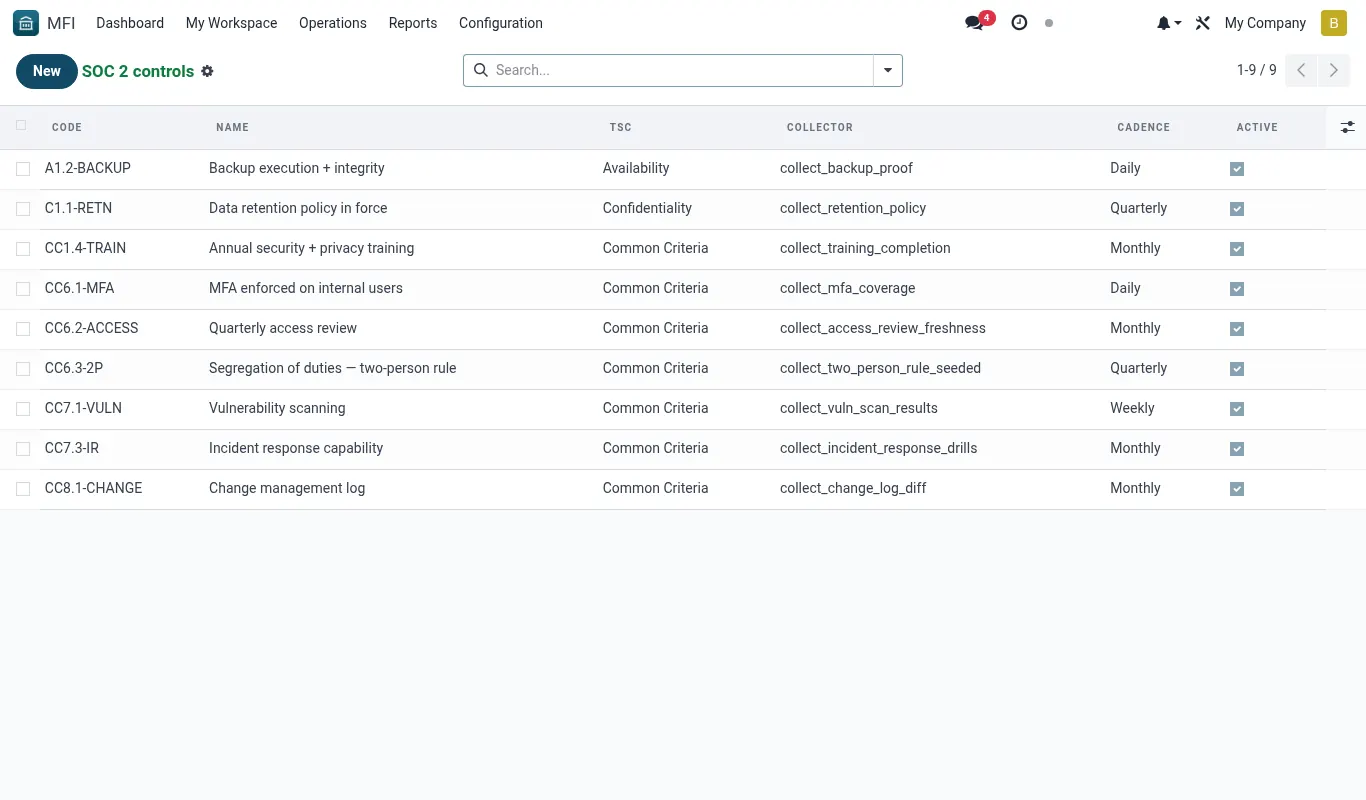
The nine shipped controls cover Common Criteria + Availability + Confidentiality. If your audit scope claims Processing Integrity or Privacy as separately-asserted criteria, you'll need custom controls. This page walks the pattern.
When to add a custom control
- You're scoping in Processing Integrity or Privacy in your audit
- Your industry adds requirements (e.g., HIPAA, PCI-DSS as bridge)
- Your insurance underwriter asks for specific evidence
- Your customer's vendor questionnaire asks for things the catalogue doesn't cover
- An internal incident lessons-learned spawned a new compensating control
Anatomy of a control
- Create a
mfi.soc2.controlrecord: code, topic, cadence, active=True - Write the Python check function (subclass
mfi.soc2.AbstractCheckor use the registry decorator) - Function signature:
def collect(self) -> dictreturning{'pass': bool, 'summary': str, 'details': dict} - Register the function with the control via
check_function_path - Test by running the control manually from the dashboard
- Add to cron rotation by setting cadence
Worked example — "loans review SLA"
Loan officers must review every PAR-30 loan within 48 hours of classification. Custom control: every Monday morning, check that every PAR-30 loan from the last week has at least one mfi.loan.review record dated <48h after classification.
# /opt/staging/custom/mfi_soc2_custom/models/check_loan_review_sla.py
from bridgeerp import models, api
from datetime import timedelta

class CheckLoanReviewSLA(models.Model):
    _inherit = 'mfi.soc2.control'

    @api.model
    def collect_loan_review_sla(self):
        last_week = fields.Datetime.now() - timedelta(days=7)
        Loan = self.env['mfi.loan']
        par30 = Loan.search([
            ('par_classification_at', '>=', last_week),
            ('par_bucket', '=', 'par_30'),
        ])
        compliant = par30.filtered(lambda l: l.review_ids and
            (l.review_ids[0].create_date - l.par_classification_at).total_seconds() < 48 * 3600)
        rate = len(compliant) / max(len(par30), 1)
        return {
            'pass': rate >= 0.95,
            'summary': f'{len(compliant)}/{len(par30)} PAR30 reviewed within 48h ({rate:.1%})',
            'details': {
                'par30_count': len(par30),
                'compliant_count': len(compliant),
                'sla_rate': rate,
                'threshold': 0.95,
                'breaches': [(l.id, l.par_classification_at) for l in (par30 - compliant)],
            },
        }
Worked scenarios
Scenario — Samuel adds the loan-review-SLA control
| Character | Role |
|---|---|
| Samuel Kibet | IT lead |
| Florence Achieng | DPO |
Timeline
- Day 1 morning: Samuel writes the check function (15 lines) and saves to mfi_soc2_custom module.
- Day 1, 11:00: Upgrades the module; creates a new mfi.soc2.control record: code=CC4.1-LOAN_REVIEW_SLA, cadence=weekly.
- Day 1, 11:30: Runs manually; gets 89% compliant — under threshold. Logs the gap with Loan Operations.
- Day 8 (Mon): Auto-run from cron; pass rate now 96% after officer training. (Evidence record generated)
- Audit time: Custom control included in the audit pack export. (Auditor satisfied)
Outcome — New evidence stream operational in one day; closes the auditor's question.
Reference
Custom-control naming convention
| Prefix | Family | Example |
|---|---|---|
| CC* | Common Criteria (CC1–CC9) | CC4.1-LOAN_REVIEW_SLA |
| A* | Availability | A1.4-DR_DRILL |
| C* | Confidentiality | C1.3-ENCRYPTION_AT_REST |
| PI* | Processing Integrity | PI1.2-TRANSACTION_INTEGRITY |
| P* | Privacy | P3.1-CONSENT_AUDIT |
| X* | Internal / not in scope | X1.1-INTERNAL_BCP_DRILL |
Troubleshooting
| Symptom | Likely cause | Fix |
|---|---|---|
| Custom control runs but never appears in audit pack | active=False on the control | Open Settings → SOC 2 → Controls → toggle Active = True. |
| Check function raises NameError | Forgot to import BridgeERP's fields or models | Add from bridgeerp import models, fields, api at the top of the .py file; restart workers. |
| Pass threshold unclear | No documented business rule for the check | Open Settings → SOC 2 → Controls → Pass threshold; default to ≥ 95% unless your policy says otherwise. Document in the chatter. |
| Custom control passed but auditor disagrees with the logic | Check function's interpretation differs from the policy intent | Rewrite the function in collaboration with the auditor; both old and new evidence stay for transparency. |
See also
Was this page helpful?