

Staging Uploads
Staging is the safety net of the Migration Importer. Rows land in mfi.migration.staging.* tables tagged with a batch UUID, are visible to the Migration Lead and Data Steward, and can be dropped and re-uploaded as many times as needed. No production GL is touched until Commit.
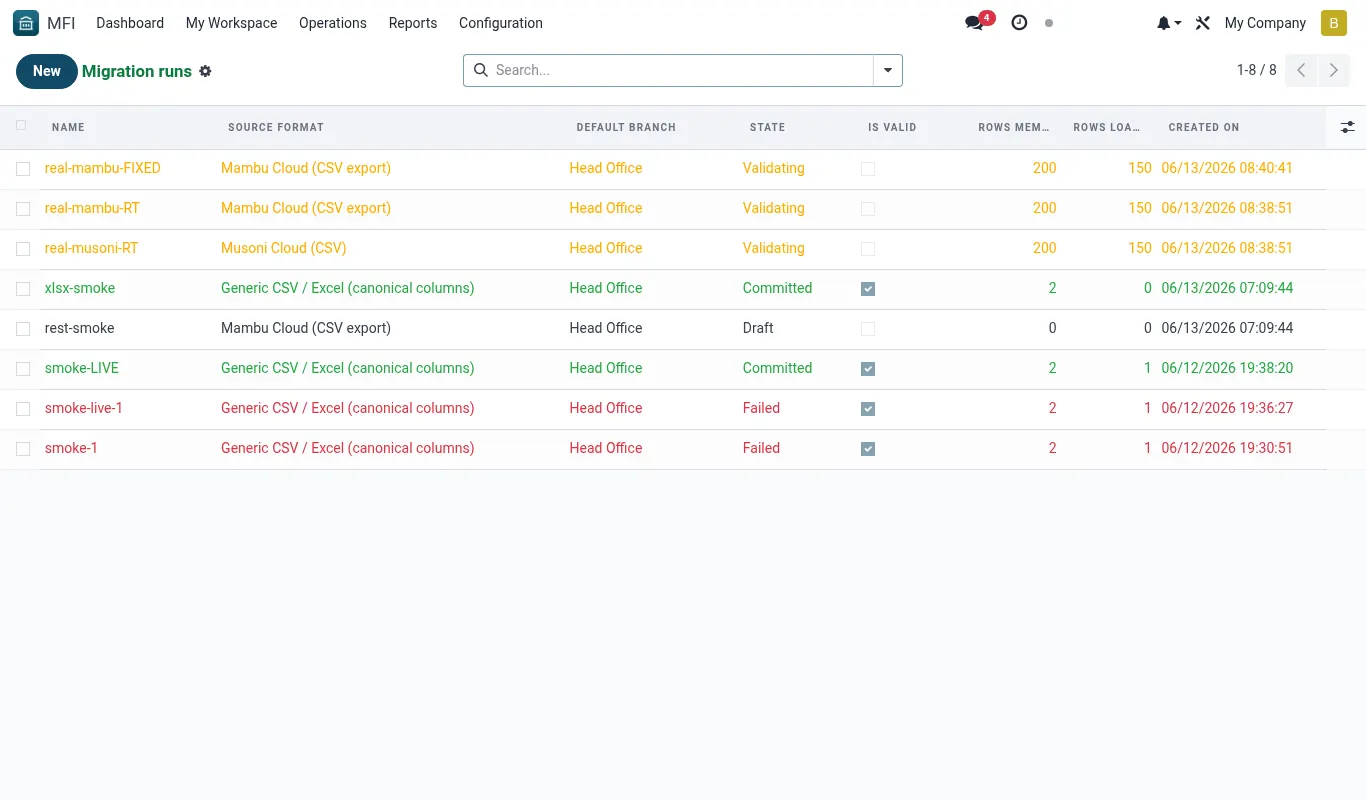
What is a Migration Run?
A Migration Run is one upload of one file against one frozen Source. It produces a batch UUID that identifies every staging row that came from that file. A Source can have many Runs over the life of a migration project — typical tenants will have 3-8 Runs per Source as they iterate on data quality.
- Header fields: Source, File, Uploaded By, Uploaded At, Batch UUID (auto), Stage (uploading -> staged -> validating -> validated -> committing -> committed -> failed -> cancelled).
- Each row in the file becomes one row in the relevant mfi.migration.staging.* table, with its batch UUID and a per-row hash.
- A Run can be cancelled at any time before Commit; cancelling drops all its staging rows.
- Runs are scoped by tenant company. A multi-branch SACCO that is one BridgeERP company has one Run per upload; a holding-company tenant with multiple subsidiary companies must run separately per company.
The upload flow, step by step
- Open MFI Suite -> Migration -> Runs -> New.
- Pick the frozen Source (e.g. 'Tujikomboe — Members — v2').
- Click 'Upload File' and choose the CSV/XLSX, or paste an SFTP drop path.
- The importer counts rows, displays a preview of the first 20, and asks for confirmation.
- Click 'Stage Rows'. The file is parsed in a background worker; for a 25,000-row Members file this takes 30-90 seconds.
- The Run moves to stage 'staged' and shows row counts: total / parsed-ok / parse-errors.
- Open the Staging tab to inspect rows. Filter, sort, mass-update like any BridgeERP list view.
- If everything looks right, click 'Run Validation' to move to the next stage. If not, click 'Cancel Run', fix the source file, and start a new Run.
Inspecting staging rows
Each staging table has its own list view with the columns most relevant to the Data Steward. Rows are colour-coded: white = parsed clean, yellow = parsed with a transform warning, red = parse error (will block validation).
| Staging table | Key columns | Typical row count for a mid-sized SACCO |
|---|---|---|
| mfi.migration.staging.member | source_key, full_name, id_number, phone, joined_on, branch_code, status | 10,000-25,000 |
| mfi.migration.staging.savings | source_key, member_key, product_code, balance, opened_on, last_txn_on | 15,000-60,000 |
| mfi.migration.staging.loan | source_key, member_key, product_code, principal, outstanding, disb_date, term_months, rate | 2,000-9,000 |
| mfi.migration.staging.schedule | loan_key, due_date, principal_due, interest_due, paid_principal, paid_interest, status | 60,000-300,000 (one row per instalment) |
| mfi.migration.staging.transaction | source_key, account_key, txn_date, amount, dr_cr, narration | 200,000-2,000,000 (one row per historical txn) |
| mfi.migration.staging.collateral | source_key, loan_key, collateral_type, value, document_ref | 1,000-5,000 |
Bulk edits on staging rows
Sometimes the Data Steward spots a systemic issue — e.g. every member from branch 'HQ' should have been coded as 'NAIROBI-CBD'. The Migration Lead has two options.
- Quick fix: select rows in the list view, click Actions -> Bulk Update, change branch_code. The change is logged in the audit chatter.
- Permanent fix: cancel the Run, edit the Source's transform (clone to v3 if frozen), re-upload. This is the correct approach for issues that will recur with future extracts.
Handling very large extracts
Co-op Bank's Sacco-Link occasionally produces single CSVs of 5-15 GB. The importer cannot accept those through the browser. The protocol for these is SFTP drop.
- Tenant IT places the file at /opt/staging/migration/inbox/
/ / .csv.gz on the staging host. - Migration Lead opens a Run, picks the Source, and enters the path under 'SFTP Drop'.
- Importer decompresses to a temp dir on the same disk, streams rows in batches of 5,000, and inserts into staging with a checkpoint every 50,000 rows.
- If the worker dies mid-load, click 'Resume Run' on the same Run record — it picks up at the last checkpoint, never re-staging rows that already landed.
Worked scenarios
Scenario — Tujikomboe stages 8,400 members and fixes 312 duplicates
| Character | Role |
|---|---|
| Jane Wambui | Migration Lead |
| Peter Otieno | Data Steward |
| Aisha Hassan | Tujikomboe IT |
Timeline
- Day 6, 09:00: Aisha uploads tujikomboe_members_2025-11-12.csv (8,432 rows, 4.1 MB). (Run TJK-MEM-001 created. Parsing starts.)
- Day 6, 09:01: Parser finishes: 8,418 green, 14 red (DOB unparseable). (Run state: staged. 14 staging rows show with red border.)
- Day 6, 09:30: Peter filters the 14 reds. All are members with DOB '00/00/0000'. (Bulk update: set DOB to False. Audit chatter notes the change.)
- Day 6, 11:00: Jane runs Validation. Report shows 312 DUP_ID_NUMBER warnings — same National ID on multiple member rows. (Run state: validated_with_warnings.)
- Day 6, 14:00: Peter audits the 312 dupes. 287 are genuine — same person opened a second member number when they re-joined. 25 are typos. (Peter exports the 287 to a 'merge_targets' CSV for post-go-live cleanup.)
- Day 6, 16:00: For the 25 typos, Peter bulk-updates the ID number directly on staging. (Each edit logged on Run chatter.)
- Day 7, 09:00: Jane re-runs Validation. 0 errors, 287 acknowledged warnings. (Run state: ready_to_commit.)
Outcome — Members staging is clean. Commit can proceed once Loans, Savings and Schedules reach the same state. Total elapsed for Members: 1.5 working days.
Reference
Run states and transitions
A Migration Run moves through these states. Transitions are one-way except for cancellation, which can happen at any time before Commit.
| State | Entered when | Allowed actions | Visible to |
|---|---|---|---|
| uploading | Stage Rows clicked | Cancel | Lead |
| staged | Parser completes | Run Validation, Cancel, Inspect rows | Lead, Steward |
| validating | Run Validation clicked | — | Lead, Steward |
| validated_with_warnings | Validation finishes with only Warning-severity issues | Acknowledge warnings, Run Validation again, Cancel | Lead, Steward |
| validated_with_errors | Validation finishes with Error-severity issues | Fix source or staging, Run Validation again, Cancel | Lead, Steward |
| ready_to_commit | All errors gone, all warnings acknowledged | Commit, Cancel | Lead |
| committing | Commit clicked | — | Lead |
| committed | Commit completes | Reverse Commit (24h), View report | Lead, Steward, Auditor |
| failed | Commit aborted (e.g. DB exception) | Retry Commit, Cancel | Lead |
| cancelled | Cancel clicked | — | Lead, Steward, Auditor |
Troubleshooting
| Symptom | Likely cause | Fix |
|---|---|---|
| Upload hangs at 0% for ten minutes. | File is larger than the browser upload limit (60 MB by default). | Use SFTP drop into /opt/staging/migration/inbox/ |
| Parser reports 'Unicode decode error' on row 4,213. | Mixed encoding in the source file — usually a Co-op Bank export with embedded Windows-1252 names in a UTF-8 file. | Re-export from legacy with consistent encoding, or set Source encoding to Latin-1 (lossy but parses). |
| Staging row count is lower than expected by exactly the number of rows in the file header. | Source has 'Skip header rows' set to 0 but file has a header row. | Open Source -> File Settings -> Skip header rows = 1. |
| Cannot find a Run after refreshing the page. | Multi-tenant filtering hid it — your default company is not the Run's company. | Top-right company switcher -> pick the tenant company; or remove default company filter on the Runs list. |