

Fee items & categories
A fee item is the smallest unit of charging in EduPrime – one line that can appear on an invoice. Get your items right and everything downstream (structures, invoices, reports) is clean. This page covers creating items, categorising them, handling levies and tax, recurring versus one-off charges, and the accounting codes behind them.
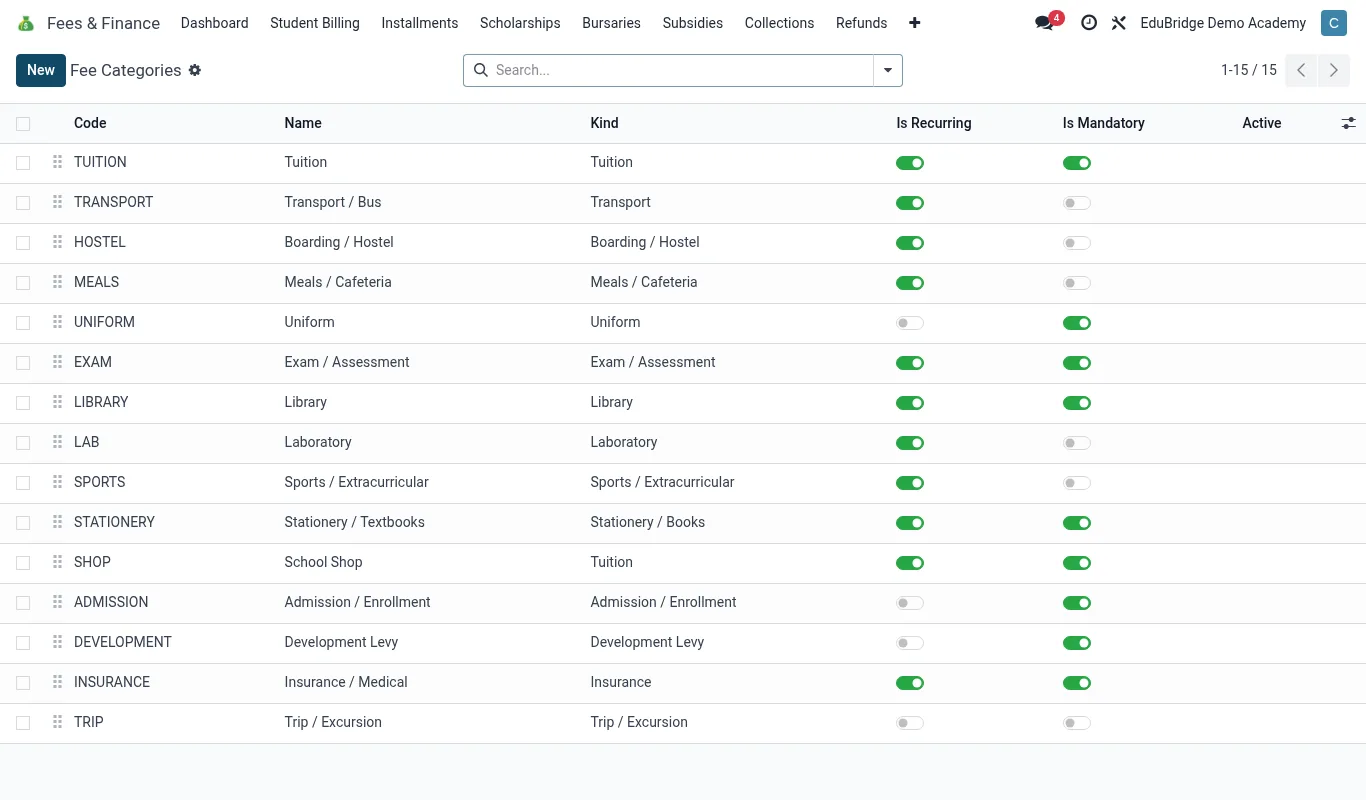
Creating a fee item
Go to Fees & Finance → Configuration → Fee Items and click New.
- Enter a clear name that a parent would recognise on a statement, e.g. Tuition, Boarding, Exam Fee – KCPE.
- Pick a category (see the table below). Categories drive grouping in reports.
- Set the default amount. You can override this per structure later, so enter the most common value.
- Choose the frequency: Per term, Per year, or One-off.
- Set the income account (GL mapping) so collections post to the correct ledger.
- Save.
| Category | Typical items | Frequency |
|---|---|---|
| Tuition | Class tuition, lab fee | Per term |
| Boarding | Bed, boarding upkeep | Per term |
| Transport | Route fee by zone | Per term |
| Meals | Lunch, full board plan | Per term |
| Activities | Clubs, sports, trips | One-off / per term |
| Exam | Internal exams, national exams | Per year / one-off |
| Admission | Registration, admission, caution money | One-off |
Recurring vs one-off items
The frequency you choose changes how invoicing treats the item.
- Per term items are re-billed every term automatically when you run term invoicing – tuition, boarding, meals.
- Per year items are billed once a year, usually in the first term – annual exam registration, insurance.
- One-off items are billed only when explicitly added – admission, a single trip, a replacement ID card.
Tax, levies & statutory charges
Most core school fees are exempt from VAT in the markets EduPrime serves, but ancillary sales (uniforms, books, hired services) may be taxable, and some authorities require a levy line.
- On the fee item, set the Tax field if the charge is taxable. Leave it blank for exempt items.
- For a government or association levy that must show as its own line, create a separate fee item (e.g. County Education Levy) rather than baking it into tuition – this keeps the levy auditable and easy to remit.
GL mapping basics
Every fee item points to an income account. This is what lets the finance reports split collections by stream and what your accountant exports at month-end. A sensible default chart:
| Item category | Income account |
|---|---|
| Tuition | 4000 – Tuition Income |
| Boarding | 4100 – Boarding Income |
| Transport | 4200 – Transport Income |
| Meals | 4300 – Catering Income |
| Admission / caution | 2200 – Refundable Deposits (liability) |
If you are unsure of account codes, ask your accountant for the chart of accounts before you create items – remapping after invoices exist means re-posting, which is avoidable with five minutes of planning up front.