

Interviews & assessments
For most schools the decision to admit rests on an interview, an entrance assessment, or both. EduPrime schedules these against the application, captures scores and interviewer notes, and keeps everything on the one record so the admissions panel decides with full context.
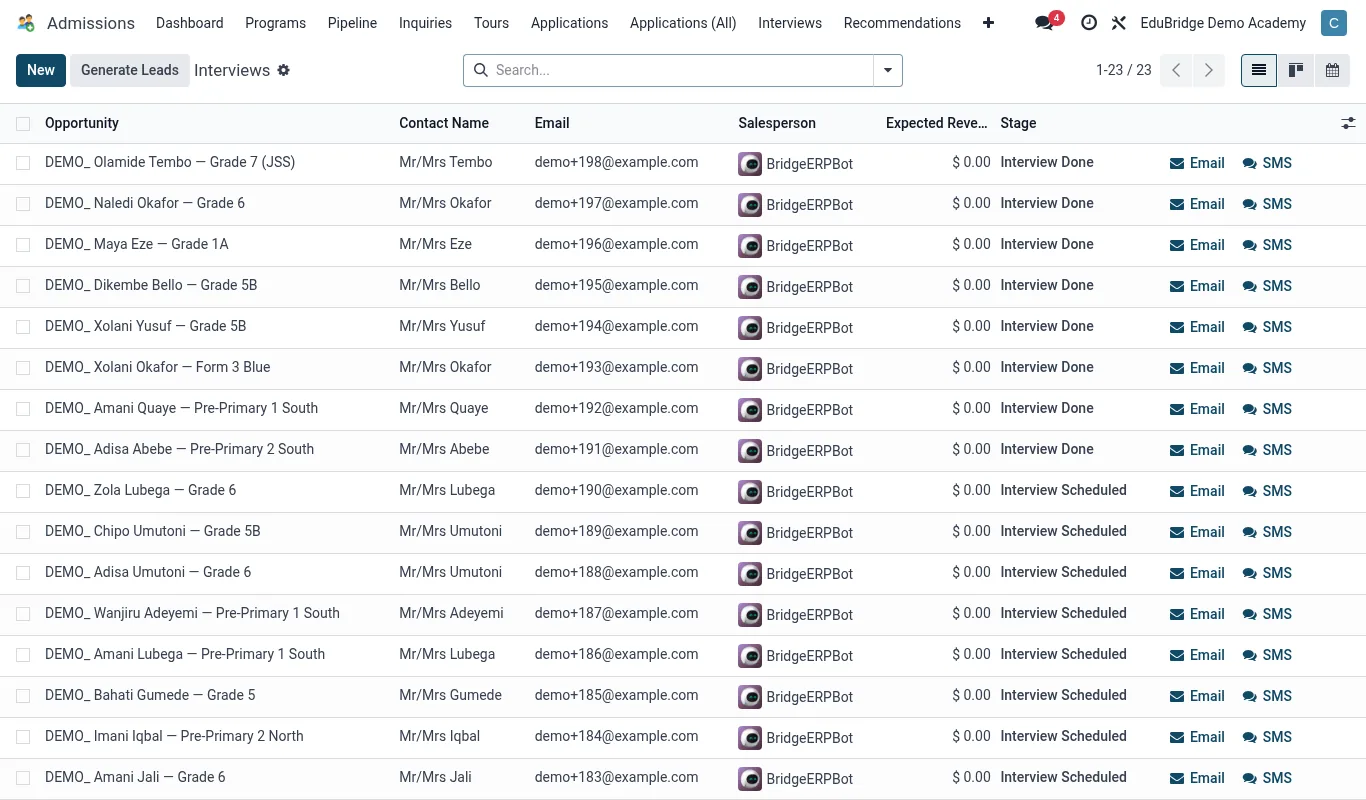
Scheduling an interview or assessment
- Open the application and advance it to the Interview / Assessment stage.
- Click Schedule and pick a date, time and venue.
- Assign the interviewer(s) or invigilator.
- EduPrime can notify the family with the appointment details and log the activity.
- Save – the appointment appears on the assigned staff member's calendar.
Scoring & assessment
Record the outcome on the application. Depending on your setup this can include:
| Element | Captured as |
|---|---|
| Entrance test | A numeric score (e.g. by subject or overall). |
| Interview rating | A rating against criteria – communication, readiness, fit. |
| Recommendation | Admit / Waitlist / Decline. |
Scores and ratings stay on the application so the admissions panel can compare candidates objectively when there are more applicants than places.
Interviewer notes
Beyond the numbers, the interviewer records qualitative notes – how the child engaged, any support needs observed, the family's expectations. These notes are visible to the panel and carry forward if the student enrols, giving the class teacher early insight.
Making the decision
With scores and notes captured, the panel records a recommendation on the application. An Admit recommendation moves the card toward the Offer stage; Waitlist holds it; Decline closes it with a reason. Because every input lives on one record, the decision is auditable and consistent from one applicant to the next.