

Subjects & curricula
Subjects are what students are taught and graded in. EduPrime maps subjects to curricula — CBC, Cambridge, IB and others — each with its own grading scale, so one school can run several programmes side by side on one transcript.
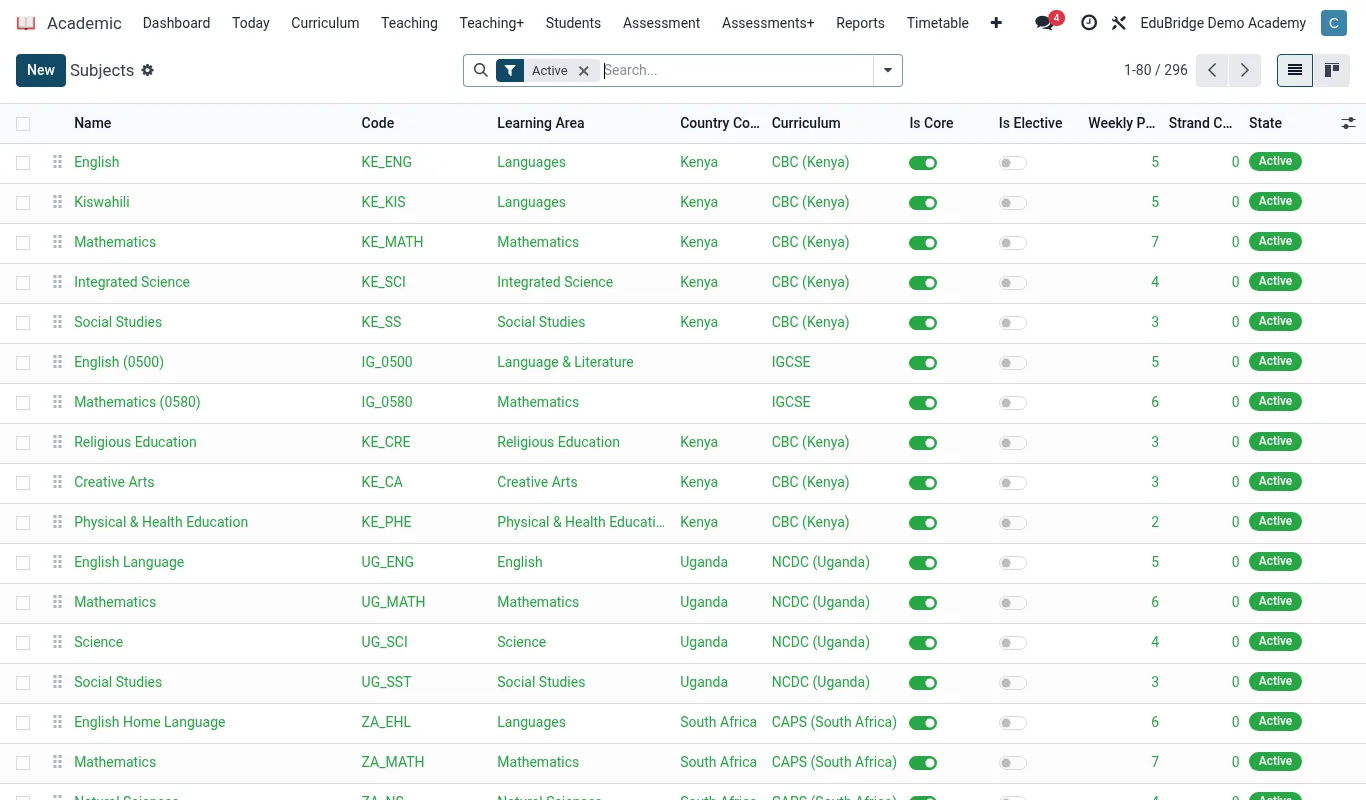
Defining subjects
Open Academic → Configuration → Subjects.
- Click New.
- Enter the subject name and code (for example
MATH,ENG). - Choose the curriculum/programme the subject belongs to.
- Mark it core or elective, and whether it is examinable.
- Optionally assign default subject teachers and weekly lesson count for timetabling.
- Save.
Mapping curricula
A curriculum (programme) groups the subjects, the progression of levels and the grading rules for a pathway. EduPrime supports several at once.
| Programme | Levels | Typical grading |
|---|---|---|
| CBC | PP1–PP2, Grade 1–9, Senior School | Performance levels (Below/Approaching/Meeting/Exceeding expectation) |
| Cambridge | Primary, Lower Secondary, IGCSE, A-Level | A*–G (IGCSE), A*–E (A-Level) |
| IB | PYP, MYP, DP | 1–7 scale (DP), criteria-based (MYP) |
| CBET / TVET | Levels / competencies | Competent / Not yet competent |
| University | Year/Semester, credit-bearing courses | GPA, letter grades, classifications |
Grading scales per programme
Each programme needs a grading scale so marks convert to the right grade and comment. Open Academic → Configuration → Grading Scales.
- Create a scale and name it for its programme (for example “IGCSE 2024”).
- Add bands: the mark range, the grade label, points/GPA value, and a default remark.
- Set the pass mark and any distinction threshold.
- Attach the scale to the programme so its subjects use it automatically.
- Save.
One transcript, many pathways
Because every subject mark references the single student record, a learner who moves from CBC into a Cambridge stream — or a university student taking modules across faculties — carries one continuous, programme-aware transcript. You do not create a new student; you enrol the existing record into the new programme's subjects, and the transcript shows the full journey.